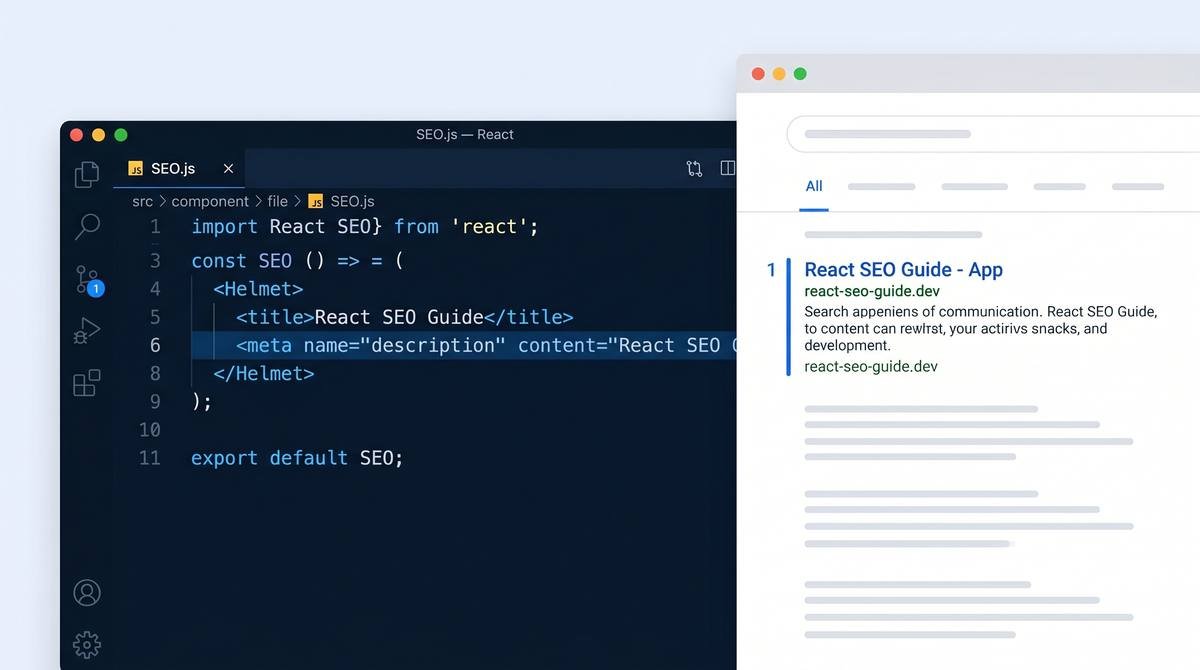
SEO for Developers: The Technical Implementation Guide (2026)
June 8, 2026 | by Ian Adair

SEO for Developers: The Technical Implementation Guide (2026)
Most SEO content treats search engines like a marketing problem. This guide treats them like a runtime. If you write code that ships to a browser, you control the inputs that determine whether your pages get indexed, rendered, and ranked. The rest is implementation detail.
SEO for developers is the practice of writing code, configuring servers, and structuring HTML so that search engines can crawl, render, index, and rank your pages efficiently. It covers semantic markup, rendering strategy, structured data, performance metrics like Core Web Vitals, and technical signals like canonical tags and robots directives. Done well, it makes your application discoverable without a marketing team.
Why developers and not marketers? Because the things that move organic traffic in 2026, rendering choice, Core Web Vitals, structured data, HTTP status codes, are owned by engineers. A marketer cannot fix an Interaction to Next Paint regression or wire up JSON-LD schema. A developer can. That is the gap this guide fills. We will walk through the technical SEO surface area for web apps, with code examples for each concept, framework notes for React, Next.js, Vue, Nuxt, Angular, and SvelteKit, and a debugging workflow that treats Google Search Console like a browser DevTools panel.
How Search Engines Work (The Parts Developers Control)
A search engine does four things to your site, and you control the first three through code.
Crawling is HTTP request fanout. Googlebot fetches a URL, parses the response for new links, queues those links, and repeats. The inputs you control are robots.txt, internal linking, sitemap.xml, response codes, and how fast your server replies.
Rendering is what turns your HTTP response into a DOM tree. For a static HTML page this is instant. For a React single-page app it requires running JavaScript in a headless Chromium instance, which Googlebot does in a second pass with significant queue latency. The rendering choice you ship determines what content the indexer actually sees.
Indexing is the database write. Google takes the rendered DOM, extracts text and metadata, deduplicates against canonical signals, and stores it in the index. You control which pages get written via canonical tags, noindex directives, and crawl directives.
Ranking is the read side, ordered by hundreds of signals including content relevance, Core Web Vitals, HTTPS, mobile usability, backlinks, and freshness. Backlinks and content quality fall outside pure engineering. Everything else is implementation.
Crawl Budget and What Wastes It
Googlebot allocates each site a finite number of requests per crawl cycle. For small sites this is invisible. For large sites with thousands of URLs, parameterized search pages, faceted navigation, or generated content, crawl budget becomes a bottleneck that determines how fresh your index stays.
The biggest crawl budget sinks: infinite URL spaces from query parameter combinations, soft 404s that return 200 status codes with no useful content, slow server response times (anything over 600ms hurts), redirect chains, and duplicate content across www, non-www, http, and https variants. We suggest auditing your access logs to see what Googlebot actually fetches, then blocking or canonicalizing the noise.
The Rendering Pipeline: Why JavaScript Matters
Google’s rendering pipeline has two waves. In the first wave, Googlebot fetches the raw HTML response and indexes whatever is there immediately. In the second wave, the URL goes into a render queue where headless Chromium executes JavaScript and produces a final DOM. The indexer then reads that final DOM and updates the record.
The gap between wave one and wave two can be hours, days, or in heavily backlogged cases longer. If your homepage content is rendered entirely by client-side JavaScript, none of it exists in the index until the second wave finishes. For frequently updated content, news, e-commerce inventory, dynamic product detail pages, this delay can make your pages invisible during their most relevant window.
Technical SEO Foundations Every Developer Must Implement
Before you touch frameworks, structured data, or rendering strategy, get the basics right. These are the non-negotiable building blocks. Google’s SEO Starter Guide covers the official spec for each item, but the implementation patterns below are what actually matter in practice.
URL Structure and Site Architecture
URLs are content identifiers and ranking signals. A clean URL describes the page, uses lowercase letters, separates words with hyphens, avoids query parameters for primary content, and reflects a logical directory hierarchy.
Good:
https://example.com/blog/seo-for-developers
https://example.com/docs/api/authentication
https://example.com/products/widget-pro

Bad:
https://example.com/?p=12345
https://example.com/Blog/SEO_For_Developers.html
https://example.com/products?id=39572&ref=footer&utm_source=email
Directory structure communicates content hierarchy. A URL like /docs/api/authentication tells Google this page lives under docs, specifically under api. That hierarchy informs internal linking patterns and topical clustering. Flat URL structures (everything at root) work for small sites but lose this signal as you scale.
For URLs that must include parameters (faceted search, tracking, pagination), use canonical tags to point to the parameter-free version and configure URL parameters in Google Search Console where appropriate.
Robots.txt and Crawl Directives
robots.txt lives at the root of your domain and tells crawlers which URL patterns to skip. It is a request, not an enforcement mechanism. Compliant crawlers respect it; malicious ones ignore it. Critically, robots.txt does not remove pages from the index. It only prevents crawling. A page blocked by robots.txt can still appear in search results if other pages link to it.
A minimal production robots.txt looks like this:
User-agent: *
Disallow: /admin/
Disallow: /api/
Disallow: /*?*utm_
Allow: /

Sitemap: https://example.com/sitemap.xml
Common mistakes: blocking /assets/ or /static/ paths (Googlebot needs to fetch CSS and JS to render your pages), blocking your entire site during development and forgetting to remove the block at launch, and using robots.txt to hide pages that should actually return noindex. If you do not want a page in the index, use the meta robots tag or the X-Robots-Tag HTTP header. Robots.txt just prevents the request.
XML Sitemaps
Sitemaps are URL discovery hints for search engines. They are most useful when your site has pages that are not well linked from your main navigation, when you have a large catalog of similar pages, or when you publish frequently and want fast discovery.
<?xml version="1.0" encoding="UTF-8"?>
<urlset xmlns="http://www.sitemaps.org/schemas/sitemap/0.9">
  <url>
    <loc>https://example.com/</loc>
    <lastmod>2026-06-08</lastmod>
    <changefreq>weekly</changefreq>
    <priority>1.0</priority>
  </url>
  <url>
    <loc>https://example.com/blog/seo-for-developers</loc>
    <lastmod>2026-06-08</lastmod>
    <changefreq>monthly</changefreq>
    <priority>0.8</priority>
  </url>
</urlset>
Sitemaps should be generated dynamically from your content store, not hand-edited. Next.js ships first-class sitemap support via app/sitemap.ts. Astro has @astrojs/sitemap. SvelteKit has svelte-sitemap. For Rails or Django, generate the XML at build time or in a cached endpoint. Submit your sitemap URL to Google Search Console once, and Googlebot will pick up changes automatically on subsequent crawls.
Keep sitemaps under 50,000 URLs and 50MB uncompressed. For larger sites, split into multiple sitemaps and reference them from a sitemap index file. Include only canonical URLs that return 200 status codes. Sitemaps that contain redirects, 404s, or noindexed URLs erode crawl trust.
HTTPS and Redirect Chains
HTTPS has been a ranking signal since 2014. There is no scenario in 2026 where a production website should serve content over HTTP. Use Let’s Encrypt or your platform’s managed certificate. Enforce HTTPS via a 301 redirect from HTTP to HTTPS at the edge or in your reverse proxy.
The redirect status code matters. Use 301 (Moved Permanently) for any URL change you intend to be permanent: HTTP to HTTPS, www to non-www (or vice versa), old URL slug to new URL slug after a content migration. Use 302 (Found) only for genuinely temporary redirects: A/B tests, geo-based routing, or scheduled maintenance pages. Google passes link equity (PageRank, in the original framing) through 301s but treats 302s as temporary and may continue indexing the original URL.
Redirect chains are silent killers. If your old URL redirects to a second URL which redirects to a third, each hop adds latency and dilutes signal. Googlebot will follow up to about five hops before giving up. Audit your redirects and make every chain a single jump from old URL to final destination. A technical SEO audit will surface redirect chains, broken links, and mixed content issues in one pass.
Meta Tags That Actually Matter (And the Ones That Don’t)
The HTML head is a contract between your page and search engines. Google publishes a definitive list of meta tags Google supports, and the MDN meta element reference covers the broader specification. The tags below are the ones that move rankings, click-through rates, or social previews in 2026.
Title Tag
The title tag is the single most important on-page SEO element. It appears as the clickable headline in search results and as the browser tab label. Keep it between 50 and 60 characters to avoid truncation on desktop SERPs. Lead with the primary keyword where it reads naturally. Include your brand at the end, separated by a pipe or hyphen.
<title>SEO for Developers: The Technical Implementation Guide | AppSEO</title>Each page needs a unique title. Duplicate titles signal to Google that you have duplicate content, which can cause the wrong page to rank or none of them to rank well. For dynamic content (product pages, blog posts), generate titles from the content record at build or request time.
Meta Description
The meta description does not directly affect rankings, but it controls the snippet under your title in the SERP, which drives click-through rate. Higher CTR correlates with better rankings over time. Aim for 150 to 160 characters. Write it like ad copy: hook the reader, hint at the answer, prompt the click.
<meta name="description" content="A technical SEO implementation guide for developers building web apps. Code examples for meta tags, structured data, JavaScript rendering, and Core Web Vitals.">If you do not write a meta description, Google will generate one from your page content. That is usually fine for blog posts but rarely optimal for landing pages or product pages where you want to control the messaging.
Canonical Tag
The canonical tag tells search engines which version of a URL is the authoritative one when multiple URLs serve the same or near-duplicate content. This is the fix for tracking parameter URLs, paginated archives, and content syndication.
<link rel="canonical" href="https://example.com/blog/seo-for-developers">Three common mistakes. First, self-referencing canonicals on every page (this is actually correct and we suggest doing it; it preempts parameter pollution). Second, pointing the canonical to a different page entirely, which collapses both pages in the index and often drops the wrong one. Third, using canonical tags for pagination instead of letting each paginated page self-canonicalize; rel=prev/rel=next is deprecated, so each page in a sequence should self-reference.
Meta Robots Tag
The meta robots tag is the in-document version of robots.txt directives, with one critical difference: it can remove pages from the index. Use noindex when you want a page to be crawlable but not appear in search results (thank-you pages, internal search results, user-generated low-quality pages).
<meta name="robots" content="noindex, follow">
<meta name="robots" content="noindex, nofollow">
<meta name="robots" content="nosnippet">
<meta name="robots" content="max-snippet:160, max-image-preview:large">
The “follow” directive tells Google to follow links on the page even though the page itself is not indexed (useful for category pages that should pass link equity but not rank themselves). “nofollow” applies to all links on the page; for individual links, use rel=”nofollow” on the anchor tag instead.
Open Graph and Twitter Card Tags
Open Graph and Twitter Card meta tags do not affect Google rankings directly. They control how your URL renders when shared on social platforms, Slack, LinkedIn, iMessage, and most chat applications. Inconsistent or missing OG tags produce bare-URL previews that get fewer clicks. This is brand and CTR work that compounds.
<meta charset="UTF-8">
<meta name="viewport" content="width=device-width, initial-scale=1">
<title>SEO for Developers: The Technical Implementation Guide | AppSEO</title>
<meta name="description" content="A technical SEO guide for developers building web apps.">
<link rel="canonical" href="https://example.com/blog/seo-for-developers">

<!-- Open Graph -->
<meta property="og:title" content="SEO for Developers: The Technical Implementation Guide">
<meta property="og:description" content="A technical SEO guide for developers building web apps.">
<meta property="og:url" content="https://example.com/blog/seo-for-developers">
<meta property="og:type" content="article">
<meta property="og:image" content="https://example.com/og/seo-for-developers.png">
<meta property="og:site_name" content="AppSEO">

<!-- Twitter Card -->
<meta name="twitter:card" content="summary_large_image">
<meta name="twitter:title" content="SEO for Developers">
<meta name="twitter:description" content="The technical implementation guide.">
<meta name="twitter:image" content="https://example.com/og/seo-for-developers.png">
Use a 1200×630 OG image at minimum. Test your previews with Facebook’s Sharing Debugger and Twitter’s Card Validator (or the X equivalent) before launch.
Meta Tags That Do Nothing for SEO
You can skip these. They show up in legacy CMS templates and tutorials but produce zero ranking signal in 2026:
<meta name="keywords">: Google stopped using this in 2009. It is harmless but pointless.<meta name="author">: Not a ranking signal. Use structured data (Article schema with author property) instead.<meta name="generator">: Tells the world what CMS you use. Has no SEO value and minor security implications.<meta http-equiv="X-UA-Compatible">: Only relevant for legacy Internet Explorer. Drop it.
Structured Data (JSON-LD), Your Secret Ranking Advantage
Structured data is metadata about your page content, written in JSON-LD and placed in a script tag in your HTML head or body. It does not directly change your rankings, but it unlocks rich results, knowledge panels, and increasingly, AI Overview citations. Pages with the right schema get bigger, more visible search results and better click-through rates.
What Structured Data Actually Does
Structured data tells search engines what your content is, not just what it says. An article with Article schema is identifiable as an article, with an author, a publish date, and a headline. A product page with Product schema can show price, ratings, and availability directly in the SERP. A how-to page with HowTo schema can produce step-by-step rich results.
Google’s structured data documentation lists every supported schema type and the rich result it can produce. The vocabulary itself is defined at Schema.org, a joint project of Google, Bing, Yahoo, and Yandex. Always use the JSON-LD format. Microdata and RDFa are still supported but harder to maintain and noisier in the DOM.
Article Schema
Article schema is the most common structured data type for blogs, news sites, and documentation. It establishes the page as a written piece, with attribution and dates.
<script type="application/ld+json">
{
  "@context": "https://schema.org",
  "@type": "Article",
  "headline": "SEO for Developers: The Technical Implementation Guide",
  "description": "A technical SEO implementation guide for developers building web apps.",
  "image": "https://example.com/og/seo-for-developers.png",
  "datePublished": "2026-06-08",
  "dateModified": "2026-06-08",
  "author": {
    "@type": "Person",
    "name": "Jane Developer",
    "url": "https://example.com/authors/jane"
  },
  "publisher": {
    "@type": "Organization",
    "name": "AppSEO",
    "logo": {
      "@type": "ImageObject",
      "url": "https://example.com/logo.png"
    }
  },
  "mainEntityOfPage": {
    "@type": "WebPage",
    "@id": "https://example.com/blog/seo-for-developers"
  }
}
</script>
FAQPage Schema
FAQPage schema marks up a list of questions and answers. When Google picks it up, it can produce expandable Q&A blocks directly in the SERP under your result. Use it for genuinely useful FAQ sections (like the one at the bottom of this article). Do not use it for marketing FAQs that are really just sales copy phrased as questions; Google has gotten stricter about this.
<script type="application/ld+json">
{
  "@context": "https://schema.org",
  "@type": "FAQPage",
  "mainEntity": [
    {
      "@type": "Question",
      "name": "Does Google index JavaScript content?",
      "acceptedAnswer": {
        "@type": "Answer",
        "text": "Yes, Google indexes JavaScript-rendered content, but with delay. Googlebot first indexes the raw HTML, then queues the page for JavaScript rendering in a second wave."
      }
    },
    {
      "@type": "Question",
      "name": "Does HTTPS affect SEO rankings?",
      "acceptedAnswer": {
        "@type": "Answer",
        "text": "Yes. HTTPS has been a Google ranking signal since 2014. All production sites should serve content over HTTPS with a 301 redirect from HTTP."
      }
    }
  ]
}
</script>
SoftwareApplication Schema
If you are shipping a web app, SoftwareApplication schema is specifically designed for you. It tells Google that this URL is an application, with categories, ratings, pricing, and OS support. This is particularly valuable for SaaS products that want to rank for category queries like “best invoice software” or “API monitoring tool”. For deeper coverage of app-specific schema and discovery patterns, our SEO for Web Apps guide goes section by section.
<script type="application/ld+json">
{
  "@context": "https://schema.org",
  "@type": "SoftwareApplication",
  "name": "AppSEO Auditor",
  "operatingSystem": "Web",
  "applicationCategory": "BusinessApplication",
  "offers": {
    "@type": "Offer",
    "price": "29.00",
    "priceCurrency": "USD"
  },
  "aggregateRating": {
    "@type": "AggregateRating",
    "ratingValue": "4.8",
    "ratingCount": "247"
  }
}
</script>
How to Validate Structured Data
Two tools, both free. Google’s Rich Results Test parses your URL or pasted code, identifies which schema types it found, and tells you whether they are eligible for rich results. It catches Google-specific requirements like required properties for each type. The Schema.org validator catches structural issues against the broader spec. We suggest running both during development and the Rich Results Test in CI as a sanity check before deploy.
JavaScript SEO, The Rendering Decision That Determines Your Rankings
If you build with a JavaScript framework, your single biggest SEO decision is how you render. Get this right and the rest of technical SEO is straightforward. Get it wrong and no amount of meta tag tuning will save you.
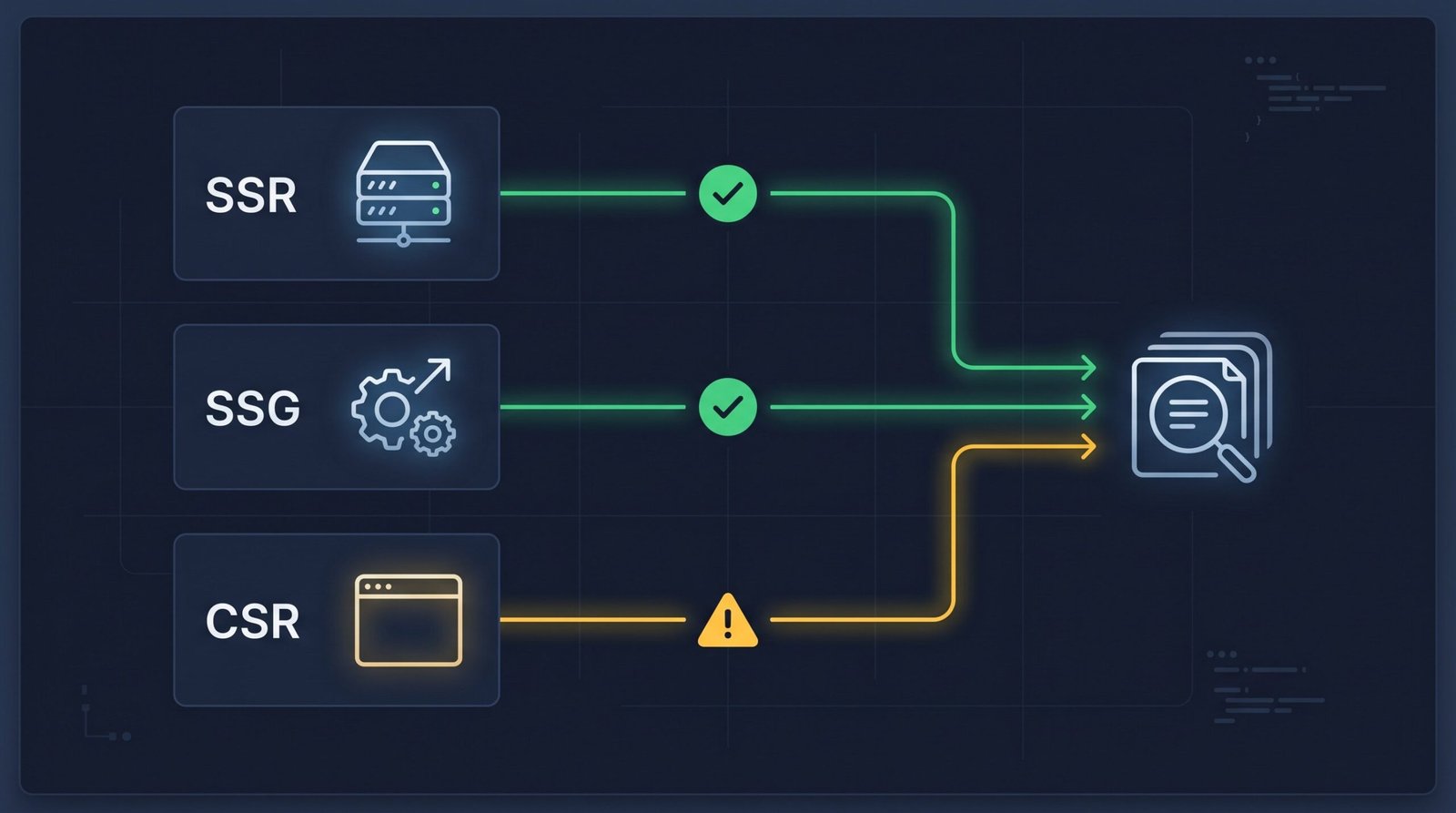
How Google Crawls JavaScript
Googlebot is a Chromium-based renderer. It can execute JavaScript, including modern ES2022 features, fetch API, Web Workers, and most browser APIs. But execution is expensive, and Googlebot is the largest crawler on the internet. Google manages the cost by splitting indexing into two passes.
Pass one: fetch the HTML response, extract links, and index whatever is in the raw HTML. Pass two: send the URL to the render queue, where headless Chromium executes the page JavaScript, waits for network and JS activity to settle, and produces a final rendered DOM. The indexer then re-processes this DOM and updates the record.
The gap between passes one and two varies. For high-value or frequently crawled URLs it can be minutes. For long-tail URLs on smaller sites it can be days. Content that only exists in the post-JavaScript DOM is invisible until pass two. If you ship a React single-page app where the root div is empty until the bundle loads, that is what Google sees in pass one: nothing.
Rendering Strategy Comparison
Five rendering strategies are common in 2026. Each has different SEO implications.
| Strategy | SEO Impact | Best For | Frameworks |
|---|---|---|---|
| Server-Side Rendering (SSR) | Excellent | Dynamic content, personalization | Next.js, Nuxt, Angular Universal |
| Static Site Generation (SSG) | Excellent | Blogs, docs, marketing pages | Next.js, Nuxt, Astro, Eleventy |
| Incremental Static Regeneration (ISR) | Excellent | Large catalogs, semi-dynamic content | Next.js, SvelteKit |
| Client-Side Rendering (CSR) | Poor | App internals, authenticated dashboards | React (CRA), Vue SPA |
| Hybrid (CSR shell + SSR) | Good | SaaS apps with public + private routes | Next.js, Nuxt |
SSR generates the full HTML on each request at the server. SSG generates it once at build time and serves static files. ISR is SSG with a revalidation window, regenerate this page every N seconds if requested. CSR ships an empty shell and renders in the browser. Hybrid mixes static or server-rendered marketing routes with CSR for authenticated app routes.
For public, indexable content, SSR or SSG is the right answer in nearly every case. For authenticated dashboards behind a login wall, CSR is fine because that content is never indexed anyway. For SaaS products with a public marketing site and a private app, the hybrid pattern (server-render the marketing routes, client-render /app/*) is the standard play.
Framework-Specific SEO Implementation
React: Pure Create React App or a Vite SPA is the worst-case SEO scenario for JavaScript frameworks. The default is CSR, the initial HTML is essentially empty, and meta tags injected via react-helmet-async only appear after JavaScript runs. If your app needs to rank, move to Next.js, Remix, or another React framework with built-in SSR. If you must stay on CSR, use react-helmet-async to inject head tags and accept that you are betting on Google’s render queue. Our React SEO implementation guide walks through the patterns that work and the ones that do not.
Next.js: The leading React framework for SEO because it makes SSR and SSG the default path of least resistance. In the App Router, use the generateMetadata async function to produce per-route metadata from your data layer. Next.js handles canonical tags, Open Graph, and sitemap generation natively via app/sitemap.ts and app/robots.ts files. For ISR, set the revalidate export on a page or fetch call. Our Next.js SEO guide covers the App Router patterns in depth.
Vue and Nuxt: For Vue 3 SPAs, @vueuse/head and unhead handle reactive head management. For anything that needs to rank, use Nuxt 3, which provides useSeoMeta and useHead composables, automatic SSR, the @nuxtjs/sitemap module, and the @nuxtjs/robots module. The nuxt-seo collection bundles most of what you need into a single install. The Vue SEO guide details the composables and Nuxt module setup.
Angular: Angular Universal provides SSR for Angular applications. The Angular team rebranded this as “Angular SSR” in recent releases, and it ships as a first-class option in the Angular CLI. TransferState lets you avoid duplicate API requests by passing data from the server render to the client hydration step. The Angular SEO guide covers Angular Universal setup and the Meta and Title services that update head tags reactively.
SvelteKit: SSR is the default behavior. You opt out per route by exporting export const ssr = false. For head tags, use <svelte:head> inside your page or layout components. Combined with SvelteKit’s built-in form actions and load functions, you get an SEO-friendly setup with very little ceremony.
Astro: Astro is purpose-built for content-heavy sites and ships static HTML by default. Components hydrate selectively via the islands architecture, which means JavaScript only loads where you ask for it. For blogs, marketing sites, and documentation, Astro often produces the fastest Core Web Vitals scores of any framework with minimal tuning.
Dynamic Rendering as a Workaround
Dynamic rendering serves a pre-rendered HTML snapshot to bots and the regular client-side app to users. Tools like Prerender.io and Rendertron implement this pattern. Google officially called dynamic rendering a workaround, not a long-term strategy, and we agree. It introduces a divergence between what users see and what Google sees, which is a fragile place to live. If you are choosing your rendering strategy fresh in 2026, choose SSR or SSG and skip dynamic rendering entirely. If you are stuck with a legacy CSR app and cannot migrate, dynamic rendering will keep you in the index while you plan the migration.
Core Web Vitals, SEO Metrics Developers Own
Core Web Vitals are the user experience metrics Google measures from real Chrome users via the Chrome User Experience Report. They feed into the Page Experience signal and influence rankings. More importantly, they correlate directly with user behavior: faster pages get more engagement, lower bounce rates, and higher conversions. The web.dev Core Web Vitals reference defines each metric, and our Core Web Vitals guide covers the deep optimization work.
LCP (Largest Contentful Paint), target under 2.5s
LCP measures how long it takes for the largest visible element above the fold to render. Usually this is a hero image, a video poster, or a large heading. The clock starts at navigation and stops when that element paints.
The biggest LCP wins come from server response time, render-blocking resources, and image delivery. Speed up your server to under 200ms Time to First Byte. Preload your LCP image with <link rel="preload" as="image"> and use fetchpriority="high" on the img tag. Remove or defer render-blocking JavaScript and CSS. Inline critical CSS for the above-the-fold styles. Use modern image formats (AVIF, WebP) with proper srcset and sizes attributes.
INP (Interaction to Next Paint), target under 200ms
INP replaced First Input Delay in March 2024 as the responsiveness metric in Core Web Vitals. INP measures the latency of every user interaction on the page, click, tap, key press, and reports the worst (or close to worst) experience. A high INP means the main thread is blocked when the user tries to do something.
To improve INP: reduce main-thread JavaScript by code-splitting and lazy-loading non-critical modules. Move heavy computation off the main thread using Web Workers. Use React’s transitions API (useTransition, useDeferredValue) to keep user input snappy during expensive renders. Audit third-party scripts; analytics, ad networks, and chat widgets are common INP offenders. Self-host critical fonts and use font-display: swap to avoid blocking text rendering.
CLS (Cumulative Layout Shift), target under 0.1
CLS measures unexpected layout shifts during the page lifecycle. A shift happens when an element that has already rendered moves to a new position. This is what causes the frustrating mis-tap when an ad loads in and pushes the button you were about to click.
The most common CLS sources: images and videos without explicit width and height attributes, web fonts that swap from a fallback to a different-metric loaded font, ads or embeds that inject content into the layout, and JavaScript that inserts banners or notifications. Always set explicit dimensions on media. Use aspect-ratio CSS for responsive containers. Reserve space for ads and embeds with min-height containers. Preload fonts and use the size-adjust descriptor to match fallback metrics to your loaded font.
Measuring Core Web Vitals
Four tools, each for a different stage of the workflow. Chrome DevTools Performance Insights for local debugging. Lighthouse (also in DevTools) for synthetic audit scores on a single URL. PageSpeed Insights for both lab data (Lighthouse) and field data (CrUX) on a single URL. Google Search Console Core Web Vitals report for site-wide field data grouped into Good, Needs Improvement, and Poor buckets.
The PageSpeed Insights field data is what feeds rankings. The lab data is faster to iterate against but can diverge from real-world performance, especially on metric like INP that depend on actual user interactions. We suggest treating lab data as a fast feedback loop and field data as ground truth.
On-Page SEO from a Developer’s Perspective
Most on-page SEO advice reads like a marketer’s checklist. Read it like a spec instead. Each item is an HTML pattern, a markup choice, or a content structure rule. Our on-page SEO guide covers the editorial side; this section is the engineering view.
Semantic HTML Matters for Rankings
Search engines parse semantic HTML to understand page structure. A page wrapped in proper semantic landmarks (header, nav, main, article, aside, footer) is easier for crawlers to interpret than a sea of divs with class names. Use heading levels as content hierarchy: one H1 per page describing the page topic, H2s for major sections, H3s for subsections under each H2. Skipping levels (H1 then H4) confuses both crawlers and screen readers.
<strong> and <em> carry semantic weight and are what crawlers read for emphasis. <b> and <i> are presentational only and carry no semantic signal. If you mean to indicate importance, use <strong>. If you mean visual weight only, use CSS font-weight.
Image SEO
Images contribute to rankings via three mechanisms: the alt attribute (accessibility and image search), file naming (image search and document context), and Core Web Vitals impact (especially LCP).
Write alt text that describes what the image shows in the context of the page. For decorative images, use alt="" to mark them as decorative (do not omit the attribute entirely; that signals missing alt text). For functional images like buttons or icons, describe the action.
File names should be lowercase, hyphen-separated, descriptive. seo-for-developers-rendering-pipeline.webp beats IMG_4827.jpg in image search and as a context signal.
Ship modern formats. AVIF for the smallest files, WebP for broad compatibility, JPEG or PNG as fallbacks. Use the picture element to serve format alternatives:
<picture>
  <source srcset="hero.avif" type="image/avif">
  <source srcset="hero.webp" type="image/webp">
  <img src="hero.jpg" alt="Rendering pipeline diagram" width="1200" height="630" loading="lazy">
</picture>
Always set width and height attributes on img tags to prevent CLS. Use loading="lazy" for images below the fold. Do not lazy-load your LCP image (it should preload, not defer).
Internal Linking as a Graph Problem
Your site is a graph. Pages are nodes, internal links are edges. Search engines use this graph to discover content, distribute link equity (the modern descendant of PageRank), and infer topical relationships. Two principles:
First, every important page should be reachable from your homepage in three clicks or fewer. Pages buried deeper get crawled less and ranked lower. If you have valuable content nobody links to, it is an orphan and invisible to search.
Second, anchor text describes the destination. “Click here” and “read more” carry no signal. <a href="/blog/seo-for-developers">our SEO guide for developers</a> tells Google what the destination is about and gives that page a relevance boost for the matched terms. Use descriptive anchors everywhere, in body copy, in navigation, in footers.
The Developer’s GSC Debugging Workflow
Google Search Console is your SEO error console. Treat it the way you treat browser DevTools. It tells you what Google sees, what is broken, and what to fix.
Google Search Console as Your SEO Error Console
Four GSC features do most of the work. URL Inspection simulates a Googlebot fetch of any URL on your site and shows you the rendered HTML, the indexing status, mobile usability, structured data detected, and the canonical Google selected (which can differ from yours). It is the closest thing to “View Source as Googlebot” you have. The Coverage report (now called Pages in the new GSC) lists every URL Google has discovered, grouped by indexing status: Indexed, Not Indexed (with reasons), Excluded. Click into each bucket to see specific URLs and why they were excluded. The Core Web Vitals report shows field data from real Chrome users, grouped by Good, Needs Improvement, and Poor for both mobile and desktop. The Enhancements section reports on structured data Google has parsed and any errors or warnings against each schema type.
How to Diagnose a Page That Isn’t Ranking
You shipped a new page. A week later it is not in the SERP. Follow this sequence:
- Is it indexed? Run URL Inspection on the URL. If it says “URL is not on Google”, check whether the URL has been discovered (Last crawled date) and whether anything is blocking indexing.
- Is it rendered correctly? In URL Inspection, click “Test live URL” and view the rendered HTML. Confirm your title, content, structured data, and meta tags are all present. If the page is missing content, your JavaScript rendering is the issue.
- Does it have structured data errors? Use the Rich Results Test on the URL. Errors in JSON-LD can cause Google to ignore your schema entirely.
- Is it slow? Check PageSpeed Insights for Core Web Vitals scores. Poor performance on key metrics correlates with weaker rankings and slower indexing.
- Are there crawl errors? Check the Pages report for any errors associated with the URL. 5xx errors, redirect loops, and soft 404s all block indexing.
If all five pass, the page is technically sound. Remaining issues are content quality, topical authority, and backlinks, the editorial and off-page work that lives outside this guide.
Developer SEO Quick Reference Table
| Item | Implementation | Priority |
|---|---|---|
| Unique title tag (50-60 chars) | HTML <title> | Critical |
| Meta description (150-160 chars) | HTML <meta name=”description”> | High |
| Canonical tag | rel=canonical | High |
| HTTPS | TLS cert + 301 HTTP to HTTPS | Critical |
| robots.txt | /robots.txt | Critical |
| XML sitemap | /sitemap.xml + GSC submission | High |
| Structured data (JSON-LD) | <script type=”application/ld+json”> | High |
| Core Web Vitals | Code-level (LCP under 2.5s, INP under 200ms, CLS under 0.1) | Critical |
| Semantic H1-H6 | HTML hierarchy | High |
| Alt text on all images | HTML alt=”” | High |
| SSR or SSG for JS frameworks | Rendering strategy decision | Critical |
| Internal links with descriptive anchors | HTML <a> links | Medium |
| Open Graph and Twitter Card tags | HTML meta tags in head | Medium |
| Mobile-friendly viewport | <meta name=”viewport”> | Critical |
| Server response time under 600ms | Edge caching, optimized backend | High |
Ship every Critical item. Most High items follow naturally once you have the right framework setup. Medium items are CTR and brand wins that compound over months.
FAQ, SEO for Developers
Does Google index JavaScript content?
Yes, Google indexes JavaScript-rendered content, but with delay. Googlebot first indexes the raw HTML response, then queues the page for JavaScript rendering in a second wave. The gap between these waves can range from minutes to days, depending on site authority and crawl priority. For content that needs to rank quickly, ship server-rendered or statically generated HTML so the content is visible in the first pass.
Does HTTPS affect SEO rankings?
Yes. HTTPS has been a confirmed Google ranking signal since 2014. In 2026, there is no reason for a production website to serve content over HTTP. Use a free Let’s Encrypt certificate or your hosting provider’s managed certificate, and configure a 301 redirect from HTTP to HTTPS at the edge. Sites without HTTPS also get flagged as “Not Secure” in browsers, which crushes user trust and click-through rates.
What is the most important meta tag for SEO?
The title tag. It appears as the clickable headline in search results and as the browser tab label, and it is one of the strongest on-page ranking signals Google reads. Each page needs a unique, descriptive title between 50 and 60 characters, with the primary keyword placed where it reads naturally. Meta description and canonical are also high-value tags, but title carries the most direct ranking weight of any single head element.
Does page speed affect Google rankings?
Yes, through the Core Web Vitals signal in Page Experience. Google measures LCP, INP, and CLS from real Chrome users and uses the field data as a ranking input. Beyond direct ranking impact, faster pages have lower bounce rates and higher engagement, which feed back into ranking signals over time. Aim for LCP under 2.5 seconds, INP under 200 milliseconds, and CLS under 0.1 across your most important pages.
What is the difference between robots.txt and the noindex meta tag?
robots.txt blocks crawling; noindex prevents indexing. A URL blocked by robots.txt can still appear in search results if other pages link to it, because Google sees the link and indexes the URL without ever fetching the content. The noindex meta tag (or X-Robots-Tag HTTP header) keeps a URL out of the index entirely, but the page must be crawlable for Google to see the noindex directive. Use robots.txt for crawl budget control and noindex for index control.
Do I need a sitemap if my site is small?
Probably not, but it is cheap insurance. For sites under a few hundred well-linked pages, Googlebot will find everything through internal links. Sitemaps become essential when you have isolated pages without strong internal links, large catalogs, frequent publishing, or content that needs faster discovery. Most modern frameworks generate sitemaps automatically, so the cost to add one is near zero. We suggest including one regardless of site size.
What is the best rendering strategy for SEO?
Static site generation (SSG) and server-side rendering (SSR) both score excellent for SEO; the right choice depends on how dynamic your content is. SSG is ideal for content that does not change per request: blogs, documentation, marketing pages. SSR or incremental static regeneration (ISR) is better for content that needs personalization or frequent updates. Pure client-side rendering (CSR) is the worst SEO outcome for public content and should be reserved for authenticated app interiors that do not need to rank.
RELATED POSTS
View all

Wix SEO Guide 2026: Step-by-Step Optimization to Rank Your Wix Site
May 24, 2026 | by Ian Adair

Off-Page SEO: The Complete Guide for App Developers and SaaS Founders
June 1, 2026 | by Ian Adair