


Next.js SEO: The 2026 Developer Guide (App Router)
generateMetadata() API instead of next/head, and pairs it with SSR, SSG, or ISR to ship pre-rendered HTML that crawlers can read without executing JavaScript.

Most Next.js SEO articles you’ll find on Google are stuck in 2022. They show next/head patterns from the Pages Router, ignore AI crawler behavior, and never benchmark rendering strategies side by side. This guide does the opposite. It assumes you’re shipping with the App Router on Next.js 14 or 16, that you care about ranking in ChatGPT search and Perplexity as much as Google, and that you want code you can paste into app/layout.tsx tonight.
If you also work on Vite or CRA projects, our React SEO guide covers rendering and SEO for plain React. Everything here builds on those principles.
Why Next.js SEO Is Different From Regular Web SEO
A static WordPress blog has one rendering mode: the server returns finished HTML. Search engines crawl it, parse the markup, and move on. Simple.
Next.js gives you four rendering modes per route. That flexibility is the reason it ranks well when configured correctly, and the reason so many Next.js sites quietly fail to rank at all. The crawler arrives, finds a skeleton with a <div id="__next"></div>, and has nothing to index.
There are three structural differences that matter for organic search.
Server Components run on the server, not the browser. Any metadata, JSON-LD, or canonical tag you produce inside a Server Component lands in the initial HTML response. That HTML is what Googlebot reads first, before any rendering pass.
The Metadata API replaces next/head. You no longer mount a head tag inside a component tree. You export a metadata object or a generateMetadata function from layout.tsx or page.tsx, and Next.js assembles the document head for you. Per the official generateMetadata reference, both exports are Server Component only, because metadata has to resolve before the page renders.
JavaScript execution is no longer free. Google’s renderer handles JavaScript, but with a queue and delay. AI crawlers like GPTBot, ClaudeBot, and PerplexityBot fetch raw HTML and skip JavaScript entirely. If your content lives in a client-rendered shell, those crawlers cannot see it. This is the single biggest blind spot in current Next.js SEO advice.
For a broader frame around how this fits a product launch or SaaS site, see our web app SEO playbook.
Rendering Strategies and Their SEO Impact
Pick the rendering strategy first. Everything else – metadata, sitemaps, JSON-LD – is plumbing on top. Get this wrong and the rest of your SEO work is wasted.
| Strategy | How It Works | Crawlability | AI Crawler Support | SEO Verdict | Best For |
|---|---|---|---|---|---|
| CSR (Client-Side Rendering) | Server ships an empty shell. Browser fetches JS and renders content. | Poor. Googlebot needs a second-pass render that can take hours or days. | None. GPTBot, ClaudeBot, and PerplexityBot do not execute JavaScript. | Avoid for public, indexable pages. | Authenticated dashboards behind a login wall. |
| SSR (Server-Side Rendering) | Server renders HTML on every request and streams it to the client. | Excellent. Full HTML on first response. | Full. Crawlers read finished markup. | Strong, but TTFB can hurt LCP under load. | Personalized pages, search results, frequently updated dashboards. |
| SSG (Static Site Generation) | HTML built once at deploy time. Served from CDN edge. | Excellent. Pre-rendered HTML, instant TTFB. | Full. Identical HTML for every visitor. | Best in class. Fastest and most predictable. | Marketing pages, docs, blog posts, landing pages. |
| ISR (Incremental Static Regeneration) | Static at build time, regenerated in the background after a revalidation window. | Excellent. Stale HTML is still complete HTML. | Full. AI crawlers see the cached version. | Best for content that changes occasionally. | Product catalogs, news, programmatic SEO at scale. |
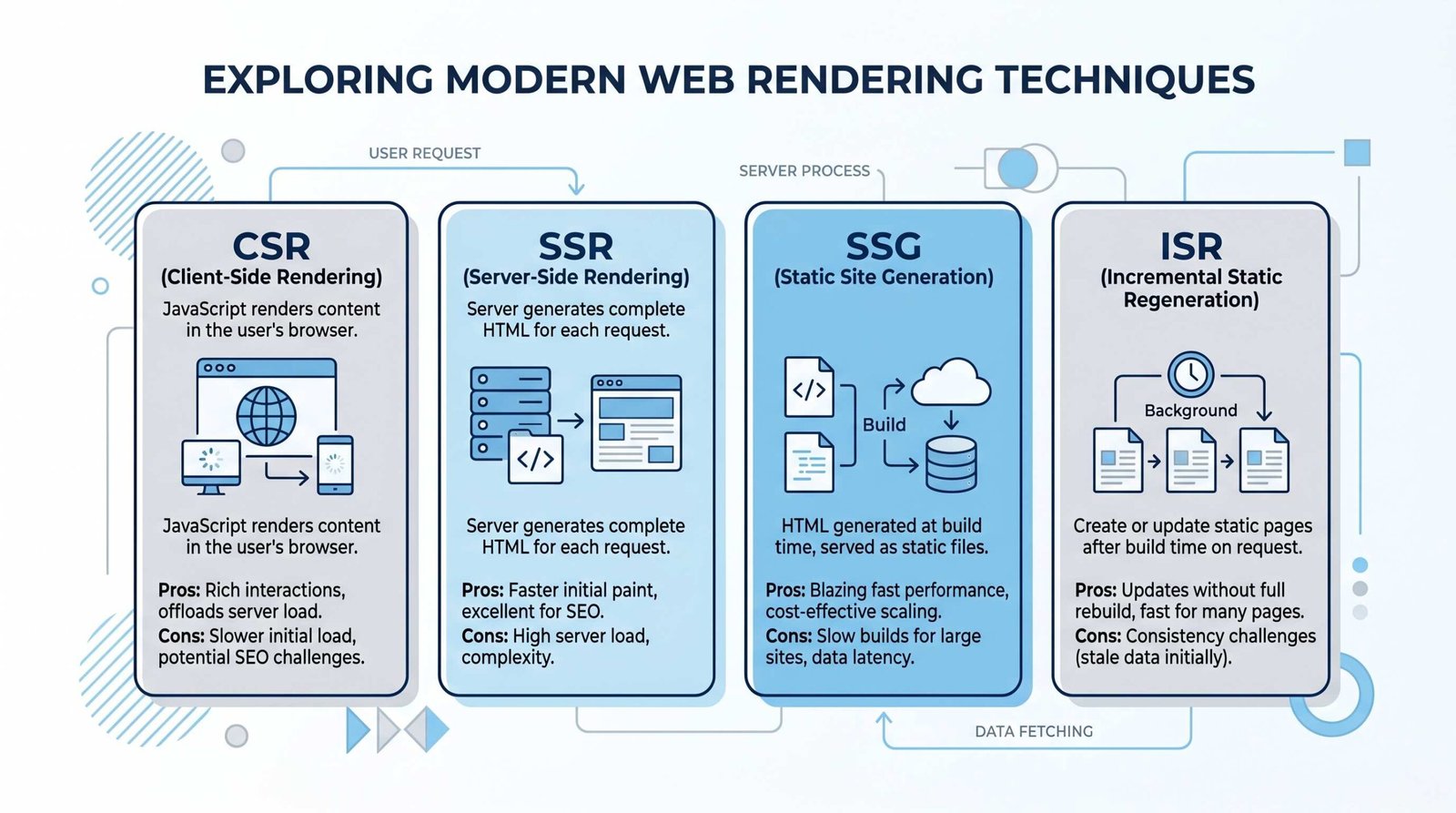
Google’s own JavaScript SEO documentation confirms that pages with a 200 status are queued for rendering, but the queue is not instant. For content that needs to rank quickly, pre-rendered HTML is the only reliable answer.
Pick ISR as your default if you’re building a content site. Use SSG when the data never changes, SSR when it must be live on every request, and CSR only for pages that should not appear in search at all.
Setting Up SEO in Next.js App Router
The App Router gives you two ways to declare metadata: a static metadata object for fixed pages, and the async generateMetadata function for dynamic ones. You cannot export both from the same segment.
Start by setting a metadataBase in your root layout. This anchors every relative Open Graph and canonical URL to the same origin.
// app/layout.tsx
import type { Metadata } from 'next'

export const metadata: Metadata = {
  metadataBase: new URL('https://appseo.com'),
  title: {
    default: 'AppSEO - Organic Growth for App Developers',
    template: '%s | AppSEO',
  },
  description: 'Technical SEO playbooks for SaaS founders and app developers.',
  openGraph: {
    type: 'website',
    siteName: 'AppSEO',
    locale: 'en_US',
  },
  robots: {
    index: true,
    follow: true,
    googleBot: { 'max-image-preview': 'large', 'max-snippet': -1 },
  },
}
The title.template field is a small detail that pays back constantly. Every child route can export just its own title fragment, and Next.js stitches the brand suffix on automatically.
For dynamic routes, fetch the data and return a Metadata object. Set alternates.canonical on every dynamic page, or query string variants will dilute rankings.
// app/blog/[slug]/page.tsx
import type { Metadata } from 'next'
import { notFound } from 'next/navigation'
import { getPost } from '@/lib/posts'

type Props = { params: Promise<{ slug: string }> }

export async function generateMetadata(
  { params }: Props
): Promise<Metadata> {
  const { slug } = await params
  const post = await getPost(slug)
  if (!post) return {}

  return {
    title: post.title,
    description: post.excerpt,
    alternates: { canonical: `/blog/${slug}` },
    openGraph: {
      title: post.title,
      description: post.excerpt,
      type: 'article',
      publishedTime: post.publishedAt,
      modifiedTime: post.updatedAt,
      authors: [post.author.name],
      images: [{ url: `/blog/${slug}/opengraph-image`, width: 1200, height: 630 }],
    },
    twitter: {
      card: 'summary_large_image',
      title: post.title,
      description: post.excerpt,
    },
  }
}

export default async function BlogPost({ params }: Props) {
  const { slug } = await params
  const post = await getPost(slug)
  if (!post) notFound()
  return <article>{/* render post */}</article>
}
Two quiet optimizations are worth knowing. fetch() calls inside generateMetadata are deduplicated with calls in the page component, so the same data fetch is shared automatically. And in Next.js 16, params is a Promise that must be awaited – the synchronous pattern from Next.js 14 has been removed.
Adding Structured Data and JSON-LD
The Metadata API does not have a built-in JSON-LD field. You inject it as a script tag from a Server Component, which means the schema lands in the initial HTML and is visible to every crawler, including AI bots that skip JavaScript.
Build a small helper, then drop it into the page render.
// components/JsonLd.tsx
export default function JsonLd({ data }: { data: Record<string, unknown> }) {
  return (
    <script
      type="application/ld+json"
      dangerouslySetInnerHTML={{ __html: JSON.stringify(data) }}
    />
  )
}

// app/blog/[slug]/page.tsx
import JsonLd from '@/components/JsonLd'

export default async function BlogPost({ params }: Props) {
  const { slug } = await params
  const post = await getPost(slug)

  const schema = {
    '@context': 'https://schema.org',
    '@type': 'BlogPosting',
    headline: post.title,
    description: post.excerpt,
    datePublished: post.publishedAt,
    dateModified: post.updatedAt,
    author: { '@type': 'Person', name: post.author.name },
    mainEntityOfPage: `https://appseo.com/blog/${slug}`,
  }

  return (
    <article>
      <JsonLd data={schema} />
      <h1>{post.title}</h1>
      {/* body */}
    </article>
  )
}
Three schema types cover most use cases for app and SaaS sites: BlogPosting for content, Product with Offer for pricing pages, and FAQPage for help articles. Validate the output with Google’s Rich Results Test before shipping.
One trap to avoid: do not stringify untrusted input directly. Sanitize anything that came from a user submission, or escape HTML entities, before passing it into dangerouslySetInnerHTML.
next-sitemap Configuration and robots.txt
Next.js can generate sitemap.xml and robots.txt in two ways: file conventions inside app/, or the next-sitemap package. The package wins for large sites because it can read your static export and chunk into multiple sitemap files automatically.
Install it and add a config file.
// next-sitemap.config.js
/** @type {import('next-sitemap').IConfig} */
module.exports = {
  siteUrl: 'https://appseo.com',
  generateRobotsTxt: true,
  sitemapSize: 5000,
  changefreq: 'weekly',
  priority: 0.7,
  exclude: ['/admin/*', '/api/*', '/dashboard/*'],
  robotsTxtOptions: {
    policies: [
      { userAgent: '*', allow: '/' },
      { userAgent: 'GPTBot', allow: '/' },
      { userAgent: 'ClaudeBot', allow: '/' },
      { userAgent: 'PerplexityBot', allow: '/' },
      { userAgent: 'CCBot', disallow: '/' },
    ],
    additionalSitemaps: ['https://appseo.com/server-sitemap.xml'],
  },
}
Wire it into your build script so it runs after next build.
// package.json
{
  "scripts": {
    "build": "next build",
    "postbuild": "next-sitemap"
  }
}
The AI crawler allow list is deliberate. Allowing GPTBot, ClaudeBot, and PerplexityBot is how you get cited in ChatGPT search, Claude, and Perplexity answers. Blocking CCBot prevents Common Crawl from scraping content into open training datasets, if that matters to your business.
For routes Next.js generates dynamically at runtime, use a server sitemap endpoint at app/server-sitemap.xml/route.ts that queries your database and returns XML. Then list it in additionalSitemaps above.
Core Web Vitals for Next.js
Core Web Vitals are a ranking signal and a user experience floor. The three metrics Google scores, per web.dev/vitals, are Largest Contentful Paint, Interaction to Next Paint, and Cumulative Layout Shift. Targets: LCP under 2.5s, INP under 200ms, CLS under 0.1, all at the 75th percentile.
Next.js has framework-level optimizations for all three.
LCP fixes. The largest paint is usually a hero image. Use next/image with the priority prop on above-the-fold images. Next.js will preload it and serve a modern format.
import Image from 'next/image'

export default function Hero() {
  return (
    <Image
      src="/hero.jpg"
      alt="Product hero"
      width={1200}
      height={630}
      priority
      sizes="(max-width: 768px) 100vw, 1200px"
    />
  )
}
Pair this with font preloading via next/font. The Google Fonts loader inlines the CSS and self-hosts the font files at build time, removing two round trips.
import { Inter } from 'next/font/google'

const inter = Inter({ subsets: ['latin'], display: 'swap' })

export default function RootLayout({ children }) {
  return <html className={inter.className}><body>{children}</body></html>
}
INP fixes. Long JavaScript tasks on the main thread are the usual cause. Move expensive logic into Server Components, which run on the server and ship zero JS to the client. For interactive widgets that must run in the browser, dynamic import them with next/dynamic and a { ssr: false } option when appropriate, so they hydrate later.
CLS fixes. Always set width and height on images and videos. Reserve space for ad slots, embeds, and dynamically loaded content with CSS aspect-ratio. Use font-display: swap with size-adjust descriptors so font swaps don’t reflow text. The next/image component handles dimensions automatically when you pass width and height props.
Measure in production, not in Lighthouse. Add the web-vitals library and ship metrics to your analytics endpoint.
// app/web-vitals.tsx
'use client'
import { useReportWebVitals } from 'next/web-vitals'

export function WebVitals() {
  useReportWebVitals((metric) => {
    fetch('/api/vitals', {
      method: 'POST',
      body: JSON.stringify(metric),
      keepalive: true,
    })
  })
  return null
}
AI Crawlers and Your Next.js App
This is the section every other Next.js SEO guide misses. As of 2026, a meaningful share of product discovery traffic comes from ChatGPT search, Perplexity, Claude, and Gemini, not Google. Those products rely on crawlers that behave differently from Googlebot.
Three behaviors matter.
No JavaScript execution. GPTBot, ClaudeBot, PerplexityBot, and Google-Extended fetch raw HTML and stop there. A client-rendered Next.js page returns an empty shell to them. The fix is the same one that helps Google: use SSR, SSG, or ISR so the HTML is complete on first response.
Different cache windows. AI crawlers index much less frequently than Googlebot. If you ship time-sensitive content, prefer SSR or short-revalidation ISR so the crawler’s cached snapshot stays close to reality.
Citations follow structured data. Pages with clean Article, FAQPage, and HowTo schema get cited more often in AI answers, because the bots use those signals to extract attributable claims. The JSON-LD setup above already does this work.
Two practical additions for AI visibility. Add an llms.txt file at your site root that lists your highest-value URLs in plain markdown, mirroring the role sitemap.xml plays for Google. And expose a clean, no-cookie-wall HTML version of paywalled content for AI crawlers if you can – the citation rate jumps when content is freely readable.
Frequently Asked Questions
Is Next.js good for SEO?
Yes. Next.js supports server-side rendering, static generation, and incremental static regeneration, which all deliver fully rendered HTML to crawlers. Combined with the App Router Metadata API, it is one of the strongest React frameworks for organic search.
Should I use generateMetadata or the static metadata object?
Use the static metadata object for fixed pages such as marketing or pricing pages. Use generateMetadata when the title, description, or Open Graph data depends on route params or fetched data, such as a blog post or product page. Mix both freely across files. You just cannot export both from the same route segment.
Can Googlebot index client-side rendered Next.js pages?
Usually yes, after a rendering pass with headless Chromium. The delay can be hours or days, and AI crawlers like GPTBot and PerplexityBot do not execute JavaScript at all. SSR, SSG, or ISR is safer for anything that needs to rank.
Do I still need next-seo with App Router?
No. The native Metadata API and generateMetadata function fully replace next-seo. Using both can produce duplicate or conflicting meta tags. Remove next-seo when you migrate.
How do I add JSON-LD in the App Router?
Render a script tag with type="application/ld+json" inside your Server Component, using dangerouslySetInnerHTML to inject the stringified schema object. Because it runs on the server, the schema lands in the initial HTML and is visible to every crawler.
What is the best rendering strategy for SEO in Next.js?
Static generation for stable content and incremental static regeneration for content that changes occasionally. Both serve pre-rendered HTML, which Google, Bing, and AI crawlers index without needing JavaScript execution. Reserve SSR for personalized routes and CSR for authenticated pages that should not be indexed.
Does generateMetadata work in Client Components?
No. Both metadata and generateMetadata exports are only supported in Server Components, because Next.js resolves metadata on the server before the page renders. If you need to set per-page metadata, keep the page itself a Server Component and move interactive UI into a child Client Component.
Ship these fundamentals in this order: pick your rendering strategy, set up metadataBase and generateMetadata, add JSON-LD, wire next-sitemap, then tune Core Web Vitals. Each step is small. Together they put you ahead of nearly every Next.js site competing for the same query.
RELATED POSTS
View all


YouTube SEO: The Complete 2026 Guide to Ranking Your Videos
December 22, 2023 | by appseo.com

Technical SEO Audit: A Step-by-Step Developer’s Checklist (2026)
May 21, 2026 | by Ian Adair

Local SEO for Small Business: The Complete 2026 Action Plan
May 19, 2026 | by Ian Adair