How to Make Your Angular App SEO-Friendly (2026 Update: Native SSR)
November 30, 2023 | by appseo.com

How to Make Your Angular App SEO-Friendly (2026 Update: Native SSR)
Quick answer: To make an Angular app SEO-friendly, enable server-side rendering with ng add @angular/ssr (Angular 17+ replaces the old Angular Universal package), set per-route meta tags via the Meta and Title services, use transfer state to avoid double data fetching, return proper HTTP status codes from server.ts, and prerender static routes at build time for maximum crawl speed.

If you shipped an Angular app in the last year and watched it get almost no organic traffic, you already know the problem. Googlebot can render JavaScript, but rendering is queued, delayed, and expensive. Rely on client-side rendering alone and you gamble your rankings on how patient the crawler feels this week. The fix is server-side rendering, and Angular 17+ ships it natively, without the friction of the deprecated Angular Universal setup.
This guide walks through the full modern stack: native SSR with @angular/ssr, incremental hydration for Angular 18+, transfer state, HTTP status codes from your server file, and the Core Web Vitals implications the older tutorials never touch. If you want the broader strategic picture first, our comprehensive Angular SEO guide covers ranking factors and content strategy alongside the technical work. Everything below assumes you want to ship.
Why Angular Apps Struggle With SEO (And Why SSR Fixes It)
Angular is a single-page application framework. By default, the browser downloads a nearly empty index.html, then a JavaScript bundle, then the framework boots, then components request data, then the DOM finally contains the content you want indexed. That flow is fine for humans on fast connections. It is hostile to crawlers.
Googlebot uses a two-wave indexing system. The first wave grabs raw HTML. If that HTML is a shell, Google queues the page for a second wave where a headless Chromium instance renders the JavaScript. That second wave can take days or weeks, and any errors, timeouts, or missing routes push the page further back. Bing, DuckDuckGo, and most social media crawlers do not execute JavaScript at all. If your Open Graph tags load after hydration, your link previews will be blank.
Server-side rendering solves this by generating full HTML on the server for every request. The crawler receives a complete document with content, meta tags, and structured data in the initial response. Hydration then attaches Angular’s interactivity on the client, so users still get the SPA experience. Google’s own JavaScript SEO documentation recommends server rendering or prerendering for exactly this reason. For a deeper look at how rendering strategies affect indexation across frameworks, web.dev’s rendering guide is the reference material every framework author reads.
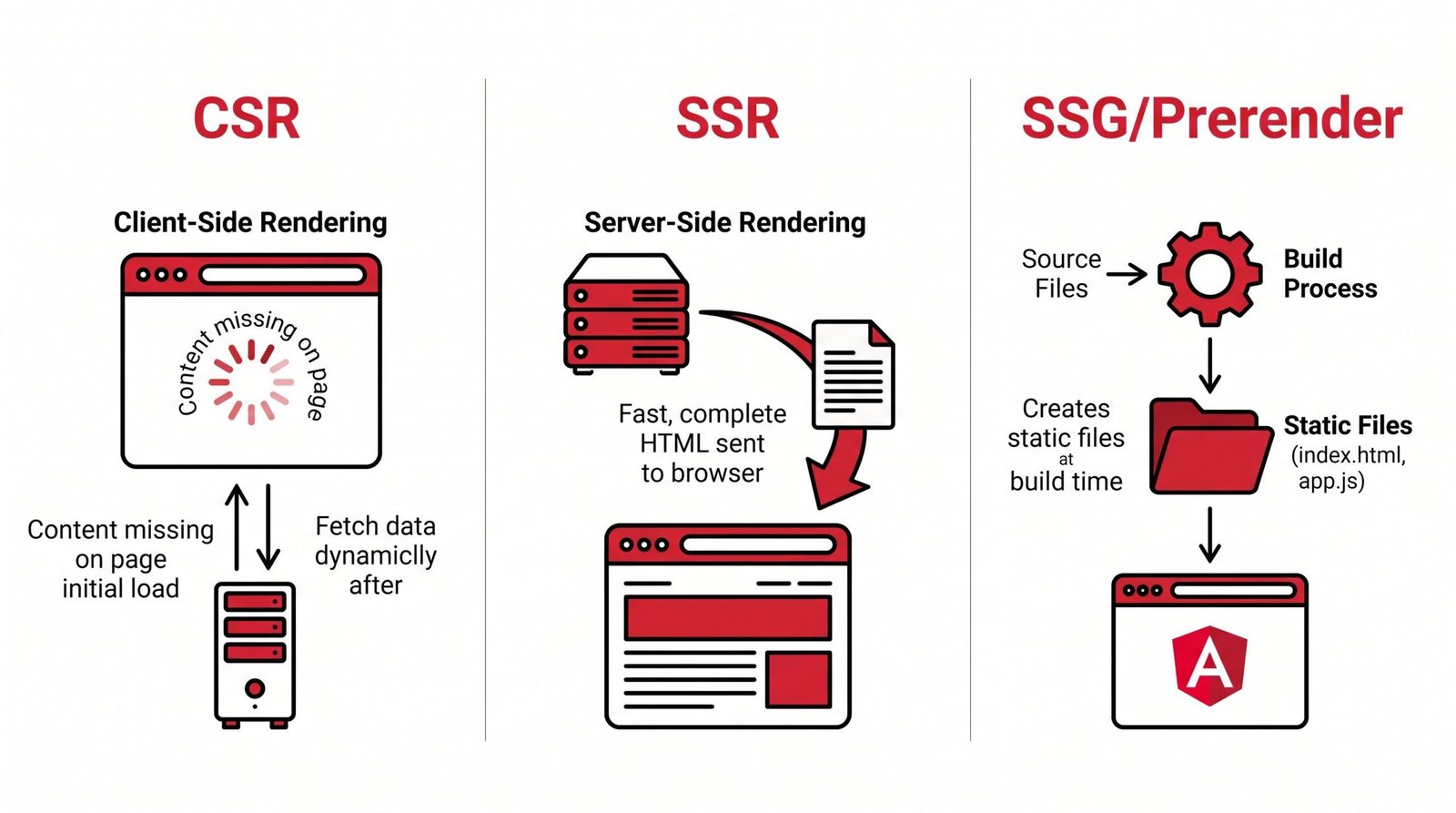
Comparison: Angular Rendering Modes for SEO
Not every route needs the same treatment. Choosing the right rendering mode per section of your app is one of the highest-leverage decisions you’ll make. Here is how the four modern Angular options compare:
| Mode | How it works | SEO impact | When to use |
|---|---|---|---|
| CSR (default) | Browser downloads JS, then renders content in the DOM after hydration. | Poor. Crawlers see an empty shell; content depends on the second-wave render. | Authenticated dashboards, internal tools, admin panels, anything behind a login. |
| SSR | Server renders full HTML on each request, then hydrates on the client. | Excellent. Crawlers get complete HTML immediately, with fresh data. | Marketing pages, product pages, blogs with frequent updates, personalized content. |
| Prerendering (SSG) | Full HTML generated at build time for known routes, served as static files. | Best. Fastest possible TTFB, no server render latency. | Documentation, static blogs, pricing pages, landing pages that rarely change. |
| Incremental hydration (Angular 18+) | Server renders HTML, client hydrates specific blocks on demand (viewport, interaction, idle). | Excellent, with better CWV than full hydration. | Large marketing sites, apps with heavy above-the-fold static content and interactive islands. |
Most production apps end up with a mix. Public marketing routes use SSR or prerendering, authenticated routes stay CSR because they don’t need indexing anyway. Get this split right and you cut server costs while maximizing organic reach.
Setting Up Angular 17+ Native SSR (The Modern Way)
If you Google “Angular SSR setup,” you will find dozens of tutorials referencing @nguniversal/express-engine or @angular/platform-server as a manual dependency. Ignore them. Since Angular 17, native SSR is a first-party feature and the recommended path. The official Angular SSR documentation now points to @angular/ssr as the canonical package.
To add SSR to an existing Angular app, run the schematic:
ng add @angular/ssrThis single command does a lot of work. It installs @angular/ssr, adds a server.ts file at the project root, updates angular.json with new build targets (server and prerender), generates a main.server.ts entry point, and configures the app config with provideClientHydration(). It also switches your project to the new application builder if you haven’t already.
Understanding server.ts
The generated server.ts is a small Express-style file that boots Angular’s SSR engine and handles requests. A minimal version looks like this:
import { APP_BASE_HREF } from '@angular/common';
import { CommonEngine, isMainModule } from '@angular/ssr/node';
import express from 'express';
import { dirname, join, resolve } from 'node:path';
import { fileURLToPath } from 'node:url';
import bootstrap from './src/main.server';

const serverDistFolder = dirname(fileURLToPath(import.meta.url));
const browserDistFolder = resolve(serverDistFolder, '../browser');
const indexHtml = join(serverDistFolder, 'index.server.html');

const app = express();
const commonEngine = new CommonEngine();

app.get('*.*', express.static(browserDistFolder, {
  maxAge: '1y',
  index: false,
}));

app.get('*', (req, res, next) => {
  const { protocol, originalUrl, baseUrl, headers } = req;

  commonEngine
    .render({
      bootstrap,
      documentFilePath: indexHtml,
      url: `${protocol}://${headers.host}${originalUrl}`,
      publicPath: browserDistFolder,
      providers: [{ provide: APP_BASE_HREF, useValue: baseUrl }],
    })
    .then((html) => res.send(html))
    .catch((err) => next(err));
});

if (isMainModule(import.meta.url)) {
  const port = process.env['PORT'] || 4000;
  app.listen(port, () => {
    console.log(`Node Express server listening on port ${port}`);
  });
}

export default app;
The key difference from the old Universal setup is that server.ts is yours to modify. You can add middleware, custom headers, redirects, and status code logic without wrestling with a third-party engine layer. We come back to this file later to handle 404s and 503s properly.
To build and serve locally, run npm run build followed by npm run serve:ssr:your-app-name. Open curl -s http://localhost:4000/ in a terminal and confirm the response contains your actual content, not a shell. If it does, SSR is working.
Configuring Meta Tags and Title for Every Route
SSR gets your HTML to the crawler, but the crawler still needs correct titles, descriptions, canonicals, and social tags per route. Angular exposes two services for this: Title and Meta from @angular/platform-browser. Both are SSR-safe and work identically on server and client.
The cleanest pattern is to update meta in a component’s constructor or in a route resolver. Here’s a component-level example:
import { Component, inject, OnInit } from '@angular/core';
import { Meta, Title } from '@angular/platform-browser';
import { ActivatedRoute } from '@angular/router';

@Component({
  selector: 'app-product',
  standalone: true,
  templateUrl: './product.component.html',
})
export class ProductComponent implements OnInit {
  private title = inject(Title);
  private meta = inject(Meta);
  private route = inject(ActivatedRoute);

  ngOnInit() {
    const product = this.route.snapshot.data['product'];

    this.title.setTitle(`${product.name} | AppSEO Store`);

    this.meta.updateTag({ name: 'description', content: product.summary });
    this.meta.updateTag({ name: 'robots', content: 'index, follow' });

    // Open Graph
    this.meta.updateTag({ property: 'og:title', content: product.name });
    this.meta.updateTag({ property: 'og:description', content: product.summary });
    this.meta.updateTag({ property: 'og:image', content: product.imageUrl });
    this.meta.updateTag({ property: 'og:type', content: 'product' });
    this.meta.updateTag({ property: 'og:url', content: `https://example.com/products/${product.slug}` });

    // Twitter Card
    this.meta.updateTag({ name: 'twitter:card', content: 'summary_large_image' });
    this.meta.updateTag({ name: 'twitter:title', content: product.name });
    this.meta.updateTag({ name: 'twitter:description', content: product.summary });
    this.meta.updateTag({ name: 'twitter:image', content: product.imageUrl });
  }
}
Two details worth calling out. First, use updateTag, not addTag. On the server, addTag will duplicate tags on every request because the DOM persists between renders in some configurations. Second, Open Graph tags are the single biggest blind spot in every competing Angular SEO tutorial. If you skip them, your links on Slack, LinkedIn, Facebook, and Discord will show a blank card instead of a rich preview, and you lose click-through even when Google ranks you well.
For sites with many routes, centralize this in a SeoService and call it from each component or from a resolver. That way title formatting, canonical logic, and default fallbacks live in one place. Our guide to on-page SEO fundamentals covers what to put in each tag once you have the plumbing working.
Transfer State: Preventing the Double Data Fetch Problem
Here is a subtle problem that costs teams a full second of LCP if they miss it. Without transfer state, your app fetches data twice: once on the server during SSR, and again on the client during hydration. The client fetch is wasteful because the server already loaded that data, and worse, it can cause a visible flicker as content is refetched and re-rendered.
Angular 16+ enables transfer state automatically when you use provideClientHydration() and the modern HttpClient with withFetch(). Verify your app.config.ts includes both:
import { ApplicationConfig } from '@angular/core';
import { provideRouter } from '@angular/router';
import { provideClientHydration, withHttpTransferCacheOptions } from '@angular/platform-browser';
import { provideHttpClient, withFetch } from '@angular/common/http';
import { routes } from './app.routes';

export const appConfig: ApplicationConfig = {
  providers: [
    provideRouter(routes),
    provideClientHydration(
      withHttpTransferCacheOptions({
        includePostRequests: false,
        filter: (req) => !req.url.includes('/api/private'),
      }),
    ),
    provideHttpClient(withFetch()),
  ],
};
With this configuration, Angular serializes HTTP responses fetched during SSR into a script tag in the rendered HTML. On the client, HttpClient reads from that cache instead of hitting the network. Data appears immediately, no flicker, no wasted request. The filter option is useful for excluding endpoints that must always run fresh on the client, such as anything authenticated or user-specific.
To confirm it works, open DevTools’ Network tab, load an SSR page, and check that XHR requests for the initial data do not fire on the client. If they still do, either withFetch() is missing or the request isn’t being intercepted (raw fetch calls bypass this cache; use HttpClient).
Fixing HTTP Status Codes for SEO
This is the most common bug in Angular SSR apps and none of the competing tutorials mention it. Your app’s 404 page probably returns HTTP 200. When Googlebot hits a missing product page and sees a 200 response with “Not found” text, it indexes that page as a real page. Your index bloats with hundreds of duplicate “Not found” listings and your crawl budget drains.
The fix lives in server.ts. You need to inspect what Angular actually rendered and set the response status accordingly. One reliable pattern uses a token that a “NotFoundComponent” sets during rendering:
import { REQUEST, RESPONSE } from './server.tokens';
import { InjectionToken } from '@angular/core';

// server.tokens.ts
export const RESPONSE = new InjectionToken<express.Response>('RESPONSE');
export const REQUEST = new InjectionToken<express.Request>('REQUEST');

// In server.ts, inside app.get('*', ...):
app.get('*', (req, res, next) => {
  commonEngine
    .render({
      bootstrap,
      documentFilePath: indexHtml,
      url: `${req.protocol}://${req.headers.host}${req.originalUrl}`,
      publicPath: browserDistFolder,
      providers: [
        { provide: APP_BASE_HREF, useValue: req.baseUrl },
        { provide: RESPONSE, useValue: res },
        { provide: REQUEST, useValue: req },
      ],
    })
    .then((html) => {
      // Status is set by the component during render
      res.status(res.statusCode || 200).send(html);
    })
    .catch((err) => next(err));
});
Then in your NotFoundComponent:
import { Component, Inject, Optional, PLATFORM_ID, inject } from '@angular/core';
import { isPlatformServer } from '@angular/common';
import { RESPONSE } from '../server.tokens';

@Component({
  selector: 'app-not-found',
  standalone: true,
  template: `<h1>Page not found</h1>`,
})
export class NotFoundComponent {
  constructor(@Optional() @Inject(RESPONSE) private response: any) {
    if (this.response) {
      this.response.status(404);
    }
  }
}
Do the same for 503 (service unavailable) during data-fetch failures, and 301 for redirects. Return real status codes and Google will drop dead URLs from the index instead of accumulating soft 404s. If you’re not sure which of your pages return the wrong status, run a technical SEO audit and look specifically for soft 404 warnings in the crawl report.
Prerendering Static Pages for Maximum SEO Speed
Server-side rendering is great, but every request still takes CPU time on your server. For pages that don’t change per user or per request, prerendering (also called SSG, static site generation) is faster and cheaper. Angular’s builder handles both from the same codebase.
To prerender routes at build time, update angular.json:
{
  "architect": {
    "build": {
      "options": {
        "prerender": {
          "routesFile": "routes.txt",
          "discoverRoutes": true
        },
        "ssr": {
          "entry": "server.ts"
        }
      }
    }
  }
}
Create a routes.txt listing static paths:
/
/about
/pricing
/blog
/blog/why-angular-ssr-matters
/blog/core-web-vitals-guide
Or generate the list dynamically by exporting an async function from a routes file that hits your CMS or database. On ng build, Angular renders each listed route to a static HTML file and writes it to the browser output folder. Your server then serves those static files directly, skipping the SSR engine entirely for prerendered paths.
A hybrid strategy works best for most sites. Prerender the homepage, marketing pages, and content that changes rarely. Use SSR for product pages, personalized feeds, and anything that needs fresh data. Angular’s builder ships both from one build, and requests to routes not in your prerender list fall back to SSR automatically.
Incremental Static Regeneration (ISR), which some frameworks like Next.js offer natively, requires custom logic in Angular. You can implement it by scheduling rebuilds of specific routes on a cron or webhook trigger, or by adding a caching layer in front of SSR with a short TTL. For most Angular apps, weekly rebuilds of prerendered content plus real-time SSR for everything else covers the ISR use case without extra infrastructure.
Core Web Vitals Optimization for Angular SSR
Ranking is not just about crawlability. Google’s Core Web Vitals directly influence rankings, and Angular apps have specific patterns that hurt each metric. Our full guide to Core Web Vitals optimization covers the underlying metrics, but here is what matters specifically for Angular SSR.
LCP (Largest Contentful Paint)
With SSR enabled, above-the-fold content is in the initial HTML response. LCP happens as soon as the browser parses and paints that content, typically within 1 to 2 seconds on a good connection. To further reduce LCP, preload hero images with <link rel="preload" as="image"> in your document head, use responsive srcset attributes so mobile browsers download smaller versions, and serve images through a CDN with automatic AVIF or WebP conversion. In Angular templates, use NgOptimizedImage with the priority attribute for LCP candidates:
<img ngSrc="hero.jpg" width="1200" height="600" priority alt="Product hero" />CLS (Cumulative Layout Shift)
Angular’s biggest CLS trap is late-loading fonts and dynamic content that pushes layout after hydration. Always specify width and height on images. Use font-display: swap only if you have a fallback that closely matches the metrics of your web font, otherwise use font-display: optional to prevent the swap flash. Reserve space for anything loaded after initial render (ads, embeds, deferred components).
INP (Interaction to Next Paint)
INP replaced FID in 2024 and is the metric most affected by hydration cost. Traditional full hydration walks the entire tree, attaches event listeners, and can block the main thread for hundreds of milliseconds on large apps. This is exactly where incremental hydration in Angular 18+ becomes a game changer.
Incremental Hydration for Better CWV
Incremental hydration lets you mark specific parts of your app with @defer hydration triggers. Instead of hydrating everything on load, Angular hydrates a component when it enters the viewport, when the user interacts with it, or when the browser is idle. Enable it by adding withIncrementalHydration() to your hydration provider:
import { provideClientHydration, withIncrementalHydration } from '@angular/platform-browser';

export const appConfig: ApplicationConfig = {
  providers: [
    provideClientHydration(withIncrementalHydration()),
  ],
};
Then in templates, wrap non-critical interactive sections in a defer block with a hydration trigger:
@defer (hydrate on viewport) {
  <app-comments [postId]="postId" />
}

@defer (hydrate on interaction) {
  <app-video-player [src]="videoUrl" />
}

@defer (hydrate on idle) {
  <app-related-articles [tags]="tags" />
}
The result is dramatically lower Total Blocking Time and INP scores because the main thread stays free during initial load. Comments hydrate only when the user scrolls to them, the video player hydrates when clicked, and related articles wait for idle time. All of them are still fully rendered in the initial HTML for crawlers.
Schema Markup for Angular: Adding JSON-LD
Structured data helps Google understand your content and unlocks rich results (star ratings, FAQ dropdowns, breadcrumbs). In Angular SSR, JSON-LD needs to be present in the server-rendered HTML so crawlers see it on the first pass. Injecting it via document.head in ngOnInit works, but you need to do it in an SSR-safe way using Renderer2:
import { Component, Inject, Renderer2, inject } from '@angular/core';
import { DOCUMENT } from '@angular/common';

@Component({
  selector: 'app-article',
  standalone: true,
  templateUrl: './article.component.html',
})
export class ArticleComponent {
  private renderer = inject(Renderer2);
  private document = inject(DOCUMENT);

  ngOnInit() {
    const article = this.route.snapshot.data['article'];

    const schema = {
      '@context': 'https://schema.org',
      '@type': 'Article',
      headline: article.title,
      description: article.summary,
      author: {
        '@type': 'Person',
        name: article.author.name,
      },
      datePublished: article.publishedAt,
      dateModified: article.updatedAt,
      image: article.heroImage,
      publisher: {
        '@type': 'Organization',
        name: 'AppSEO',
        logo: { '@type': 'ImageObject', url: 'https://appseo.com/logo.png' },
      },
    };

    const script = this.renderer.createElement('script');
    script.type = 'application/ld+json';
    script.text = JSON.stringify(schema);
    this.renderer.appendChild(this.document.head, script);
  }
}
For FAQ pages, add FAQPage schema alongside your visible FAQ:
const faqSchema = {
  '@context': 'https://schema.org',
  '@type': 'FAQPage',
  mainEntity: faqs.map(faq => ({
    '@type': 'Question',
    name: faq.question,
    acceptedAnswer: { '@type': 'Answer', text: faq.answer },
  })),
};
Common schema types worth adding: Article for blog posts, Product with Offer and AggregateRating for ecommerce, Organization and WebSite in a global layout component, BreadcrumbList for category pages, FAQPage where relevant. Validate every schema block with Google’s Rich Results Test before shipping.
Sitemap and robots.txt
A sitemap tells search engines which URLs to crawl and when they last changed. A robots.txt controls which paths crawlers can access. Both are essential and both live at fixed paths at your site root.
The simplest setup: place a static robots.txt in src/ and add it to your angular.json assets array. Reference your sitemap inside it:
User-agent: *
Allow: /
Disallow: /api/
Disallow: /admin/

Sitemap: https://example.com/sitemap.xml
For the sitemap, static generation works if your route list is small. For larger sites, expose a dynamic endpoint in server.ts that queries your database or CMS and streams XML:
app.get('/sitemap.xml', async (req, res) => {
  const posts = await fetchAllPublishedPosts();
  const urls = [
    { loc: 'https://example.com/', lastmod: new Date().toISOString(), priority: 1.0 },
    { loc: 'https://example.com/blog', lastmod: new Date().toISOString(), priority: 0.8 },
    ...posts.map(p => ({
      loc: `https://example.com/blog/${p.slug}`,
      lastmod: p.updatedAt,
      priority: 0.7,
    })),
  ];

  const xml = `<?xml version="1.0" encoding="UTF-8"?>
<urlset xmlns="http://www.sitemaps.org/schemas/sitemap/0.9">
${urls.map(u => `  <url><loc>${u.loc}</loc><lastmod>${u.lastmod}</lastmod><priority>${u.priority}</priority></url>`).join('\n')}
</urlset>`;

  res.header('Content-Type', 'application/xml');
  res.send(xml);
});
Split sitemaps by content type (posts, products, categories) if you have more than 50,000 URLs or the file exceeds 50MB. Reference the split sitemaps from a sitemap index file. Submit the sitemap URL in Google Search Console and Bing Webmaster Tools so both engines discover new pages faster.
Deploying Angular SSR: Vercel, Netlify, and Node.js
Angular SSR needs a Node.js runtime, which shapes your deployment options. Three paths cover most teams.
Traditional Node.js server: Build with ng build and run node dist/your-app/server/server.mjs behind a reverse proxy (nginx, Caddy) with process management (PM2, systemd). This gives you full control over caching, edge middleware, and long-running processes. Use it for high-traffic apps or when you need custom infrastructure.
Vercel: Vercel’s Angular preset handles the SSR build automatically. Push to Git, Vercel detects the Angular config, deploys the browser bundle to their CDN, and runs server.ts as a serverless function. Zero configuration for most cases. Cold starts can add 200 to 500ms latency; mitigate with edge caching headers on your responses.
Netlify: Similar to Vercel, using Netlify Functions or Edge Functions. Install @netlify/angular-runtime and Netlify wraps your server.ts in a function. Prerendered routes are served statically, dynamic routes hit the function.
Whichever host you pick, set aggressive Cache-Control headers on prerendered content (max-age=31536000, immutable for hashed assets, s-maxage=3600, stale-while-revalidate=86400 for SSR HTML). Cache-Control is the single biggest lever for SSR performance and cost, and most teams underuse it.
Testing Your Angular SEO Setup
Ship nothing without verifying. Every step above can silently break, and you often won’t notice until Search Console reports the damage weeks later.
Start with a raw HTTP request. Run curl -s https://yoursite.com/some-route | less and search for your page’s actual content, meta description, Open Graph tags, and JSON-LD. If any of them are missing, they will not be indexed. Do this for every page template (home, product, blog post, category) at least once per release.
Next, use Google Search Console’s URL Inspection tool. Paste a live URL, click “Test Live URL,” and check the rendered HTML tab. Google shows you exactly what Googlebot saw. Compare the rendered HTML to your view-source HTML. If the rendered version has content that view-source doesn’t, that content depends on client rendering and may be missed. This tool is the single best debugging aid for Angular SEO and most teams never use it. If you’re not familiar with the range of tools available, our overview of SEO for web apps and single-page applications covers the diagnostic stack.
Then run the Rich Results Test for structured data validation. Paste your URL, confirm all schema types are detected, fix any warnings. Warnings usually mean an optional field is missing that Google would prefer you include.
Finally, run a Lighthouse audit in Chrome DevTools with the SEO category enabled. Lighthouse catches missing meta descriptions, non-crawlable links, small tap targets, and blocked robots directives. A perfect SEO score in Lighthouse is table stakes, not an achievement, but a score below 90 always means something is broken.
Quick Reference: Angular SEO Checklist
- Run
ng add @angular/ssrto enable native server-side rendering (Angular 17+). - Verify
provideClientHydration()is in your app config. - Add
provideHttpClient(withFetch())so transfer state actually works. - Set per-route titles and meta descriptions using the Title and Meta services.
- Add Open Graph and Twitter Card tags for social sharing.
- Return real HTTP status codes (404, 503) from your NotFoundComponent via injected RESPONSE token.
- Prerender static routes with the prerender builder option, listing paths in routes.txt or a dynamic generator.
- Enable incremental hydration with
withIncrementalHydration()and use@defer (hydrate on ...)triggers for heavy interactive components. - Use
NgOptimizedImagewith the priority attribute on LCP images. - Inject JSON-LD schema via Renderer2 in an SSR-safe way for Article, Product, FAQPage, BreadcrumbList.
- Serve robots.txt and a dynamic /sitemap.xml endpoint, submit both to Google Search Console.
- Set aggressive Cache-Control headers for prerendered and SSR responses.
- Verify each page template with curl, GSC URL Inspection, Rich Results Test, and Lighthouse before every deploy.
FAQ
Is Angular Universal still relevant in 2026?
No. Angular Universal (@nguniversal/express-engine) was replaced by native SSR (@angular/ssr) in Angular 17. New projects should use ng add @angular/ssr. Existing Universal projects should migrate; Angular’s migration schematic handles most of the work. Continuing to use Universal means missing incremental hydration, the improved builder, and simpler deployment configs.
Does Google actually crawl JavaScript-rendered Angular pages?
Yes, but with meaningful delay and reduced reliability compared to server-rendered HTML. Google uses a two-wave indexer, where JavaScript is rendered in a second pass that can lag the first by days or weeks. Bing, DuckDuckGo, LinkedIn, Facebook, and most other crawlers do not execute JavaScript at all. If you care about ranking across engines, use SSR.
What is the difference between prerendering and SSR in Angular?
Prerendering (SSG) generates HTML at build time. Every visitor gets the same static file, served from a CDN with minimal latency. SSR generates HTML on each request, allowing per-user or per-request content. Prerendering is faster and cheaper for content that rarely changes; SSR is required for personalized or frequently updated pages. Angular supports both from the same codebase.
How do I fix soft 404 errors in Angular SSR?
Set the response status code from server.ts using an injected RESPONSE token. When your NotFoundComponent renders, call response.status(404). Google’s crawler treats a 200 response with “not found” text as a real page and indexes it, causing soft 404 warnings in Search Console. Real 404 status codes make the crawler drop the URL from the index.
Do I need transfer state if I have SSR?
Yes. Without transfer state, HTTP calls made during SSR are repeated on the client during hydration, doubling data cost and causing visible content flicker. Angular enables transfer state automatically when you use provideClientHydration() plus provideHttpClient(withFetch()). Confirm it works by checking that XHR requests for initial data do not fire on the client in DevTools.
Can I run Angular SSR on a serverless platform?
Yes. Vercel and Netlify both support Angular SSR by wrapping server.ts in a serverless or edge function. Cold starts add 200 to 500ms in serverless environments, so cache SSR responses at the CDN with s-maxage headers to reduce cold-start impact. For very high traffic or ultra-low latency requirements, a long-running Node.js server on a dedicated host or container is faster.
How does incremental hydration affect SEO?
Incremental hydration does not change what crawlers see. The entire component tree is still rendered to HTML on the server, so crawlers get complete content regardless of hydration strategy. What incremental hydration improves is Core Web Vitals, particularly INP and Total Blocking Time, by deferring the JavaScript hydration cost of below-the-fold or interaction-triggered components. Better CWV improves rankings indirectly through Google’s page experience signals.
Which Angular routes should I prerender vs SSR?
Prerender routes that are the same for every visitor and change infrequently: homepage, marketing pages, pricing, blog posts, documentation, category pages. Use SSR for routes with fresh data or personalization: product pages with live inventory, user dashboards behind auth, search results, feeds. Use CSR only for routes that don’t need indexing at all, such as post-login application shells.
RELATED POSTS
View all