YouTube SEO: The Complete 2026 Guide to Ranking Your Videos
December 22, 2023 | by appseo.com
YouTube SEO: The Complete 2026 Guide to Ranking Your Videos
YouTube SEO is the process of optimizing your videos, channel, and metadata so YouTube’s search and recommendation algorithm surfaces your content to the right viewers. It combines keyword research, title and description optimization, watch time strategy, thumbnail design, and channel signals to improve discoverability across YouTube search, suggested videos, the home feed, and Google search results.
The reason most YouTube SEO advice fails in 2026 is that it stopped evolving in 2021. The platform has shipped major ranking signals since then: the Hype endorsement system, deeper Google AI Overview integration, smarter Shorts discovery, and chapter-level indexing. If your strategy still revolves around tags and keyword-stuffed descriptions, you are competing with one hand tied behind your back.
This guide is built for content creators, marketers, and small businesses who want their videos to rank. Every section leads with the answer, then explains why it works. We suggest reading it in order the first time and then bookmarking the checklist near the end for ongoing use.
What Is YouTube SEO?
YouTube SEO is the discipline of making your videos easier for YouTube and Google to understand, rank, and recommend. It operates on three surfaces at once: YouTube’s internal search, YouTube’s recommendation engine (home feed, suggested videos, Shorts shelf), and Google’s universal results, where video carousels and AI Overviews increasingly pull from YouTube.
Traditional SEO focuses on a single ranking system, which is Google. YouTube SEO has to satisfy a more complex stack. YouTube wants to keep people watching, Google wants to answer queries, and the Hype leaderboards now reward videos that earn active endorsements from real viewers. A video that ranks well in 2026 satisfies all three.
The good news: the core ideas are stable. Match search intent, earn watch time, design for the click, and feed the algorithm consistent engagement signals. The mechanics have evolved, but the philosophy is the same as it has been since YouTube became a search engine.
How the YouTube Algorithm Works in 2026
The YouTube algorithm in 2026 ranks videos based on a weighted mix of relevance, watch time, engagement velocity, viewer satisfaction, and personalization. There is no single ranking factor. YouTube blends signals from the moment a viewer impresses on your thumbnail to the moment they leave the platform.
Four signal categories carry the most weight today, and understanding each one tells you exactly where to focus your optimization work.
Watch time and audience retention
Watch time and audience retention are the two most important signals YouTube uses to decide whether to promote a video. Watch time is the total minutes accumulated; retention is the percentage of each video viewers actually watch. YouTube cares about both, but retention is the leading indicator. A two-minute video with 80% retention will often outperform a ten-minute video with 25% retention, because the algorithm reads sustained attention as a vote of confidence.
Strong retention starts in the first 30 seconds. If 40% of viewers leave before the one-minute mark, the algorithm will throttle distribution. We suggest opening with a clear payoff, restating what the viewer will learn, then earning every subsequent minute with pacing, visual variety, and content density.
Engagement signals (likes, comments, shares, saves)
Engagement signals tell YouTube how viewers feel about your video beyond just watching it. Likes are the weakest of the four, comments and shares are stronger, and saves to a playlist are the most powerful because they signal future watch intent.
Velocity matters more than volume. A video that earns 200 comments in the first 24 hours sends a much stronger signal than one that accumulates 200 comments over six months. This is why creators who reply to early comments often see distribution improve: each reply triggers a notification, another visit, another minute of watch time, and a fresh signal that the conversation around the video is alive.
The YouTube Hype Signal (2025)
The Hype signal is YouTube’s 2025 endorsement feature that lets viewers actively boost smaller channels onto country-specific leaderboards. Viewers spend their weekly Hype allotment on videos they want others to see, and videos with the most Hype points climb a public leaderboard for their country and category.
This matters for SEO because Hype is a confirmed discovery and engagement signal. Channels with under 500,000 subscribers are eligible, and a single trending position can drive thousands of new viewers to a video that otherwise would have stayed buried. None of the legacy YouTube SEO guides cover this yet, but it is a real lever, especially for growing channels.
Three things make Hype work in practice. First, you have to explicitly ask viewers to Hype the video; most people do not know the button exists. Second, timing matters because Hype resets weekly. Publishing on a Tuesday gives the leaderboard run more time than a Sunday upload. Third, niche categories have less competition for the leaderboard, so smaller channels can dominate a category and ride the resulting traffic for days.
Relevance and keyword match
Relevance is YouTube’s read on how well your video matches what a viewer is searching for or what their viewing history suggests they want next. The algorithm pulls signals from the title, description, on-screen text, spoken transcript, file name, chapters, and even comments to build its understanding of the video.
This is why one-word keyword stuffing no longer works. YouTube wants to understand the topic, not just the term. A video titled “How to Edit Podcasts in Descript (Full 2026 Tutorial)” with a 300-word description that uses related terms like “audio editing”, “Descript workflow”, “remove filler words”, and “export podcast episode” will outrank a video titled “Podcast Editing” with a thin description, even if the second video has more views.
YouTube SEO vs. Google SEO: Key Differences
YouTube SEO and Google SEO share the same DNA but operate by different rules. Both reward relevance and quality, but the mechanics of how they measure those things differ at almost every step.
| Factor | YouTube SEO | Google SEO |
|---|---|---|
| Primary success metric | Watch time and retention | Clicks and dwell time |
| Indexing speed | Minutes to hours | Hours to weeks |
| Backlinks | Weak signal | Strong ranking factor |
| Click-through rate | Critical (thumbnail driven) | Important (title/meta driven) |
| Content freshness | Engagement velocity in first 48 hours | Crawl and re-index of updated pages |
| Personalization | Heavy (history, location, device) | Moderate (history, location) |
| Authority signals | Channel watch time, subscriber base | Domain authority, backlink profile |
The biggest implication: a YouTube video can earn major distribution within hours of upload if early signals are strong, while a new blog post often waits weeks for organic momentum. This is why the first 48 hours after publishing on YouTube are so critical, and why a strong launch strategy beats a perfect SEO setup on a poorly received upload.
Keyword Research for YouTube
YouTube keyword research is the process of finding the exact phrases viewers type into YouTube search, then mapping those phrases to video ideas that match search intent. It is not the same as Google keyword research because YouTube searchers behave differently: they want to watch something, not read something, and they often want a demonstration, walkthrough, or reaction rather than an explainer.
The fastest way to find real YouTube keywords is to use YouTube itself, then layer in volume data from external tools.
YouTube search suggest
YouTube’s search suggest dropdown is the most underused keyword tool on the internet. Type a seed phrase into YouTube search and the platform autocompletes with the most-searched variations of that phrase, ordered by query volume. These are real searches by real users, served straight from YouTube’s database.
We suggest building seed lists from your topic area, then prefixing each seed with how, why, what, where, when, and best to surface long-tail variations. Add modifiers like “for beginners”, “in 2026”, “step by step”, and “vs” to find comparison and tutorial intent. Save the suggestions in a spreadsheet so you can prioritize by intent fit.
Analyzing competitor video tags
Competitor video tags reveal the exact phrases other creators are targeting and offer a shortcut to discovering related terms. While YouTube hides tags from the public UI, browser extensions like VidIQ, TubeBuddy, and the open-source vidIQ alternatives can surface them in seconds.
Pick the three top-ranking videos for your target keyword, pull their tags, and look for patterns. Tags that appear across multiple top videos signal a topic cluster YouTube already associates with your keyword. This works even though tags are a weak direct ranking factor, because they tell you what successful competitors think YouTube wants to see.
Volume tools for YouTube
Volume tools quantify which keywords are worth pursuing. The major options in 2026 are Ahrefs Keyword Explorer (YouTube mode), Semrush Keyword Magic Tool, vidIQ, TubeBuddy, and Keywords Everywhere. Each pulls slightly different data; we suggest cross-referencing two tools before committing to a primary keyword.
Volume alone is not a sufficient signal. A keyword with 5,000 monthly searches and ten million indexed competitors is harder to win than a keyword with 800 searches and 50 well-matched competitors. Use volume to prioritize within a tier, not across tiers, and weigh competition against your channel’s current authority.
Optimizing Your Video Title
The video title is the single highest-impact piece of metadata you control, and it does two jobs at once: it tells YouTube what the video is about, and it convinces a human to click. Get both right and the rest of your optimization compounds. Get either one wrong and your video stalls.
A high-performing YouTube title in 2026 follows four rules. First, lead with the primary keyword in the first 60 characters because YouTube weighs the front of the title most heavily. Second, write for the click without resorting to clickbait that breaks the implicit promise of the thumbnail. Third, include a number, year, or specificity hook (“7 Mistakes”, “2026 Guide”, “in 60 Seconds”) because these consistently increase click-through rate. Fourth, stay under 70 characters so the title does not truncate on the home feed or in suggested videos.
Example transformations:
- Weak: “Tips for Better Sleep”
- Better: “How to Sleep Better in 2026: 7 Habits That Actually Work”
- Weak: “Excel Tutorial”
- Better: “Excel for Beginners: The 2026 Tutorial That Replaces a 4-Hour Course”
The “better” versions hit the keyword, signal value, set a timeframe, and promise specificity. None of them rely on rage-bait or false claims.
Writing a YouTube Description That Ranks
The YouTube description is your secondary ranking signal and your primary opportunity to give YouTube semantic context about your video. The first 150 characters appear above the fold and matter most for click-through and for AI Overview inclusion. The remaining 4,850 characters give YouTube room to understand the topic in depth.
A description that ranks does five things:
- Restates the topic in natural language in the first two lines, including the primary keyword
- Expands into a 100 to 300 word summary of what the video covers
- Includes timestamps that match the video’s chapter markers
- Links to related videos, playlists, and external resources where relevant
- Closes with channel links, subscribe prompts, and any disclosures
For B2B and SaaS creators, the description is also where you signal commercial intent. If you ship a product that solves the problem in the video, link it. We suggest reviewing how strong creators handle this for SaaS SEO and content distribution, where description copy often does double duty as a soft conversion driver. Keep the link in context with the topic, and never bury it under 30 lines of boilerplate.
One important note on keyword density: writing for YouTube and writing for Google overlap, but YouTube reads descriptions as natural language and penalizes obvious stuffing. A description that uses the primary keyword two or three times and supports it with related terms outperforms one that repeats the exact phrase eight times.
YouTube Tags in 2026: Do They Still Matter?
YouTube tags still matter, but only marginally. In 2018 they were a meaningful ranking factor. In 2026 they help YouTube disambiguate ambiguous topics and surface your video for misspelled queries, but they no longer move rankings on their own. YouTube has said publicly that the title, thumbnail, and description carry far more weight.
That said, tags are free and take 60 seconds to fill out, so we suggest treating them as cleanup rather than strategy. Add five to fifteen tags per video. Include the primary keyword, two to three close variants, and a handful of broader category tags. Skip the practice of stuffing 500 characters of marginally related phrases. YouTube treats that as low-quality signal noise.
One useful application: tag with brand or series names if you publish recurring content. Tagging consistently across a series helps YouTube understand the relationship between videos and increases the chance that one video in the series suggests another in the suggested videos rail.
Thumbnails and Click-Through Rate
Thumbnails drive click-through rate, and click-through rate is the single biggest lever you have on impressions. YouTube serves your thumbnail tens of thousands of times in the home feed, suggested videos rail, and search results. A 2% improvement in CTR can double a video’s lifetime views.
The thumbnail rules that hold up in 2026:
- Contrast first. The thumbnail competes against 20 others on a phone screen. High contrast between subject and background wins the eye.
- Faces work. Expressive human faces consistently outperform abstract imagery. The eye is wired to lock onto faces.
- Three words or fewer of text. Long text strings become unreadable at thumbnail size. Pick one phrase that adds information the title does not already convey.
- Test variations. YouTube’s native thumbnail A/B testing is now available to all channels. Use it. The data is more reliable than your gut.
- Match the title and the content. A misleading thumbnail tanks retention, which tanks future distribution. Earn the click honestly.
For small businesses and local operators, thumbnails also do brand work. A consistent visual style across your channel teaches viewers to recognize your videos in a busy feed. Local service businesses that follow this same recognition principle in their broader marketing should review how visual consistency intersects with local SEO for small business to compound the effect across search surfaces.
YouTube Shorts SEO vs. Long-Form Video SEO
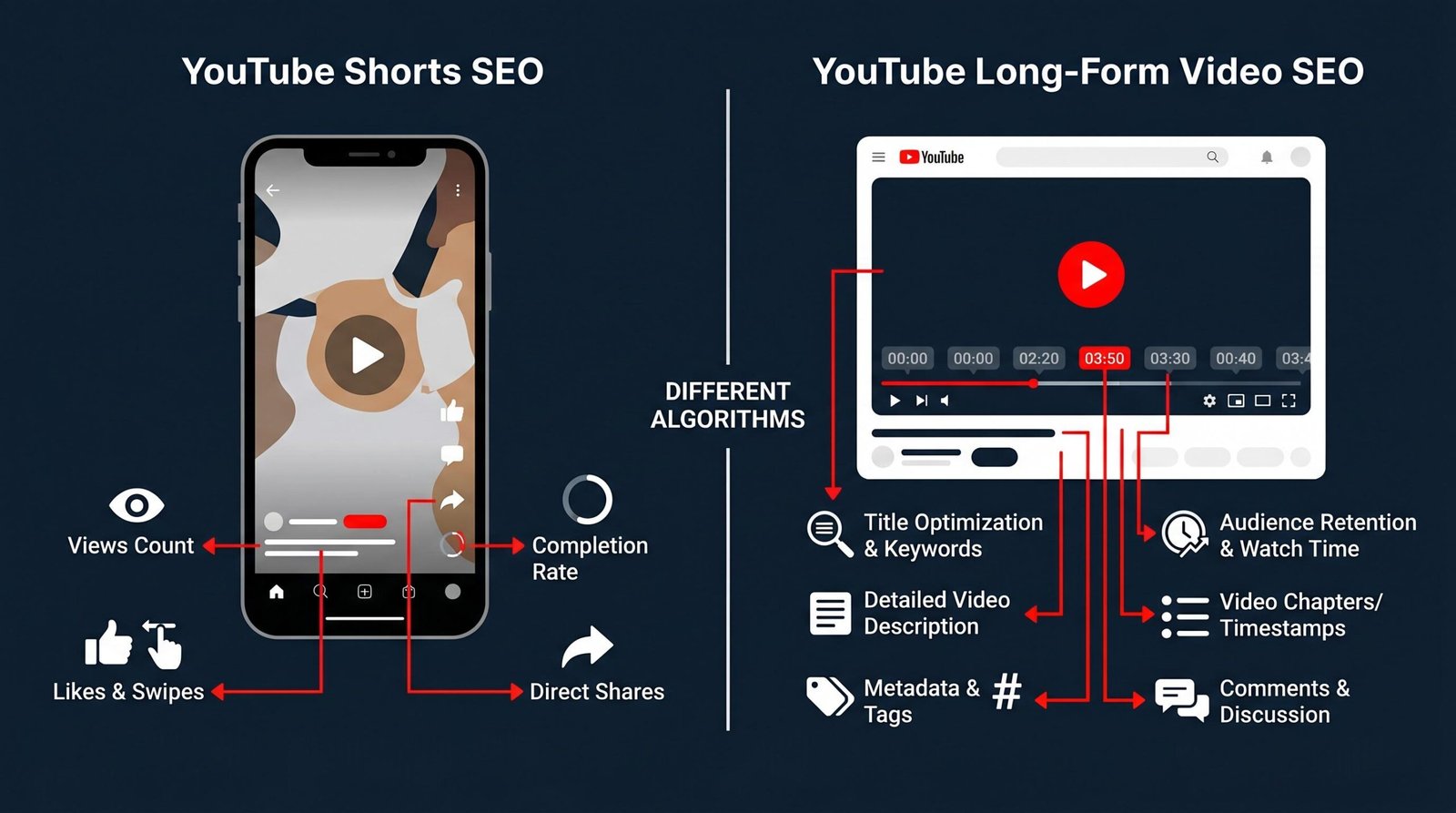
YouTube Shorts and long-form videos do not share the same ranking algorithm. Shorts are surfaced primarily through the vertical Shorts feed using engagement velocity and swipe-through behavior, while long-form videos are ranked through search, suggested videos, and the home feed using watch time and session duration. Most YouTube SEO guides flatten this distinction. They should not.
| Ranking factor | YouTube Shorts | Long-form video |
|---|---|---|
| Primary discovery surface | Shorts feed (vertical swipe) | Search, suggested, home feed |
| Most important signal | Loop and rewatch rate | Watch time and retention |
| Title weight | Lower, often unseen | High, drives clicks and SEO |
| Description weight | Almost nothing | Major semantic signal |
| Thumbnail role | Rare; mostly autoplays | Critical for CTR |
| Watch time threshold | Under 60 seconds | Open-ended (longer can rank if retention holds) |
| Cross-promotion to channel | Weak | Strong |
| Monetization | Shorts ad revenue pool | Standard ad revenue |
The practical takeaway: optimize Shorts for the loop. The first second has to hook attention, the last second has to nudge a rewatch, and the body has to deliver enough payoff that viewers swipe up to your channel. Long-form videos win on session length, so structure them to lead the viewer to a related video at the end and keep them on the platform.
One trap to avoid: do not assume Shorts will grow your subscriber base in a way that translates to long-form views. The audiences barely overlap. We suggest using Shorts as a top-of-funnel discovery tool and a way to recycle moments from long-form videos, not as a substitute for a long-form strategy.
Chapters and Timestamps as SEO Signals
Video chapters and timestamps let Google index specific moments inside your video and dramatically increase the number of queries a single video can rank for. When you add chapter markers to your description, Google parses them, displays them as Key Moments in search results, and treats each chapter as a separate piece of indexable content.
This is one of the highest-ROI optimizations in YouTube SEO and one of the most overlooked. A 20-minute tutorial with eight well-named chapters can rank for eight distinct queries instead of just one. Each chapter that matches a search query gets its own surface in Google search, complete with a thumbnail and a deep link that drops the viewer right at that moment in the video.
The mechanics are simple. In your video description, list timestamps starting at 00:00 and label each one with a descriptive title. YouTube requires at least three chapters, each lasting ten seconds or longer, with the first chapter starting at 00:00. YouTube’s official video chapter documentation covers the formatting requirements in detail.
A few rules that improve chapter performance:
- Write chapter titles as search queries, not as outline headers. “How to install the plugin” beats “Installation”.
- Front-load the most-searched chapter early in the video so retention stays strong.
- Keep chapter titles under 40 characters. Longer titles truncate in Google search results.
- Do not invent chapters that do not match the video content. Google strips chapters from videos where the labels do not match the spoken content.
Optimizing for YouTube AI Overviews (2026)
YouTube videos now appear inside Google’s AI Overviews, and optimizing for that inclusion is one of the most valuable distribution opportunities in 2026. When Google generates an AI Overview for a query, it can embed a YouTube video as a primary source, drive viewers directly to the moment in the video that answers the query, and credit the channel with both the click and the watch time.
Three factors determine whether Google chooses your video for an AI Overview.
Query-framed titles. Google favors videos whose titles look like answers to the query. “How to Fix a Leaky Faucet in 5 Minutes” outperforms “Faucet Repair” for the query “how to fix a leaky faucet” because the title visibly resolves the question.
Chapter structure with descriptive labels. AI Overviews lean heavily on Key Moments. Videos with chaptered structures and search-query-formatted labels are far more likely to appear, because Google can pinpoint the exact moment the answer is delivered.
Semantic descriptions with answer language. Descriptions that include the question being answered, restate the answer in the first 150 characters, and use the natural language a person would speak the question in are more likely to be selected. Skip keyword lists; write the description as if you were briefly explaining the video to a friend.
One more signal worth tracking: structured data. Google’s video structured data documentation covers how embedded VideoObject markup on a hosting page can reinforce a video’s eligibility for video search features, including AI Overviews. If you embed your YouTube videos on your own website, mark them up with VideoObject schema to compound the signal.
Channel-Level SEO: The Factor Most Creators Ignore
Channel-level SEO is the optimization work that improves the discoverability and authority of your entire channel, not just individual videos. The algorithm tracks channel-level signals, including aggregate watch time, average view duration, audience consistency, upload cadence, and viewer return rate. Strong channel signals lift every video you publish; weak ones drag them all down.
Most creators obsess over individual video SEO and ignore the channel layer entirely. This is a mistake. A well-optimized channel turns one viral video into a subscriber base that powers every subsequent upload.
Channel name and About section
The channel name and About section are the first signals YouTube uses to categorize your channel. The name should be memorable, easy to spell, and ideally include or hint at your topic. “TechWithTim” tells YouTube and viewers exactly what to expect. “Tim’s Channel” tells them nothing.
The About section gives you 1,000 characters to describe what your channel covers, who it is for, and how often you publish. Use the primary topic keyword in the first sentence. Include your upload schedule. List the kinds of viewers you serve. YouTube uses this text to inform topic classification and audience matching, especially for new channels with thin watch history.
Playlists and watch session length
Playlists are the most underused channel-level SEO tool. A well-built playlist autoplays one of your videos after another, which extends session length, which is the single most important channel signal YouTube tracks.
The strategy is to group videos by topic intent. A viewer searching for “Excel pivot table tutorial” who lands on your video should see a playlist of related Excel tutorials in the right rail. If they finish your video and the next one in the playlist autoplays, you just doubled the session length YouTube credits to your channel.
We suggest building topic-based playlists rather than chronological ones, naming them with searchable phrases (playlists themselves rank in YouTube search), and writing a one-sentence description for each. Pin your strongest playlist to your channel page so first-time visitors hit it first.
Community posts as engagement signals
Community posts maintain engagement velocity between video uploads and feed the algorithm a steady stream of interaction data. They are completely absent from most YouTube SEO guides, which is a significant miss. A channel that posts community updates two or three times a week keeps its audience active even when no new video is live.
Each community post that earns likes, comments, or poll votes signals to YouTube that the channel’s audience is engaged. When you do publish a new video, that engagement pool primes the launch. Subscribers who interacted with a community post earlier in the week are more likely to receive the video notification, more likely to click, and more likely to convert into early watch time.
Effective community posts ask a question, run a poll, share a behind-the-scenes image, or tease the next video. We suggest two to four posts per week, with at least one explicitly inviting interaction (a poll or open-ended question).
Channel trailer for first-time visitors
The channel trailer is a short video that autoplays for non-subscribers who visit your channel page. It is your one-shot pitch for why a visitor should subscribe. Channels with strong trailers consistently convert visitors at higher rates than channels without one.
Effective trailers are 30 to 90 seconds long, state clearly what the channel covers, show two or three clips of the best content, and end with an explicit subscribe ask. YouTube’s own guidance on getting discovered emphasizes the trailer as a discovery and conversion tool, not just a vanity asset.
Subtitles, Captions, and Transcript SEO
Subtitles and captions improve accessibility, increase watch time, and feed YouTube’s understanding of your video’s content. YouTube auto-generates captions for most uploads, but auto-generated captions contain errors, especially for technical terms, proper nouns, and accented speech. Manually corrected captions perform better.
The SEO impact comes from two places. First, YouTube uses the transcript to understand topic relevance, especially when the title and description are thin. Second, captions enable viewers to watch with sound off, which boosts watch time in environments where sound is impractical (offices, late-night phone scrolling, public transit).
For creators who publish in English and want international reach, manually translated captions in two or three additional languages can unlock 20% to 40% of incremental watch time. YouTube also displays your video to viewers in those languages when their language preference matches your captions.
One specific tactic: upload a clean SRT file with timestamps rather than relying on auto-captions. The transcript fidelity is higher, and the file lives in your YouTube backend for future repurposing into blog posts, podcast show notes, and AI-generated summaries. Content creators expanding from blogging into video should treat the transcript as raw material for cross-channel distribution, the same way they would treat a written draft, a practice that overlaps cleanly with broader SEO for bloggers workflows.
Embedding YouTube Videos on Your Website
Embedding YouTube videos on your own website increases watch time, builds external signals for the video, and adds dwell time and engagement signals to your web pages. Done correctly, an embed reinforces both YouTube SEO and Google SEO at the same time.
The technical setup matters. Use YouTube’s standard iframe embed, mark up the page with VideoObject structured data so Google can read the embedded video, and place the video above the fold for pages where the video is the primary content. WordPress users can streamline this with a structured data plugin; we cover the options in our guide to the best SEO plugin for WordPress.
A few additional optimizations:
- Use the privacy-enhanced embed URL (youtube-nocookie.com) for GDPR compliance and faster load times.
- Set rel=0 in the embed URL to prevent unrelated suggested videos from appearing in the player.
- Add a text-based transcript below the embed. Search engines index the transcript and assign it to the page, expanding the keyword footprint of the post.
- Audit embed performance with a technical SEO audit to catch lazy-loading issues, missing structured data, or Core Web Vitals regressions caused by heavy embeds.
The compounding effect is real. A video embedded on a high-traffic blog post can generate thousands of additional views per month, all of which count toward YouTube’s watch time signals while also improving the blog post’s dwell time. Both algorithms reward the setup.
YouTube Analytics for SEO Insights
YouTube Analytics is where you find the data that tells you what to fix. The dashboard is dense, but four reports do most of the heavy lifting for SEO work.
Traffic Sources. Shows where viewers found your video. If a video gets 90% of views from suggested videos and 2% from search, your title and tags are not converting in search. If the reverse, your thumbnail is underperforming in suggested.
Search terms. Lists the exact YouTube search queries that surfaced your video. This is gold for keyword expansion. Queries that drove views to a video you did not target are candidates for new video ideas.
Audience retention. Shows the moment-by-moment drop-off curve. Steep drops in the first 30 seconds mean your intro is weak. Drops at the 50% mark mean the middle is sagging. Use the curve to diagnose and fix the underperforming sections of each video.
Click-through rate by impression source. Compares CTR across surfaces (browse, suggested, search). Low CTR in search means your thumbnail and title do not match query intent. Low CTR in suggested means your thumbnail does not compete in the rail. Different fixes for different problems.
One pattern we have seen repeatedly: creators check Analytics once a week, then make changes based on the wrong report. The discipline is to define a single question before opening Analytics (“why did this video plateau?”), pull the report that answers that question, and ignore the rest. The dashboard rewards focused inquiry and punishes vague browsing.
YouTube SEO Checklist
This is the working checklist we use before publishing every video. It is structured as pre-publish, publish, and post-publish phases. Save it.
| Phase | Task | Why it matters |
|---|---|---|
| Pre-publish | Primary keyword researched in YouTube suggest and at least one volume tool | Confirms search demand before you invest production time |
| Pre-publish | Title under 70 characters with keyword in first 60 characters | Maximum SEO weight and no truncation on the home feed |
| Pre-publish | Title contains specificity hook (number, year, “vs”, “in X minutes”) | Improves click-through rate |
| Pre-publish | Thumbnail uses high contrast, expressive face if appropriate, three words or fewer of text | Wins the impression battle in feed |
| Pre-publish | Description has primary keyword in first 150 characters | Most-read portion above the fold |
| Pre-publish | Description includes 100 to 300 word summary using related terms | Builds semantic context for YouTube and AI Overviews |
| Pre-publish | Chapters added with at least three timestamps starting at 00:00 | Unlocks Key Moments in Google search and AI Overview eligibility |
| Pre-publish | Manually corrected captions or SRT uploaded | Improves topic relevance and accessibility |
| Pre-publish | 5 to 15 tags including primary keyword and two to three variants | Minor relevance signal for ambiguous queries |
| Pre-publish | Custom thumbnail tested against one alternative if possible | Native A/B testing surfaces the higher-CTR option |
| Pre-publish | End screen and cards configured to direct viewers to next video | Extends session length, a major channel-level signal |
| Publish | Scheduled at a time matching audience peak in YouTube Analytics | Maximizes first-hour watch time velocity |
| Publish | Added to relevant playlist immediately | Triggers autoplay sequence and lifts session length |
| Publish | Community post announcing the video published within 30 minutes of upload | Drives early notification recipients to click |
| Publish | Pinned comment with a discussion prompt | Seeds comment activity and engagement velocity |
| Post-publish (first 48 hours) | Reply to every comment within the first 24 hours | Boosts comment counts and signal velocity |
| Post-publish (first 48 hours) | Hype prompt added to community post and pinned comment if eligible | Drives leaderboard placement and incremental discovery |
| Post-publish (first 48 hours) | Embed video in matching blog post on your website | Adds watch time and reinforces dwell time on your page |
| Post-publish (first week) | Review Traffic Sources to confirm search and suggested are both contributing | Diagnoses which optimization layer needs attention |
| Post-publish (first month) | Update thumbnail if CTR falls below channel median | Recovers impressions before YouTube reduces distribution |
| Post-publish (ongoing) | Refresh description and chapters quarterly for evergreen videos | Signals freshness and maintains AI Overview eligibility |
Working through every line on this list takes 30 to 45 minutes per video. That is a high return on time relative to the additional distribution it earns. The creators who treat this as discipline rather than overhead are the ones whose channels compound.
Frequently Asked Questions
How long does it take for YouTube SEO to work?
YouTube SEO works on a faster cycle than traditional Google SEO, but it is not instant. New videos typically receive their initial distribution test in the first 24 to 48 hours, when YouTube serves the video to a small slice of your subscribers and similar viewers. If early signals (CTR, retention, engagement) are strong, the algorithm expands distribution within days. For evergreen videos, search traffic builds over the first three to six months as the video accumulates watch time and Google indexes the chapters. Expect a fast initial signal and a longer tail buildout, especially for tutorial and how-to content where search demand is steady.
Do YouTube tags still help videos rank?
YouTube tags have diminished as a ranking factor and are now a weak signal compared to the title, description, and thumbnail. YouTube has confirmed publicly that tags primarily help disambiguate misspellings and ambiguous topics. That said, tags take less than a minute to fill out, so we suggest adding five to fifteen relevant tags including your primary keyword, a few variants, and category-level tags. Do not invest hours in tag research. Spend that time on the title, thumbnail, and description, all of which carry significantly more weight in the 2026 algorithm.
What is the ideal video length for YouTube SEO?
There is no single ideal length. What matters is retention rate, not absolute duration. A three-minute video with 75% retention sends a stronger signal than a fifteen-minute video with 20% retention. That said, longer videos generate more total watch time, which is the metric YouTube uses to rank channels. For tutorial and educational content, eight to twelve minutes hits a sweet spot where retention stays high and watch time accumulates meaningfully. For entertainment and storytelling, length is less constrained as long as pacing holds. Pick the length the topic demands, then optimize for retention.
Should I focus on YouTube Shorts or long-form videos?
It depends on your goal. Shorts are excellent for top-of-funnel discovery: they reach new viewers quickly, are easier to produce, and the Shorts feed surfaces them aggressively to non-subscribers. Long-form videos build deeper audience relationships, generate more ad revenue per view, and support session-length signals that strengthen your channel. The audiences do not overlap as much as creators assume, so we suggest treating Shorts as a discovery layer that funnels into a long-form channel rather than as a substitute for it. If you only have time for one, choose the format that matches the content type your topic naturally suits.
How do I rank a YouTube video on Google?
Videos rank on Google primarily through the title, structured chapters, and semantic description, supported by embedded VideoObject schema on a hosting page. Google pulls video data directly from YouTube, so the optimization work is mostly the same: clear query-framed titles, chapter structure that maps to search queries, and descriptions that include the question being answered in natural language. To compound the effect, embed the video on a relevant blog post on your own site with proper structured data. Videos that rank both on YouTube and on Google often outperform either surface alone by a factor of two to three on total distribution.
What is the YouTube Hype feature and how do I use it for SEO?
Hype is YouTube’s 2025 endorsement feature that lets viewers spend a weekly allotment of Hype points to boost videos from smaller channels onto country-specific leaderboards. Channels under 500,000 subscribers are eligible. From an SEO perspective, Hype is a discovery signal: a strong leaderboard run can drive thousands of new viewers and the resulting engagement velocity feeds back into the recommendation algorithm. To use it well, explicitly ask viewers to Hype the video in the first 60 seconds and in a pinned comment, publish early in the Hype weekly cycle to maximize leaderboard time, and target niche categories where competition for top positions is thinner.
RELATED POSTS
View all

On-Page SEO: The Complete 2026 Guide (With Code Examples and a Checklist)
May 26, 2026 | by Ian Adair