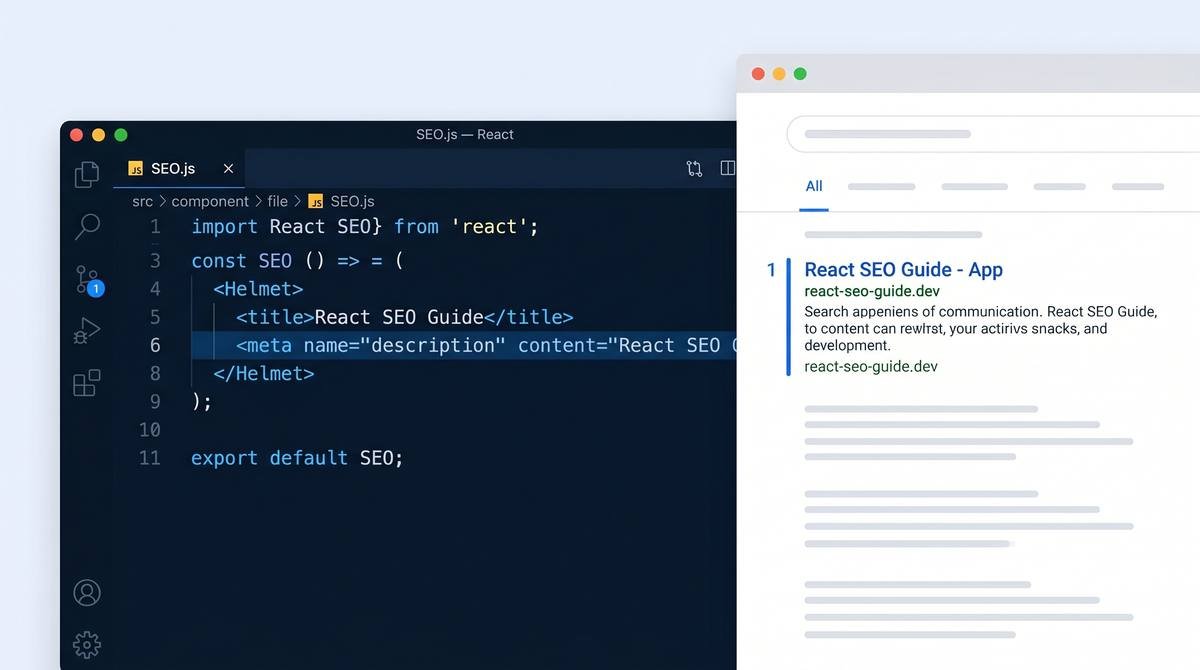
Angular SEO: The Complete Guide for 2026 (SSR, Prerendering & Hydration)
May 14, 2026 | by Ian Adair

Angular SEO: The Complete Guide for 2026
Angular ships a powerful component framework, but its default client-side rendering means Googlebot may receive an empty shell on the first request, with all content arriving only after JavaScript executes. That gap creates indexing delays, weak Core Web Vitals scores, and lost organic traffic for content-heavy Angular apps. This guide covers the practical steps in Angular 17/18+ to fix that: setting up SSR with the new @angular/ssr package, prerendering specific routes, enabling hydration, managing meta tags per route, and injecting structured data, with code that actually runs in current Angular versions.
Is Angular good for SEO? Angular can rank well, but only when paired with server-side rendering or static prerendering. Pure client-side rendering forces Googlebot to wait for a second rendering pass before indexing your content, which slows discovery and weakens Core Web Vitals. The two primary fixes are Angular SSR through the @angular/ssr package and static prerendering of routes at build time.
Why Angular Poses Unique SEO Challenges
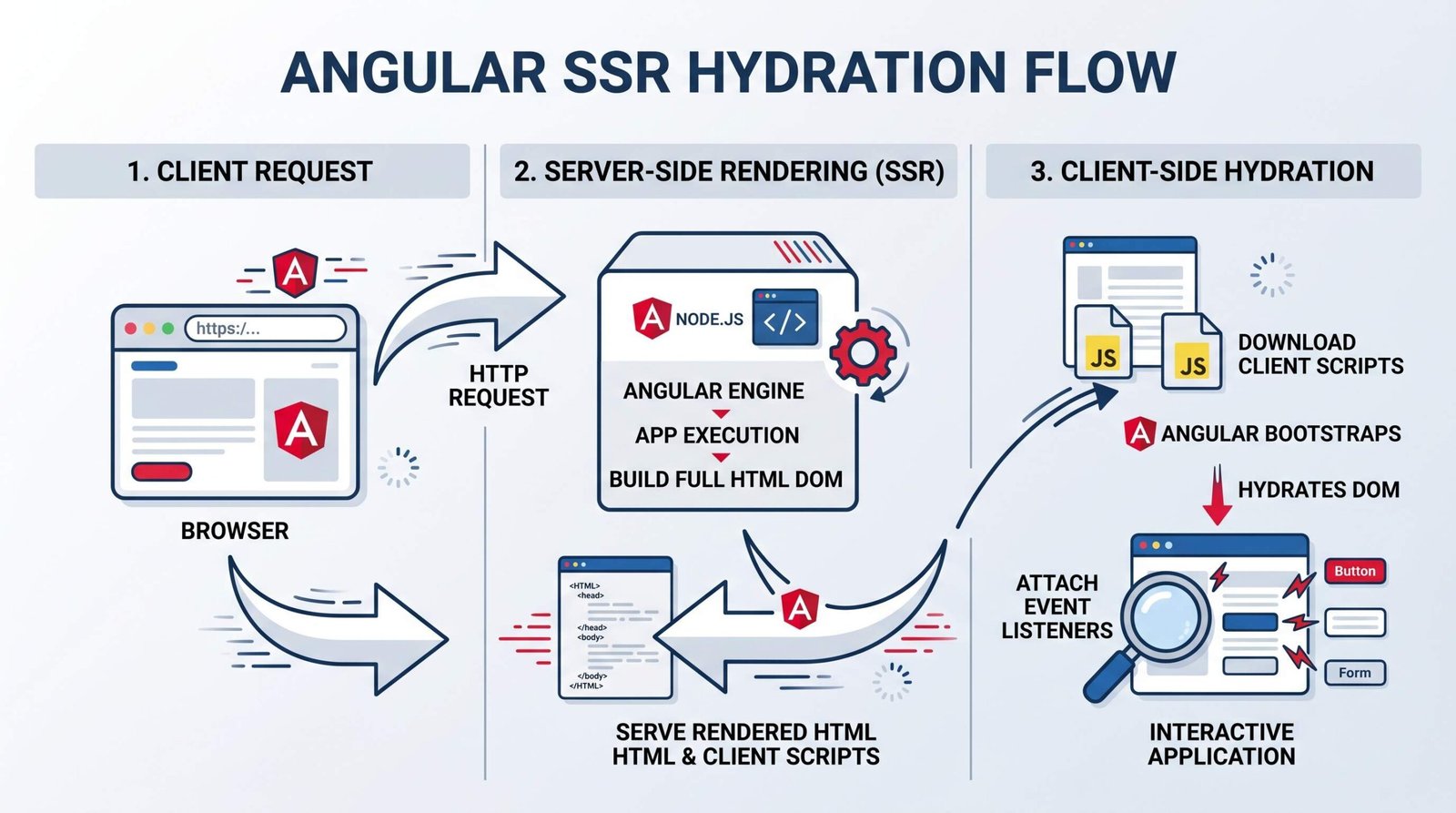
Angular renders client-side by default. The browser receives a near-empty HTML document containing a <app-root> element and a JavaScript bundle reference. The actual content, headings, links, copy, structured data, only appears after Angular bootstraps in the browser and the router resolves the current route.
Googlebot handles JavaScript, but with caveats. According to Google’s JavaScript SEO documentation, Googlebot processes pages in three stages: crawling the HTML, queueing for rendering, and finally rendering through a headless Chromium instance. Pages with a 200 status code are queued for rendering, and the wait between crawling and rendering can range from seconds to days depending on resource availability.
The practical impact is twofold. First, content that exists only after JavaScript execution, product descriptions, blog text, internal navigation links, structured data, is delayed in the index. Second, your Core Web Vitals scores suffer because the browser has to download, parse, compile, and execute the entire framework before painting anything meaningful. First Contentful Paint (FCP) and Largest Contentful Paint (LCP) both stretch out, which feeds back into ranking signals.
For an Angular app behind a login wall (a SaaS dashboard, an internal tool), this barely matters. For a content site, marketing site, e-commerce catalog, or any app whose value depends on organic discovery, it matters a great deal. We have covered the same fundamentals from a React angle in our React SEO guide, and the same principle applies: framework-rendered content needs server-side help to compete on indexing speed and Core Web Vitals.
Angular SSR with @angular/ssr (Angular 17+)
Angular’s SSR story changed substantially in version 17. The old @nguniversal/express-engine package and AppServerModule setup are legacy. New projects use the unified @angular/ssr package with the application builder, standalone APIs, and the provideServerRendering() provider. The official Angular SSR guide documents the current approach.
Setting up SSR in a new Angular project
For a new project, pass the --ssr flag to ng new:
ng new my-app --ssrFor an existing project, add the package:
ng add @angular/ssrThe CLI scaffolds a server.ts entry point, a src/app/app.config.server.ts server configuration, and a src/main.server.ts bootstrap file. It also updates angular.json with server, serve-ssr, and prerender build targets, and adjusts the application builder so a single ng build produces both browser and server bundles.
Understanding the new ApplicationConfig approach
In Angular 17+, you no longer subclass an AppServerModule. Server configuration uses standalone providers, merged with your client configuration through mergeApplicationConfig. A typical app.config.server.ts looks like this:
// src/app/app.config.server.ts
import { ApplicationConfig, mergeApplicationConfig } from '@angular/core';
import { provideServerRendering } from '@angular/platform-server';
import { provideServerRouting } from '@angular/ssr';
import { appConfig } from './app.config';
import { serverRoutes } from './app.routes.server';

const serverConfig: ApplicationConfig = {
  providers: [
    provideServerRendering(),
    provideServerRouting(serverRoutes)
  ]
};

export const config = mergeApplicationConfig(appConfig, serverConfig);
The browser-side app.config.ts stays focused on client concerns (router, HTTP client, hydration):
// src/app/app.config.ts
import { ApplicationConfig } from '@angular/core';
import { provideRouter } from '@angular/router';
import { provideClientHydration } from '@angular/platform-browser';
import { provideHttpClient, withFetch } from '@angular/common/http';
import { routes } from './app.routes';

export const appConfig: ApplicationConfig = {
  providers: [
    provideRouter(routes),
    provideClientHydration(),
    provideHttpClient(withFetch())
  ]
};
The new server.ts uses AngularNodeAppEngine from @angular/ssr/node instead of the old Express engine. A minimal version:
// server.ts
import {
  AngularNodeAppEngine,
  createNodeRequestHandler,
  isMainModule,
  writeResponseToNodeResponse
} from '@angular/ssr/node';
import express from 'express';
import { fileURLToPath } from 'node:url';
import { dirname, resolve } from 'node:path';

const serverDistFolder = dirname(fileURLToPath(import.meta.url));
const browserDistFolder = resolve(serverDistFolder, '../browser');

const app = express();
const angularApp = new AngularNodeAppEngine();

app.use(express.static(browserDistFolder, {
  maxAge: '1y',
  index: false,
  redirect: false
}));

app.use((req, res, next) => {
  angularApp
    .handle(req)
    .then((response) =>
      response ? writeResponseToNodeResponse(response, res) : next()
    )
    .catch(next);
});

if (isMainModule(import.meta.url)) {
  const port = process.env['PORT'] || 4000;
  app.listen(port, () => {
    console.log(`Server listening on http://localhost:${port}`);
  });
}

export const reqHandler = createNodeRequestHandler(app);
How SSR improves indexing: what Googlebot sees
With SSR enabled, the initial HTTP response contains a fully rendered HTML document. Headings, paragraphs, anchor tags, and JSON-LD scripts all arrive in the first response. Googlebot indexes that HTML immediately during the first crawling wave, before any JavaScript executes. Internal links are discovered immediately and queued for crawling. Structured data is parsed on the first pass.
SSR also moves the heaviest rendering work off the user’s device. The Core Web Vitals improvements are measurable: a typical Angular SSR migration drops LCP by 1 to 3 seconds and removes the long Time to Interactive gap caused by client-side framework boot.
Static Prerendering in Angular
SSR runs on every request. Static prerendering, also called static site generation (SSG), runs once at build time and produces a static HTML file per route. For routes whose content does not depend on the request (marketing pages, blog posts, documentation, product detail pages with cached data), prerendering is usually faster, cheaper, and easier to deploy than SSR.
Configuring prerender routes
Angular 17+ introduced a per-route configuration through app.routes.server.ts. Each route gets a renderMode: Server, Prerender, or Client.
// src/app/app.routes.server.ts
import { RenderMode, ServerRoute } from '@angular/ssr';

export const serverRoutes: ServerRoute[] = [
  { path: '', renderMode: RenderMode.Prerender },
  { path: 'about', renderMode: RenderMode.Prerender },
  { path: 'pricing', renderMode: RenderMode.Prerender },
  { path: 'blog', renderMode: RenderMode.Prerender },
  { path: 'dashboard/**', renderMode: RenderMode.Client },
  { path: '**', renderMode: RenderMode.Server }
];
For parameterized routes (a blog post page at /blog/:slug, for example), use getPrerenderParams to tell Angular which parameter values to prerender. The function can inject() services to fetch a list of slugs at build time:
import { inject } from '@angular/core';
import { RenderMode, ServerRoute } from '@angular/ssr';
import { PostService } from './post.service';

export const serverRoutes: ServerRoute[] = [
  {
    path: 'blog/:slug',
    renderMode: RenderMode.Prerender,
    async getPrerenderParams() {
      const posts = inject(PostService);
      const slugs = await posts.getAllSlugs();
      return slugs.map((slug) => ({ slug }));
    }
  }
];
At build time, Angular calls getAllSlugs(), generates one HTML file per slug, and writes them to the dist/ output. You can then deploy the entire dist/browser folder to a CDN or static host, with no Node.js runtime required.
SSG vs SSR: which to use and when
Use prerendering when route content depends on data that changes infrequently and does not vary per user. Use SSR when content changes per request (user-specific data, real-time inventory, search results), or when your data set is too large to prerender at build time. The two approaches mix freely: prerender your marketing pages and blog, SSR your dynamic catalog, client-render your authenticated dashboard. We covered the same trade-off for the React ecosystem in our Next.js SEO guide.
Angular Rendering Approaches Compared
| Approach | How Googlebot sees it | Indexing speed | Best use case | Downside |
|---|---|---|---|---|
| Client-side rendering (CSR) | Empty shell first, content after JS execution | Slow, depends on rendering queue | Authenticated apps, dashboards | Indexing lag, weak LCP, poor crawl efficiency |
| SSR (@angular/ssr) | Fully rendered HTML on first request | Fast, single crawl pass | Dynamic content, personalized pages | Server compute cost, more deployment complexity |
| Static prerendering (SSG) | Fully rendered HTML, served from disk or CDN | Fastest, can be cached forever | Marketing pages, blog posts, docs | Build-time only, requires rebuilds for new content |
| Hybrid (per-route mix) | Depends on route; mix of HTML and shell | Fast for prerendered, normal for SSR | Mixed content and app sites | More configuration, careful per-route choices |
Angular Hydration and Its SEO Impact
Hydration is the process of attaching the client-side Angular app to the server-rendered DOM, reusing existing nodes rather than tearing them down and rebuilding. Angular 16 shipped non-destructive hydration as an opt-in feature. Angular 17 made it the default for new SSR projects, and Angular 18 added event replay so user interactions that happen before hydration completes are not lost.
Why hydration matters for SEO is mostly a Core Web Vitals story. Without hydration, an SSR Angular app paints the server-rendered HTML, then immediately destroys and re-renders the entire DOM once the client app boots. That destroy-and-rebuild causes a visible flash and, more importantly, a Cumulative Layout Shift (CLS) spike. CLS is one of the three Core Web Vitals Google ranks on, so a high CLS score directly costs you ranking.
With hydration enabled, Angular walks the server-rendered DOM, attaches event listeners, restores component state, and leaves the painted markup in place. There is no flash, no rebuild, and no CLS hit. The Angular hydration guide covers the full setup and constraints.
Enabling hydration is one line, added to your client configuration:
// src/app/app.config.ts
import { ApplicationConfig } from '@angular/core';
import { provideClientHydration, withEventReplay } from '@angular/platform-browser';

export const appConfig: ApplicationConfig = {
  providers: [
    provideClientHydration(withEventReplay())
  ]
};
The provideClientHydration API reference documents additional features like withIncrementalHydration(), which lets you keep large sections of the page dehydrated until the user interacts with them (powered by @defer blocks). For content sites, default hydration is usually enough. For complex apps with heavy below-the-fold widgets, incremental hydration can cut JavaScript execution time substantially.
One catch: hydration is strict about DOM structure. If your components manipulate the DOM directly with innerHTML, appendChild, or similar APIs, Angular will throw a hydration mismatch error in development. The fix is either to refactor to template-driven rendering or, as a last resort, add ngSkipHydration to the offending component.
Managing Meta Tags and Titles in Angular
Static meta tags in index.html work fine for the homepage, but every other route needs its own title and description. Angular provides the Title and Meta services from @angular/platform-browser for this.
A basic pattern, called from the component’s ngOnInit:
import { Component, OnInit, inject } from '@angular/core';
import { Title, Meta } from '@angular/platform-browser';

@Component({
  selector: 'app-product',
  template: `<h1>{{ product.name }}</h1>`,
  standalone: true
})
export class ProductComponent implements OnInit {
  private title = inject(Title);
  private meta = inject(Meta);

  product = { name: 'Example Product', description: 'A great product' };

  ngOnInit() {
    this.title.setTitle(`${this.product.name} | AppSEO Store`);
    this.meta.updateTag({
      name: 'description',
      content: this.product.description
    });
    this.meta.updateTag({
      property: 'og:title',
      content: this.product.name
    });
    this.meta.updateTag({
      property: 'og:description',
      content: this.product.description
    });
  }
}
For maintainability, we suggest wrapping this in a dedicated service so every route component does not repeat the same code:
// src/app/seo.service.ts
import { Injectable, inject } from '@angular/core';
import { Title, Meta } from '@angular/platform-browser';
import { DOCUMENT } from '@angular/common';

export interface PageSeo {
  title: string;
  description: string;
  canonical?: string;
  image?: string;
}

@Injectable({ providedIn: 'root' })
export class SeoService {
  private title = inject(Title);
  private meta = inject(Meta);
  private document = inject(DOCUMENT);

  setPage(seo: PageSeo) {
    this.title.setTitle(seo.title);
    this.meta.updateTag({ name: 'description', content: seo.description });
    this.meta.updateTag({ property: 'og:title', content: seo.title });
    this.meta.updateTag({ property: 'og:description', content: seo.description });
    if (seo.image) {
      this.meta.updateTag({ property: 'og:image', content: seo.image });
    }
    this.setCanonical(seo.canonical);
  }

  private setCanonical(url?: string) {
    if (!url) return;
    let link: HTMLLinkElement | null =
      this.document.querySelector('link[rel="canonical"]');
    if (!link) {
      link = this.document.createElement('link');
      link.setAttribute('rel', 'canonical');
      this.document.head.appendChild(link);
    }
    link.setAttribute('href', url);
  }
}
Canonical URLs deserve their own note. Angular’s Meta service handles <meta> tags but not <link> elements, so you need to manipulate the document head directly, as in the example above. We also suggest resolving the canonical URL through a route resolver or signal when the route activates, not in ngOnInit, so that SSR captures the final value before serializing the document.
For dynamic data, route resolvers run before the component activates and play nicely with SSR. Set meta tags inside the resolver, or pass resolved data into the component and call SeoService.setPage() from ngOnInit. Both approaches produce the correct meta tags in the server-rendered HTML.
Structured Data (JSON-LD) in Angular
Structured data lets Google understand the type of content on a page. For a blog, you want Article schema. For a product page, Product. For an FAQ section, FAQPage. JSON-LD is the format Google has favored for years and the one you should use in Angular.
The challenge in Angular is that templates do not let you inject a <script type="application/ld+json"> tag directly with the raw JSON content, the framework sanitizes it. We suggest a small service that builds the script element through Renderer2 instead:
// src/app/jsonld.service.ts
import { Injectable, inject, Renderer2, RendererFactory2 } from '@angular/core';
import { DOCUMENT } from '@angular/common';

@Injectable({ providedIn: 'root' })
export class JsonLdService {
  private renderer: Renderer2;
  private document = inject(DOCUMENT);

  constructor() {
    const factory = inject(RendererFactory2);
    this.renderer = factory.createRenderer(null, null);
  }

  setSchema(schema: object, id: string = 'page-jsonld') {
    const existing = this.document.getElementById(id);
    if (existing) {
      this.renderer.removeChild(this.document.head, existing);
    }
    const script = this.renderer.createElement('script');
    this.renderer.setAttribute(script, 'type', 'application/ld+json');
    this.renderer.setAttribute(script, 'id', id);
    script.text = JSON.stringify(schema);
    this.renderer.appendChild(this.document.head, script);
  }
}
Using Renderer2 instead of DomSanitizer.bypassSecurityTrustHtml keeps the code SSR-compatible. document is provided by Angular’s DOCUMENT injection token, which resolves to the real DOM in the browser and to a server-rendered document instance during SSR. The script ends up in the server-rendered HTML, which is exactly what we want for crawlers.
A practical example, called from a blog post component:
this.jsonLd.setSchema({
  '@context': 'https://schema.org',
  '@type': 'Article',
  headline: post.title,
  description: post.description,
  image: post.heroImage,
  datePublished: post.publishedAt,
  dateModified: post.updatedAt,
  author: {
    '@type': 'Person',
    name: post.author.name
  },
  publisher: {
    '@type': 'Organization',
    name: 'AppSEO',
    logo: {
      '@type': 'ImageObject',
      url: 'https://appseo.com/logo.png'
    }
  },
  mainEntityOfPage: {
    '@type': 'WebPage',
    '@id': `https://appseo.com/blog/${post.slug}`
  }
});
Core Web Vitals in Angular
Google ranks on Core Web Vitals: Largest Contentful Paint (LCP), Interaction to Next Paint (INP), and Cumulative Layout Shift (CLS). Angular’s defaults can hurt all three, but each has a known fix in current versions.
LCP: Server-render the above-the-fold content so the browser does not wait for JavaScript to paint anything meaningful. For LCP images specifically, use the NgOptimizedImage directive, which sets fetchpriority=high, generates preload tags during SSR, and provides automatic srcset for responsive images. The Angular image optimization guide documents the directive in full.
import { Component } from '@angular/core';
import { NgOptimizedImage } from '@angular/common';

@Component({
  selector: 'app-hero',
  standalone: true,
  imports: [NgOptimizedImage],
  template: `
    <img ngSrc="hero.jpg" width="1200" height="630" priority alt="Hero image">
  `
})
export class HeroComponent {}CLS: Avoid dynamic content insertion above the fold. If you must show content that depends on async data, reserve space for it with fixed dimensions or skeleton placeholders so the layout does not shift when content arrives. Hydration removes the worst CLS cause (the full-page rebuild) but bad component patterns can still introduce shifts.
INP and FCP: Server-rendering plus hydration cuts the FCP delay that pure CSR introduces. For INP, defer heavy below-the-fold work with @defer blocks and incremental hydration, and trim unused JavaScript through the application builder’s tree-shaking and route-level lazy loading.
The same Core Web Vitals targets apply across frameworks. We have written about them at length in our SEO for web apps guide, which covers the metric thresholds and the cross-framework patterns that move them.
Angular SEO Checklist
- SSR or prerendering is enabled. Confirm by curling a route and checking that the response contains your actual content, not just
<app-root></app-root>. - Prerendering routes are configured for static pages, with
getPrerenderParamsfor parameterized routes that should be prerendered. - Client hydration is active via
provideClientHydration()withwithEventReplay()on Angular 18+. - Title and Meta services are called on every route, either from a resolver or component
ngOnInit, and the values appear in the server-rendered HTML. - Canonical tags are set on every indexable route, using a service that manipulates the document head directly.
- JSON-LD schema is injected through a renderer-based service so the script tags ship in the SSR output.
- NgOptimizedImage is used for all content images, with
priorityon the LCP image of each page. - Robots meta tags do not accidentally block indexing. Check that no global guard or layout component sets
name="robots" content="noindex"on routes that should be indexed. - A sitemap is generated and submitted to Google Search Console. For prerendered apps, you can generate it as part of the build from the same source data
getPrerenderParamsuses. - Internal links use real anchor tags with
routerLink, not click handlers ondivelements. Googlebot needs real<a href>elements to discover routes.
Frequently Asked Questions
Does Angular work with Google Search Console?
Yes. Angular sites work with Google Search Console the same way any other site does. Submit your sitemap, verify ownership through a meta tag or DNS record, and use the URL Inspection tool to check how Googlebot sees a specific page. If you are running Angular without SSR, expect the URL Inspection tool’s rendered HTML view to show your content but the indexing to lag behind. With SSR or prerendering, the rendered and indexed HTML match what Googlebot sees on its first crawl.
Can I use Angular without SSR for SEO?
Technically, yes. Googlebot does execute JavaScript and will eventually render and index your Angular app. In practice, the indexing delay can stretch from hours to weeks, and your Core Web Vitals scores will be weaker than they need to be. For content sites or any app that depends on organic traffic, going without SSR or prerendering is a self-imposed handicap. For authenticated apps where SEO does not matter, CSR is fine.
What is Angular Universal?
Angular Universal was the SSR project for Angular through version 16. It used the @nguniversal/express-engine package and required an AppServerModule. Starting in Angular 17, the project was renamed and rebuilt around the new application builder, with a unified @angular/ssr package and standalone providers. If you read older guides referencing Universal, the concepts are similar but the APIs have changed substantially; we suggest following the current Angular SSR guide instead.
How do I check if Googlebot can see my Angular content?
Three quick checks. First, curl the URL with a Googlebot user agent and look for your headings and content in the response body. Second, use Google Search Console’s URL Inspection tool and view the rendered HTML and screenshot. Third, run a Mobile-Friendly Test on the URL and check what the test sees. If any of these return an empty shell or a fraction of your content, your SSR or prerendering setup is misconfigured.
Does Angular 18 have built-in SEO support?
Angular 18 ships the building blocks (the @angular/ssr package, hydration with event replay, NgOptimizedImage, the application builder) that make SEO straightforward, but it does not auto-configure them. You still set up SSR, decide which routes to prerender, and wire up meta tags and structured data. The difference from earlier versions is that the building blocks are simpler, faster, and better integrated. Angular 19 and the upcoming Angular 20 continue this direction with incremental hydration and improved server route configuration.
Is dynamic rendering a valid alternative to SSR for Angular?
Google explicitly calls dynamic rendering a workaround, not a long-term solution, in its dynamic rendering documentation. The current guidance is to use server-side rendering, static prerendering, or hydration instead. Since Angular 17+ makes all three easy, there is no good reason to reach for dynamic rendering in a new Angular project.
RELATED POSTS
View all