Next.js SEO Guide for 2026: App Router, Metadata API, and Core Web Vitals
May 12, 2026 | by Ian Adair

Next.js SEO Guide for 2026: App Router, Metadata API, and Core Web Vitals
If you build with Next.js, you have an unfair SEO advantage. The framework ships fully rendered HTML to crawlers by default, and the App Router gives you a typed, programmatic Metadata API that makes “forgot to update the title tag” bugs nearly impossible. But that advantage only pays off if you wire things up correctly. Most ranking problems we see on Next.js sites come from three places: a missing metadataBase, a CSR fallback on a content page, or AI crawlers that quietly skip the route entirely.
This guide walks through Next.js 15 and 16 App Router patterns that ship today. Every code sample is current with the stable Metadata API, every decision is justified, and we cover the parts the official docs and competing guides leave out, especially AI crawler indexability and when ISR beats SSG.
Next.js SEO in 2026 centers on three things: using the App Router’s
generateMetadata()API to control every meta tag programmatically, choosing the right rendering strategy (SSG, SSR, or ISR) for your content type, and optimizing Core Web Vitals withnext/imageandnext/font. Most ranking issues come from misconfigured metadata or JavaScript-dependent pages that AI crawlers can’t index.
What Makes Next.js SEO Different from Plain HTML SEO
Plain HTML sites have it easy. The server returns a complete document, the crawler reads it, the page gets indexed. React apps without a framework do the opposite: they ship an empty shell and rely on the browser to assemble the page with JavaScript. Googlebot can usually handle that second pass, but its render queue is slower than the initial crawl, and most AI crawlers skip JavaScript execution entirely.
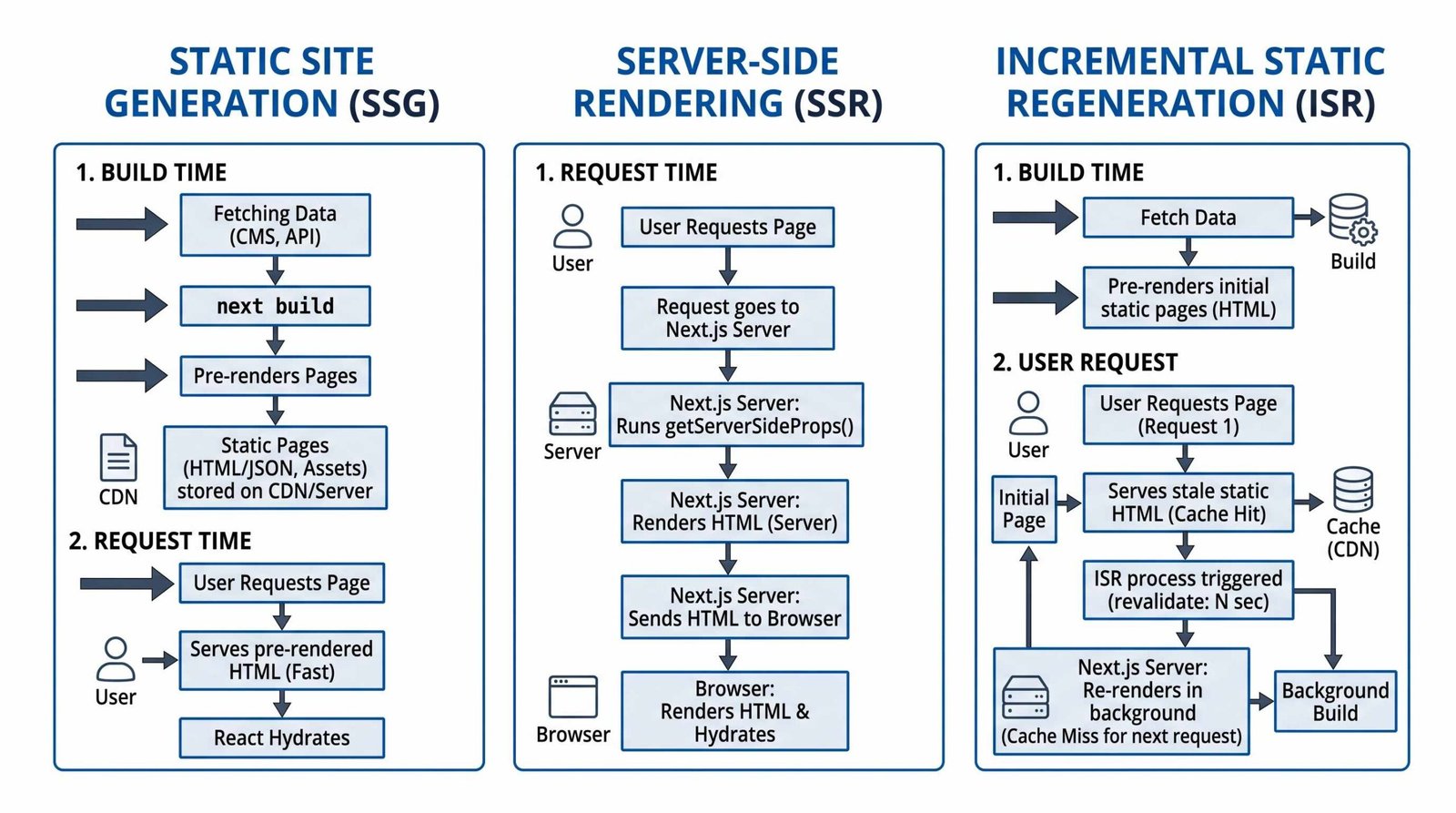
Next.js sits between those two worlds. You write React components, but the framework decides when to render them: at build time, on the server per request, or at intervals via Incremental Static Regeneration. The choice you make per route directly affects crawlability, freshness, and Core Web Vitals. If you have not picked a strategy intentionally, you have picked the wrong one.
Quick answer: which rendering mode to choose
| Content type | Recommended mode | Why |
|---|---|---|
| Marketing pages, docs, evergreen blog posts | SSG | Fastest LCP, cheapest serving, fully indexable |
| Product catalog with prices that change daily | ISR | Static speed with scheduled freshness |
| Personalized dashboards, logged-in views | SSR | Per-request data, but noindex these routes |
| Interactive widgets inside a static page | SSG shell + Client Components | Crawlable HTML with interactive islands |
For deeper background on rendering modes across the broader React ecosystem, see our React SEO fundamentals guide, which compares CSR, SSR, SSG, and ISR outside of Next.js specifically.
The App Router Metadata API (Next.js 15/16)
Forget next/head. That pattern belongs to the Pages Router. In the App Router, you control every tag through one of two exports from a layout.tsx or page.tsx file: a static metadata object, or an async generateMetadata() function. You cannot export both from the same segment.
Static metadata: the simple case
If your title, description, and Open Graph values do not depend on route params or fetched data, export a static metadata object. This is the default for layouts and most marketing pages.
// app/layout.tsx
import type { Metadata } from 'next'

export const metadata: Metadata = {
  metadataBase: new URL('https://appseo.com'),
  title: {
    default: 'AppSEO, Practical SEO for Web App Builders',
    template: '%s | AppSEO',
  },
  description: 'Technical SEO guidance for developers building SaaS, web apps, and mobile products.',
  alternates: { canonical: '/' },
  openGraph: {
    type: 'website',
    siteName: 'AppSEO',
    images: ['/og-default.png'],
  },
  twitter: { card: 'summary_large_image' },
  robots: { index: true, follow: true },
}
Three lines do the heavy lifting. metadataBase turns every relative URL (canonicals, OG images) into an absolute one, which is required for social platforms and most AI crawlers to fetch them. The title.template pattern wraps child page titles automatically. And alternates.canonical sets the self-referencing canonical that prevents duplicate-content issues from query strings.
Dynamic metadata for a blog post
For routes that depend on data, like a blog post or a product page, export an async generateMetadata() function. It receives the route params and can fetch from your CMS or database. Next.js memoizes the fetch, so calling the same endpoint inside the page component does not re-fetch.
// app/blog/[slug]/page.tsx
import type { Metadata } from 'next'
import { getPost } from '@/lib/posts'

type Props = { params: Promise<{ slug: string }> }

export async function generateMetadata(
  { params }: Props
): Promise<Metadata> {
  const { slug } = await params
  const post = await getPost(slug)

  if (!post) return { title: 'Not found', robots: { index: false } }

  return {
    title: post.title,
    description: post.excerpt,
    alternates: { canonical: `/blog/${slug}` },
    openGraph: {
      type: 'article',
      title: post.title,
      description: post.excerpt,
      publishedTime: post.publishedAt,
      modifiedTime: post.updatedAt,
      authors: [post.author.name],
      images: [{ url: post.coverImage, width: 1200, height: 630 }],
    },
    twitter: {
      card: 'summary_large_image',
      title: post.title,
      description: post.excerpt,
      images: [post.coverImage],
    },
  }
}
A few things worth calling out. The params object is a Promise in Next.js 15+, so you must await it. The openGraph.type: 'article' unlocks article-specific OG tags like publishedTime that Facebook, LinkedIn, and some AI crawlers actually parse. And the canonical here is a path, not a full URL, because metadataBase in the root layout resolves it.
Why metadataBase is non-negotiable
Without it, your OG image URLs become relative paths. Social platforms cannot fetch them, your share previews break, and rich results in Google may quietly omit images. Set it once in app/layout.tsx using new URL() with your production domain. Every child route inherits it.
Canonical URLs and pagination
Set alternates.canonical on every page. For paginated archives like /blog?page=2, the canonical should point to the paginated URL itself, not to /blog. Google retired the rel="prev/next" hint years ago, so self-canonicals are the cleanest signal.
Controlling indexability with robots
The robots metadata key renders to a <meta name="robots"> tag. Use it to noindex preview routes, search results pages, and authenticated dashboards. For the Next.js documentation on this surface, see the official generateMetadata() API reference.
export const metadata: Metadata = {
  robots: { index: false, follow: true, nocache: true },
}
Rendering Strategy Decision Guide for SEO
All four Next.js rendering modes ship HTML to a crawler, but the HTML they ship has different freshness, latency, and infrastructure cost. Pick per route, not per project.
Static Site Generation (SSG)
The default. If a page does not call cookies(), headers(), or use dynamic data fetching, Next.js prerenders it at build time and serves the resulting HTML from your CDN. LCP is excellent because the byte distance from edge to browser is small, and crawlers get a fully formed document on the first request.
Use SSG for documentation, marketing pages, evergreen blog posts, and anything where a deploy can ship content updates. If your CMS triggers a rebuild on publish, SSG covers most blog use cases without complexity.
Server-Side Rendering (SSR)
SSR runs your component tree on the server for every request. Useful when the page depends on cookies, the current user, or data that must be fresh per request. The trade-off is latency: every visit costs a server round trip, including data fetching, before the first byte arrives.
For SEO-critical pages, SSR is acceptable but rarely necessary. If you find yourself reaching for SSR on a marketing page, ask whether ISR would do the job at a fraction of the cost.
Incremental Static Regeneration (ISR)
The sweet spot for content that changes on a predictable cadence. ISR serves a cached static page, then revalidates it in the background after your specified interval. The next visitor gets the regenerated version. Set revalidate at the page or fetch level:
// app/products/[id]/page.tsx
export const revalidate = 300 // seconds

export default async function ProductPage({ params }) {
  const { id } = await params
  const product = await fetch(`https://api.example.com/products/${id}`, {
    next: { revalidate: 300 }
  }).then(r => r.json())
  return <ProductView product={product} />
}
ISR is the right answer for product catalogs, news indexes, leaderboard pages, and anything where a five to sixty minute freshness window is acceptable. Crawlers see a static page at edge speed, your origin handles regeneration off the critical path, and you avoid the SSR latency tax.
Client-Side Rendering (CSR)
Avoid for SEO-critical routes. If a Client Component fetches data with useEffect, that data never lands in the initial HTML. Googlebot can sometimes catch it in the render queue, but AI crawlers will not, and you lose the LCP advantage that Next.js was supposed to give you. Reserve CSR for interactive widgets nested inside an SSG or ISR page.
Comparison table
| Strategy | Crawlability | Load Speed | Data Freshness | Best For |
|---|---|---|---|---|
| SSG | Excellent | Excellent (CDN) | At build time | Marketing, docs, evergreen content |
| ISR | Excellent | Excellent (CDN with revalidation) | On a timer or on-demand | Product catalogs, news, dashboards-as-content |
| SSR | Excellent | Good (server round trip) | Per request | Personalized pages (usually noindex) |
| CSR | Poor for AI crawlers | Slow first paint | Per interaction | Interactive widgets only |
AI Crawlers and Next.js: The Hidden SEO Risk
This is the part most Next.js SEO guides skip, and it is the one we get asked about most. ChatGPT’s crawler (GPTBot), Perplexity (PerplexityBot), Claude (ClaudeBot), and the AI variants of Bing all fetch your pages, but most of them do not execute JavaScript. They take whatever HTML the server returns and call it done.
If your page is SSG or ISR, you are mostly fine. The HTML contains your content, your metadata, and your structured data. The trouble starts in three places:
- Routes that opted into dynamic rendering accidentally. A call to
cookies()orheaders()inside a Server Component flips a page to dynamic. If that page also depends on slow upstream data, an AI crawler with a short timeout may give up. - Client Components fetching the main content. A page that wraps its article body in a Client Component with
useEffect-based fetching ships an empty shell to non-JS crawlers. - Missing structured data. AI systems lean heavily on JSON-LD because it is unambiguous. If your page only has
<meta>tags, you are competing for attention with pages that hand the model a clean entity graph.
The mitigation is straightforward. Keep your main content in Server Components, render it from data fetched on the server, and inject a JSON-LD <script> tag in your page or layout for every indexable route. Google’s own guidance on this (Googlebot’s JavaScript processing) still emphasizes server rendering for reliability, and AI crawlers are stricter than Googlebot in this regard.
Also publish a sitemap with accurate lastmod timestamps. AI systems use sitemap freshness as a recrawl signal, and Next.js makes generating one trivial (see the sitemap section below).
Core Web Vitals in Next.js: LCP, INP, and CLS
The three Core Web Vitals, Largest Contentful Paint, Interaction to Next Paint, and Cumulative Layout Shift, are still the primary user-experience signals Google factors into ranking. Hit the good thresholds at the 75th percentile and you remove a whole class of ranking ceilings. Next.js gives you purpose-built primitives for each of them.
LCP and next/image
The Largest Contentful Paint is almost always your hero image or your largest above-the-fold text block. For images, next/image does five things automatically: serves WebP or AVIF when supported, generates responsive srcset entries, lazy-loads off-screen images, prevents layout shift by reserving space, and integrates with priority loading.
import Image from 'next/image'

export default function Hero() {
  return (
    <Image
      src="/hero.jpg"
      alt="A developer reviewing Core Web Vitals in the browser"
      width={1200}
      height={630}
      priority
      sizes="(max-width: 768px) 100vw, 1200px"
    />
  )
}
The priority prop is the one most teams miss. Set it on the LCP image, and Next.js preloads it during the initial document parse instead of lazy-loading it. We see a 300 to 800ms LCP improvement on hero images simply from flipping that switch.
CLS and next/font
Fonts that swap mid-load cause the dreaded layout shift. next/font self-hosts fonts, generates a size-adjusted fallback to match metrics, and eliminates the flash of unstyled text. One import in your root layout covers the whole site.
import { Inter } from 'next/font/google'

const inter = Inter({
  subsets: ['latin'],
  display: 'swap',
  variable: '--font-inter',
})

export default function RootLayout({ children }) {
  return (
    <html lang="en" className={inter.variable}>
      <body>{children}</body>
    </html>
  )
}
INP and React Server Components
Interaction to Next Paint replaced First Input Delay in 2024, and it measures how quickly the page responds to clicks, taps, and key presses across the entire session. The fastest INP wins come from shipping less JavaScript. React Server Components are designed for exactly this: they run on the server, return HTML, and never hydrate on the client.
Audit which components actually need 'use client'. A common anti-pattern is marking a parent component as a Client Component to handle one interactive child. Instead, keep the parent as a Server Component and pass the interactive child as a prop. Less client JS, faster INP.
Third-party scripts and next/script
Analytics, chat widgets, and tag managers wreck INP if they block the main thread. Use next/script with the right strategy:
import Script from 'next/script'

<Script
  src="https://plausible.io/js/script.js"
  strategy="afterInteractive"
  data-domain="appseo.com"
/>
Use afterInteractive for analytics, lazyOnload for chat widgets that can wait, and worker (experimental) to push heavy scripts to a web worker via Partytown. Never load tag managers with beforeInteractive.
Turbopack and Core Web Vitals
Next.js 16 ships Turbopack as the stable bundler. The direct impact on Core Web Vitals is small (your runtime bundle is similar), but the indirect impact is real. Faster local builds and faster CI deploys mean you ship performance fixes sooner, and ISR revalidations complete faster. A 5x build speed improvement compounds over a year of iteration.
Sitemaps and robots.txt in Next.js App Router
The App Router has dedicated file conventions for both. Drop a sitemap.ts in app/ and Next.js serves it at /sitemap.xml. Same for robots.ts, served at /robots.txt.
// app/sitemap.ts
import type { MetadataRoute } from 'next'
import { getAllPosts } from '@/lib/posts'

export default async function sitemap(): Promise<MetadataRoute.Sitemap> {
  const posts = await getAllPosts()
  const postEntries = posts.map(p => ({
    url: `https://appseo.com/blog/${p.slug}`,
    lastModified: p.updatedAt,
    changeFrequency: 'weekly' as const,
    priority: 0.7,
  }))

  return [
    { url: 'https://appseo.com', changeFrequency: 'daily', priority: 1.0 },
    { url: 'https://appseo.com/blog', changeFrequency: 'daily', priority: 0.9 },
    ...postEntries,
  ]
}
// app/robots.ts
import type { MetadataRoute } from 'next'

export default function robots(): MetadataRoute.Robots {
  return {
    rules: [
      { userAgent: '*', allow: '/', disallow: ['/api/', '/admin/'] },
    ],
    sitemap: 'https://appseo.com/sitemap.xml',
    host: 'https://appseo.com',
  }
}
For sites with more than 50,000 URLs, export generateSitemaps() alongside sitemap() to split into multiple chunks. Next.js will produce sitemap/0.xml, sitemap/1.xml, and a parent index automatically.
Structured Data (JSON-LD) in Next.js
JSON-LD is the format every major search engine and AI system parses reliably. In the App Router, inline a <script type="application/ld+json"> tag inside the page or layout. Use JSON.stringify to avoid escaping pitfalls, and consult the schema.org Article type reference for valid properties.
// app/blog/[slug]/page.tsx
export default async function BlogPost({ params }) {
  const { slug } = await params
  const post = await getPost(slug)

  const jsonLd = {
    '@context': 'https://schema.org',
    '@type': 'Article',
    headline: post.title,
    description: post.excerpt,
    image: [post.coverImage],
    datePublished: post.publishedAt,
    dateModified: post.updatedAt,
    author: {
      '@type': 'Person',
      name: post.author.name,
      url: `https://appseo.com/authors/${post.author.slug}`,
    },
    publisher: {
      '@type': 'Organization',
      name: 'AppSEO',
      logo: { '@type': 'ImageObject', url: 'https://appseo.com/logo.png' },
    },
    mainEntityOfPage: { '@type': 'WebPage', '@id': `https://appseo.com/blog/${slug}` },
  }

  return (
    <>
      <script
        type="application/ld+json"
        dangerouslySetInnerHTML={{ __html: JSON.stringify(jsonLd) }}
      />
      <Article post={post} />
    </>
  )
}
For broader patterns on structured data and how it interacts with app-style interfaces, our web app SEO guide covers FAQ, HowTo, SoftwareApplication, and BreadcrumbList markup with code samples.
Common Next.js SEO Mistakes
The bugs we see most often, ranked by how much traffic they leak.
- Forgetting
metadataBase. OG image URLs become relative, social previews break, AI crawlers may skip the image entirely. Five-second fix in the root layout. - Using CSR for content pages. A Client Component fetching the main article body in
useEffectships an empty shell. Move data fetching to a Server Component. - Not setting canonical on paginated pages. Without self-canonicals on
/blog?page=2, Google consolidates the wrong URL or, worse, indexes both. - Ignoring AI crawler indexability. Pages that render only after JavaScript executes get skipped by GPTBot, PerplexityBot, and ClaudeBot. Server-render the main content.
- Wrong
next/imagesetup. Missingpriorityon the LCP image, missingsizes, or wrapping in a div that constrains the width and breaks the responsive srcset. - Indexable preview routes. Vercel preview deployments without a noindex header end up in Google’s index and dilute your authority. Block them at the platform level.
If you ship a SaaS product, many of these intersect with broader signup-flow and pricing-page concerns covered in our SEO for SaaS playbook.
Next.js SEO Checklist
| Item | App Router Implementation | Status |
|---|---|---|
metadataBase set in root layout |
metadataBase: new URL('https://yoursite.com') |
Required |
| Unique title per page | Static metadata or generateMetadata() with title.template |
Required |
| Description per page (140 to 160 chars) | description field on every page |
Required |
| Canonical URL | alternates.canonical on every indexable page |
Required |
| Open Graph image (1200 x 630) | openGraph.images in root or per page |
Required |
| Twitter Card | twitter.card: 'summary_large_image' |
Required |
| Sitemap | app/sitemap.ts with lastModified |
Required |
| robots.txt | app/robots.ts referencing sitemap |
Required |
| JSON-LD structured data | Inline <script> in layout or page |
Required for rich results |
LCP image uses priority |
<Image priority /> on hero |
Required |
Fonts via next/font |
Self-hosted, size-adjusted fallback | Required |
Third-party scripts via next/script |
Strategy: afterInteractive or lazyOnload |
Required |
FAQ
Do I need to use next/head in the App Router?
No. next/head is a Pages Router pattern. In the App Router, export a metadata object or a generateMetadata() function from your layout or page. The framework writes the tags into the document head for you.
Is SSG or ISR better for SEO?
Both serve fully rendered HTML to crawlers at CDN speed, so crawlability is identical. Pick SSG when content updates ship with a deploy. Pick ISR when content changes on a schedule (product prices, news indexes) and you want to avoid rebuilding the whole site for each change.
Will AI crawlers like ChatGPT and Perplexity index my Next.js site?
Only if your main content is in the server-rendered HTML. Most AI crawlers do not execute JavaScript, so anything fetched in a Client Component via useEffect will be invisible to them. Keep content in Server Components, add JSON-LD structured data, and publish a sitemap with accurate lastmod values.
What is metadataBase and why does it matter?
It is a fully qualified base URL set in your root layout. Without it, every relative URL in your metadata (canonicals, Open Graph images, Twitter images) stays relative, which breaks social share previews and can cause crawlers to ignore the assets. Set it once with metadataBase: new URL('https://yoursite.com').
How do I add structured data to a Next.js page?
Inline a <script type="application/ld+json"> tag in your page or layout component. Use JSON.stringify on a JavaScript object that matches the schema.org type you are targeting (Article, Product, FAQPage, and so on). Server Components ship this in the initial HTML, so every crawler sees it.
Does Turbopack improve SEO directly?
Not directly. Turbopack is a build and dev-server bundler, not a runtime. The indirect benefit is faster iteration: quicker local builds, faster CI deploys, and faster ISR revalidations. You ship performance fixes sooner, which compounds over time.
RELATED POSTS
View all


On-Page SEO: The Complete 2026 Guide (With Code Examples and a Checklist)
May 26, 2026 | by Ian Adair