

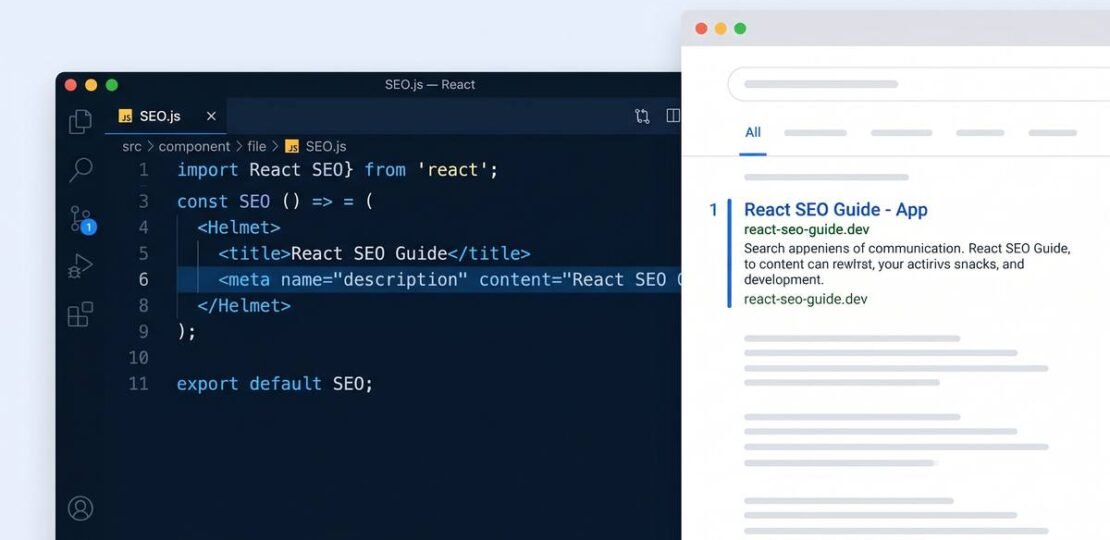
React SEO: A Developer’s Complete Guide (2026)
React SEO in brief: React apps default to client-side rendering, which sends crawlers an empty HTML shell before JavaScript runs. To fix this, switch to server-side rendering (SSR) or static site generation (SSG) using Next.js, add dynamic meta tags that ship in the initial HTML response, inject JSON-LD structured data, optimize your JavaScript bundle for Core Web Vitals, and generate an XML sitemap for all routes.
You built a fast, interactive React app. Users love it. But when you search for your own product, you find nothing. Meanwhile a 2019 WordPress blog post is ranking instead of you.
This is not unusual. React’s default client-side rendering architecture makes it structurally harder for crawlers to index your content. The problem is fixable, but it requires deliberate decisions at the architecture level, not just adding a few meta tags.
This guide covers every layer of React SEO, from rendering strategy to structured data to Core Web Vitals, with code you can use today.
Why React SEO Is Hard
Traditional websites serve a complete HTML document on every request. The server processes the request, fills in the content, and returns a page that any crawler can read immediately.
A default React single-page application (SPA) works differently:
- The browser requests a URL.
- The server returns a near-empty HTML file containing a
<div id="root"></div>and links to JavaScript bundles. - The browser downloads the JavaScript.
- React executes, fetches data from APIs, and renders the DOM.
- The page becomes visible.
Steps 3 through 5 happen entirely in the browser. If a crawler cannot or chooses not to execute JavaScript, it sees an empty page. That empty page cannot rank for anything.
Google does execute JavaScript through its Web Rendering Service, but in a separate second wave that can lag the initial crawl by days or weeks. And for AI-powered search crawlers (ChatGPT, Perplexity, Claude), JavaScript execution is typically not supported at all, meaning 50-80% of a typical React SPA’s content is invisible to them.
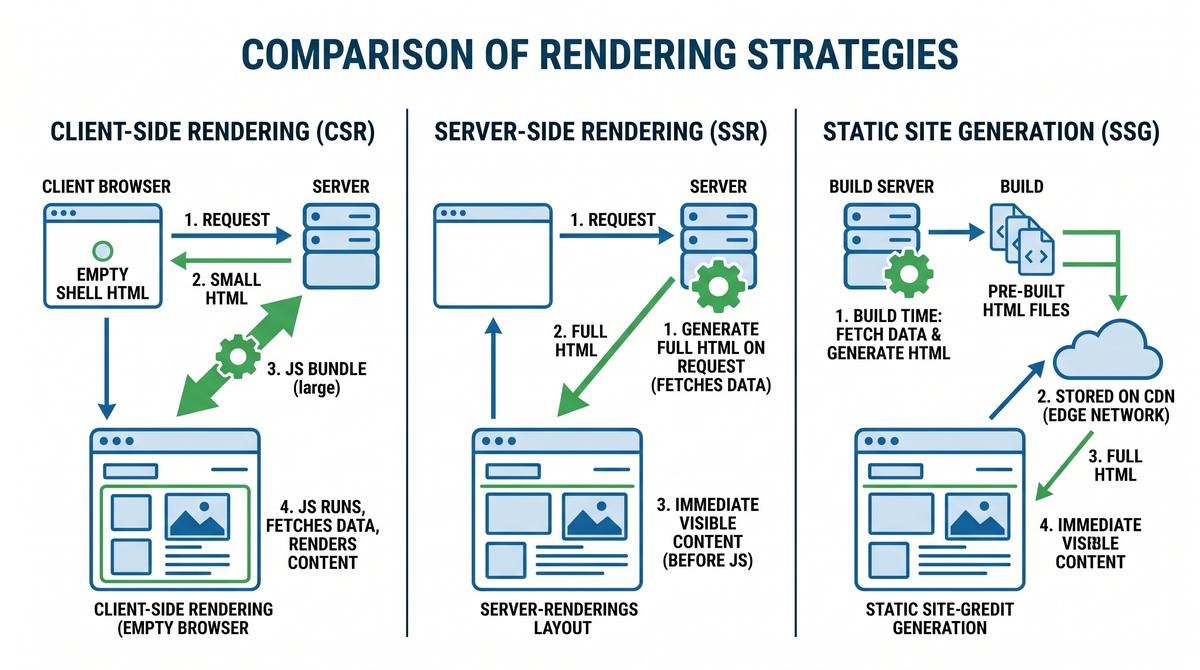
Rendering Strategies Compared
Choosing the right rendering strategy is the single most important React SEO decision you will make. Here is how the main options compare:
| Strategy | How it works | SEO impact | Best for |
|---|---|---|---|
| CSR (default) | Full render happens in the browser via JavaScript | Poor – crawlers see empty HTML | Internal tools, authenticated dashboards with no public pages |
| SSR | Server generates full HTML on each request | Excellent – full HTML available immediately | Dynamic content (user profiles, live data, personalized pages) |
| SSG | HTML generated at build time, served as static files | Best possible – instant response, minimal TTFB | Marketing pages, blogs, docs, product landing pages |
| ISR | Static pages rebuilt in the background after a set interval | Excellent – combines static speed with fresh content | E-commerce product pages, high-volume content sites |
| Pre-rendering | A service renders pages for bots only, serves CSR to users | Good – works without framework migration | Legacy CRA apps where full migration is not feasible |
We suggest Next.js for new projects. It gives you SSR, SSG, and ISR in a single framework with minimal configuration. If you are working with an existing Create React App or Vite project and cannot migrate, a pre-rendering service like Prerender.io is a viable interim fix.
Setting Up SEO in Next.js
Next.js is the practical default for React apps that need strong search visibility. Here is how to handle the key SEO configurations.
Metadata with the App Router
Next.js 13+ with the App Router has a built-in Metadata API that handles title tags, meta descriptions, Open Graph tags, and canonical URLs without any additional library.
// app/blog/[slug]/page.tsx
import { Metadata } from 'next'

interface Props {
  params: { slug: string }
}

export async function generateMetadata({ params }: Props): Promise<Metadata> {
  const post = await fetchPost(params.slug)

  return {
    title: post.title,
    description: post.excerpt,
    alternates: {
      canonical: `https://yourdomain.com/blog/${params.slug}`,
    },
    openGraph: {
      title: post.title,
      description: post.excerpt,
      url: `https://yourdomain.com/blog/${params.slug}`,
      images: [{ url: post.featuredImage, width: 1200, height: 630 }],
    },
  }
}

export default async function BlogPost({ params }: Props) {
  const post = await fetchPost(params.slug)
  return <article>{post.content}</article>
}
This metadata runs on the server, so it appears in the initial HTML response. Crawlers see it immediately without waiting for JavaScript.
Static Metadata for Fixed Pages
// app/about/page.tsx
import { Metadata } from 'next'

export const metadata: Metadata = {
  title: 'About | Your App Name',
  description: 'Learn what we build and why.',
  alternates: {
    canonical: 'https://yourdomain.com/about',
  },
}
Choosing Between SSG and SSR in Next.js
// SSG: data fetched at build time (default for app router pages without dynamic data)
export default async function ProductPage({ params }: Props) {
  const product = await fetchProduct(params.id) // runs at build time
  return <ProductDetail product={product} />
}

// Tell Next.js which params to pre-build
export async function generateStaticParams() {
  const products = await fetchAllProducts()
  return products.map(p => ({ id: p.id.toString() }))
}

// SSR: add cache: 'no-store' to force server rendering on every request
export default async function LivePricePage({ params }: Props) {
  const price = await fetch('/api/price', { cache: 'no-store' })
  // ...
}
Meta Tags Without Next.js (react-helmet-async)
If you are working with a Vite or Create React App setup that has SSR configured via a custom Express server, react-helmet-async is the standard solution for managing document head elements.
Install it:
npm install react-helmet-async
Wrap your app with HelmetProvider:
// src/main.tsx
import { HelmetProvider } from 'react-helmet-async'

ReactDOM.createRoot(document.getElementById('root')!).render(
  <HelmetProvider>
    <App />
  </HelmetProvider>
)
Use Helmet in any component:
import { Helmet } from 'react-helmet-async'

export function ProductPage({ product }) {
  return (
    <>
      <Helmet>
        <title>{product.name} | Your Store</title>
        <meta name="description" content={product.description} />
        <link rel="canonical" href={`https://yourdomain.com/products/${product.slug}`} />
        <meta property="og:title" content={product.name} />
        <meta property="og:image" content={product.image} />
      </Helmet>
      <article>{/* page content */}</article>
    </>
  )
}
Critical caveat: react-helmet-async only helps SEO when used with SSR. In a pure CSR setup, meta tags injected by Helmet are not present in the initial server response, so crawlers miss them. Helmet + SSR = effective. Helmet + CSR only = no SEO benefit for crawlers.
Structured Data in React
Structured data via JSON-LD is one of the most underused SEO tools for React apps. It helps Google understand your content type beyond just keywords, and it is the path to rich results like FAQs, breadcrumbs, product ratings, and articles in search results.
Inject JSON-LD as a script tag in the document head. In Next.js with the App Router:
// components/JsonLd.tsx
export function JsonLd({ data }: { data: object }) {
  return (
    <script
      type="application/ld+json"
      dangerouslySetInnerHTML={{ __html: JSON.stringify(data) }}
    />
  )
}

// app/products/[slug]/page.tsx
import { JsonLd } from '@/components/JsonLd'

export default async function ProductPage({ params }) {
  const product = await fetchProduct(params.slug)

  const schema = {
    '@context': 'https://schema.org',
    '@type': 'Product',
    name: product.name,
    description: product.description,
    image: product.image,
    offers: {
      '@type': 'Offer',
      price: product.price,
      priceCurrency: 'USD',
      availability: 'https://schema.org/InStock',
    },
  }

  return (
    <>
      <JsonLd data={schema} />
      <ProductDetail product={product} />
    </>
  )
}
For a blog or content site, use Article schema, BreadcrumbList for navigation paths, and FAQPage schema for posts with question-and-answer sections. You can validate your structured data output with Google’s Rich Results Test.
Core Web Vitals for React Apps
Google uses Core Web Vitals as a ranking signal. React apps have specific failure patterns that are worth knowing:
Largest Contentful Paint (LCP)
LCP measures how long it takes for the largest visible element (usually a hero image or headline) to appear. React CSR apps often fail LCP because the main content loads after JavaScript executes and API calls return.
Fix LCP by:
- Moving to SSR or SSG so content is in the initial HTML response
- Preloading critical images with
<link rel="preload">in the document head - Using
priorityon hero images in Next.js Image component (<Image priority />) - Fetching above-the-fold data server-side rather than via client useEffect
Interaction to Next Paint (INP)
INP replaced First Input Delay in 2024 and measures responsiveness to user interactions. React’s hydration process, which replays all JavaScript event bindings after SSR, can block the main thread and produce poor INP scores.
Fix INP by:
- Code-splitting with
React.lazy()andSuspenseto reduce initial bundle size - Using
useTransitionandstartTransitionto defer non-urgent state updates - Deferring third-party scripts (analytics, chat widgets) until after hydration
Cumulative Layout Shift (CLS)
CLS measures visual stability. Common React CLS sources include images without explicit width/height attributes and components that pop in after async data loads.
Fix CLS by:
- Always providing
widthandheightattributes on images (or using Next.js Image which handles this) - Reserving space for dynamically loaded content with skeleton loaders that match final dimensions
- Avoiding inserting content above the fold after initial render
Routing and URL Structure
Clean, meaningful URLs matter for both crawlers and users. Two routing mistakes are common in React apps:
Avoid Hash Routing
Hash-based routing (yourapp.com/#/about) is an older SPA pattern that causes SEO problems. Crawlers treat everything after the # as a fragment identifier, not a distinct URL. This means all your pages may appear as a single URL to Google.
Use BrowserRouter from React Router instead, which produces clean URLs like yourapp.com/about using the browser’s History API:
// Correct
import { BrowserRouter } from 'react-router-dom'

// Avoid
import { HashRouter } from 'react-router-dom' // yourapp.com/#/about
Descriptive URL Slugs
Dynamic routes should use descriptive slugs, not numeric IDs. /products/blue-running-shoes ranks better and provides context to crawlers, whereas /products/12847 communicates nothing about the page content.
Sitemaps for React SPAs
React SPAs do not have a file system structure that maps to your URL routes. Crawlers cannot discover your pages by exploring directories. You must explicitly generate an XML sitemap listing every crawlable route.
For Next.js, the next-sitemap package automates this:
npm install next-sitemap
// next-sitemap.config.js
module.exports = {
  siteUrl: 'https://yourdomain.com',
  generateRobotsTxt: true,
  exclude: ['/api/*', '/dashboard/*', '/admin/*'],
  additionalPaths: async (config) => {
    const products = await fetchAllProducts()
    return products.map(product => ({
      loc: `/products/${product.slug}`,
      lastmod: product.updatedAt,
      changefreq: 'weekly',
      priority: 0.8,
    }))
  },
}
Add to your package.json:
{
  "scripts": {
    "postbuild": "next-sitemap"
  }
}
Submit the generated sitemap.xml to Google Search Console and monitor for any indexing errors. For tips on how to read Search Console data for app-specific patterns, see our guide to SEO for web apps.
AI Crawlers and React: The Invisible Problem
Google’s crawler is not the only one you need to worry about in 2026. AI-powered search platforms, including ChatGPT’s SearchGPT, Perplexity, and Claude, have their own crawlers. Most of these do not execute JavaScript.
This means that on a standard React SPA with client-side rendering, 50-80% of your content is invisible to these platforms. As AI-generated answers increasingly surface in search results, being invisible to these crawlers is a growing competitive disadvantage.
The fix is the same as for Google: serve fully rendered HTML from the server. SSR and SSG do this automatically. If you are maintaining a legacy CSR app and cannot migrate, a pre-rendering layer that detects bot user agents and serves cached HTML is a workable interim step.
Image Optimization in React
Images affect both page speed (a Core Web Vitals factor) and contextual relevance (via alt text). A few patterns to follow:
- Use WebP format. WebP files are typically 25-35% smaller than equivalent JPEG files at similar quality. Next.js Image converts images to WebP automatically.
- Always write descriptive alt text. Alt text is what crawlers and screen readers use to understand image content.
alt="blue running shoe side view"is useful;alt="shoe1"is not. - Lazy load below-the-fold images. In Next.js, the Image component lazy loads by default. In plain React, use
loading="lazy"on img tags. - Set explicit width and height. This prevents layout shifts (CLS) while images load.
Internal Linking for React Apps
Internal links help crawlers discover your pages and understand your site structure. In React Router, use the Link component rather than plain anchor tags to keep navigation client-side for users while still rendering as standard <a href> elements that crawlers can follow:
import { Link } from 'react-router-dom'

// This renders as <a href="/products"> in the DOM - crawlable
<Link to="/products">View all products</Link>
In Next.js, the Link component from next/link does the same. Both render standard anchor elements that crawlers follow.
For more on building a strong internal linking structure for your app, see our practical guide to SEO for SaaS products.
React SEO Checklist
Before you consider your React app SEO-ready, work through this checklist:
Rendering and Architecture
- Pages that need ranking use SSR or SSG (not CSR)
- Framework choice (Next.js or similar) handles server rendering
- No hash routing (
#/) in public-facing routes
Metadata
- Every page has a unique title tag (under 60 characters)
- Every page has a unique meta description (under 155 characters)
- Canonical URLs are set for all pages
- Open Graph tags are populated for shareable pages
- Meta tags appear in the server-rendered HTML (visible in page source)
Structured Data
- JSON-LD schema is present on key page types (Article, Product, FAQ, BreadcrumbList)
- Schema validated with Google’s Rich Results Test
Performance
- LCP under 2.5 seconds (measured in field data, not just lab tests)
- INP under 200ms
- CLS under 0.1
- Images use WebP, have explicit dimensions, and have descriptive alt text
- JavaScript bundles are code-split and below-the-fold code is lazy loaded
Crawlability
- XML sitemap generated and submitted to Search Console
- robots.txt correctly configured (not blocking CSS/JS)
- 404 pages return actual HTTP 404 status codes (not soft 404s)
- Internal links use anchor elements with descriptive text
For a deeper look at how these same principles apply to apps distributed through app stores, our guide to App Store Optimization covers the mobile-specific layer of discoverability alongside web SEO.
FAQ
Why is SEO hard for React apps?
React apps default to client-side rendering (CSR), which means the server sends a near-empty HTML shell. Search engine crawlers receive that empty shell before JavaScript executes, so they may index little or no content. Google’s two-wave indexing process can delay discovery by days or weeks, and AI-powered crawlers from ChatGPT or Perplexity typically cannot execute JavaScript at all.
What is the best rendering strategy for React SEO?
For most SEO-focused React projects, Next.js with a combination of Static Site Generation (SSG) for stable content and Server-Side Rendering (SSR) for dynamic pages is the best approach. SSG pages are pre-built at deploy time, so crawlers receive full HTML instantly with zero rendering delay.
Does Google index JavaScript in React apps?
Yes, but not immediately. Google uses a headless Chromium-based Web Rendering Service to execute JavaScript, but this happens in a second wave that can lag the initial crawl by days or weeks. Non-Google crawlers, including most AI search bots, often do not render JavaScript at all.
How do I add meta tags to a React app?
For plain React apps, use the react-helmet-async library to inject dynamic title and meta tags into the document head. For Next.js projects, use the built-in Metadata API (app directory) or the Head component (pages directory). Critically, ensure meta tags appear in the server-rendered HTML, not only after client-side hydration.
What is react-helmet-async and when should I use it?
react-helmet-async is a React library that lets you manage the document head (title, meta tags, canonical URLs) from any component in the tree. Use it when your project is a Create React App or Vite SPA with SSR configured via a custom server. For pure client-side SPAs without SSR, metadata injected by react-helmet-async will not be seen by crawlers.
How do Core Web Vitals affect React SEO?
Google uses Core Web Vitals as a ranking signal. React apps commonly struggle with Largest Contentful Paint (LCP) due to client-side data fetching, and with Interaction to Next Paint (INP) caused by heavy hydration work on the main thread. Fixing these requires code splitting, server-side data fetching, and reducing JavaScript bundle size.
Should I use hash routing in React for SEO?
No. Hash-based routing (yourapp.com/#/about) creates SEO problems because search engines treat everything after the hash as a fragment identifier, not a separate URL. Use BrowserRouter from React Router to generate clean, crawlable URLs like yourapp.com/about instead.
Do I need a sitemap for a React SPA?
Yes. React SPAs do not have a file system structure that mirrors your URL routes, so crawlers cannot discover pages on their own. You need to generate an XML sitemap that lists every route. In Next.js, plugins like next-sitemap automate this. For standalone React apps, generate the sitemap at build time using a script that reads your route definitions.
TITLE_TAG: React SEO: A Developer’s Complete Guide (2026)
META_DESC: Learn how to fix React SEO problems. Covers SSR vs SSG, meta tags with react-helmet-async, Next.js Metadata API, Core Web Vitals, and sitemaps for SPAs.
RELATED POSTS
View all




Angular SEO: The Complete Guide for 2026 (SSR, Prerendering & Hydration)
May 14, 2026 | by Ian Adair