
Best Keyword Research Tools in 2026: Tested and Ranked

If you only have time to read one sentence: Ahrefs Keywords Explorer is the best paid keyword research tool in 2026, Google Keyword Planner is the best free starting point, and Google Search Console is the most underrated weapon you already own. The rest of this guide explains why, when each tool actually earns its price, and how a founder or developer doing their own SEO can build a workflow that does not waste a single hour.
Keyword research is the foundation of any SEO strategy. Pick the wrong tool and you bleed money on inflated subscriptions, chase keywords with no real intent, or worse, build content nobody is searching for. Pick the right one and your editorial calendar practically writes itself. We tested every major tool on real founder use cases (a B2B SaaS launch, a developer-tools blog, and a niche mobile app), and ranked them on data quality, usability, pricing transparency, and how well they serve people who do not have a dedicated SEO team.
Quick Answer
The best keyword research tools in 2026 are Ahrefs Keywords Explorer for comprehensive data and accuracy, Semrush Keyword Magic Tool for combined SEO and PPC research, and Google Keyword Planner as the strongest free option. Moz, Ubersuggest, KWFinder, Google Search Console, Exploding Topics, and AnswerThePublic each win specific use cases like beginner-friendliness, budget pricing, long-tail discovery, trend signals, and question-based research.
Comparison Table: Best Keyword Research Tools at a Glance
| Tool | Best For | Free Plan | Starting Price | Keyword Database Size |
|---|---|---|---|---|
| Ahrefs Keywords Explorer | Comprehensive data, serious SEO | Limited (Webmaster Tools) | $129/mo | ~25 billion |
| Semrush Keyword Magic Tool | SEO + PPC combined | Limited (10 daily searches) | $139.95/mo | ~25 billion |
| Google Keyword Planner | Free starting point | Yes (full access) | Free | Google’s own data |
| Moz Keyword Explorer | Beginners, Priority Score | 10 queries/month | $49/mo | ~1.25 billion |
| Ubersuggest | Budget paid option | 3 searches/day | $29/mo | ~5 billion |
| KWFinder (Mangools) | Long-tail, low-competition | 10-day trial | $29.90/mo | ~2.5 billion |
| Google Search Console | Existing site performance | Yes (fully free) | Free | Your site’s data |
| Exploding Topics | Trend-based research | Yes (limited) | $39/mo | Curated trend data |
| AnswerThePublic | Question keywords, PAA | 3 searches/day | $11/mo (lifetime $99) | Auto-suggest based |
1. Ahrefs Keywords Explorer: Best Overall for Comprehensive Data
Ahrefs Keywords Explorer is the tool we keep coming back to. It pulls from one of the largest crawled databases on the web (around 25 billion keywords) and combines search volume, clickstream data, and SERP analysis in a single pane. If you want one tool to do everything, this is the one.
What sets it apart is the depth of the SERP overview. You see the top-ranking pages, their estimated traffic, referring domains, position history, and even Top Pages by region. The Parent Topic feature also tells you whether you should target a specific keyword or cluster it under a broader piece, which prevents the classic mistake of writing ten thin articles when one comprehensive guide would rank better.
Key features:
- True click-through rate metrics (volume often overstates real opportunity)
- Keyword Difficulty score calibrated against actual ranking domains
- Traffic Potential metric that estimates total traffic to the page, not just the single keyword
- Matching Terms, Questions, and Related Terms reports for fast expansion
Pricing: Lite plan starts at $129/month (billed monthly) with reasonable usage limits for solo founders. The Standard plan at $249/month is what most growing teams settle on.
Best for: Founders and developers serious about organic growth who want a tool that doubles as a backlink analyzer and competitor research suite.
Honest limitation: No free tier worth mentioning. The pricing has crept up year over year, and if you only need keyword data without site auditing, you might be paying for features you never touch.
2. Semrush Keyword Magic Tool: Best for Combining SEO and PPC Research
The Semrush Keyword Magic Tool is the closest competitor to Ahrefs, with a slight edge if you also run paid campaigns. The keyword database is enormous, and the interface makes it easy to filter by intent (informational, navigational, commercial, transactional), question type, and word count.
Where Semrush shines for founders is the way it surfaces keyword groups automatically. You search for a seed, and it returns a clean tree of subtopics you can drag into a master keyword list. This makes editorial planning faster than almost any other tool we tested. The Keyword Gap report (comparing your domain against up to four competitors) is one of the fastest ways to find quick wins for a new site.
Key features:
- Intent classification baked into every result
- Keyword Magic clusters for one-click topic groupings
- CPC and competitive density data alongside organic metrics
- Position Tracking that links cleanly with your keyword lists
Pricing: Pro plan at $139.95/month. The free version permits ten searches per day, which is enough to test the waters.
Best for: Founders running both SEO and Google Ads who want a single source of truth, plus anyone who wants intent classification done for them.
Honest limitation: The interface is dense. New users routinely report decision paralysis from the sheer number of reports, and the platform’s upsells (extra users, extra projects, historical data) add up fast.
3. Google Keyword Planner: Best Free Starting Point
Google Keyword Planner is technically built for Google Ads, but it remains the only tool that pulls volume numbers directly from Google itself. For a free product, the data quality is hard to beat, and every other tool on this list is, to some degree, trying to approximate what Keyword Planner shows for free.
The catch is well-known: if you do not run an active ad campaign, search volumes show up as ranges (1K–10K, 10K–100K) instead of exact figures. Founders who run even a small $10/day campaign unlock precise numbers, which is often worth it as a one-time tactic during initial research.
Key features:
- Volume data sourced from Google itself, not third-party clickstream
- Forecast tool that projects clicks and impressions over time
- Geographic and language filtering down to the city level
- Free with any Google Ads account, no credit card required to browse
Pricing: Free. Volume ranges become exact numbers once you spend on ads.
Best for: Pre-revenue founders, bootstrappers, and anyone validating an idea before committing to a paid SEO tool.
Honest limitation: Heavy PPC bias. Keyword Planner groups similar terms together (sometimes aggressively), which can hide long-tail variations a dedicated SEO tool would surface separately.
4. Moz Keyword Explorer: Best for Beginners
Moz Keyword Explorer built its reputation on being the friendliest entry point into serious keyword research. The interface is clean, the metrics are explained inline, and the unique Priority Score blends volume, difficulty, organic CTR, and your domain’s potential to rank into one number. For someone who has never done keyword research before, that one-number summary is genuinely useful.
Moz also tends to be more conservative with difficulty scores than Ahrefs or Semrush, which can prevent the common beginner mistake of chasing keywords that are theoretically winnable but practically locked up by giant publishers. The SERP Analysis view is straightforward, showing Page Authority and Domain Authority for each ranking result.
Key features:
- Priority Score (proprietary blended metric)
- Organic CTR estimate factoring in featured snippets and ads
- Lexical and SERP-based keyword suggestions
- Domain Authority and Page Authority for SERP analysis
Pricing: Standard plan at $49/month (annual billing). Free tier offers ten queries per month.
Best for: First-time SEOs, content marketers without a technical background, and small teams that want fewer reports done well.
Honest limitation: The keyword database is smaller than Ahrefs or Semrush, so very long-tail or obscure niches may return thin results. Moz’s domain crawl is also less comprehensive than its bigger rivals.
5. Ubersuggest: Best Budget Paid Option
Ubersuggest, owned by Neil Patel, is the value play. At roughly a quarter of the price of Ahrefs or Semrush, it delivers a surprisingly capable keyword research experience plus rank tracking, site auditing, and backlink analysis. For solo founders on a tight budget, this is often the first paid tool they buy.
The interface is approachable, and the Content Ideas report (which shows what is ranking and getting social shares for a given keyword) is genuinely useful for content planning. Ubersuggest also offers a lifetime deal periodically, which can be a no-brainer if you catch it during a promotion.
Key features:
- Keyword Ideas with volume, CPC, and SEO difficulty
- Content Ideas showing top-performing articles for any keyword
- Domain Overview and competitor analysis
- Chrome extension for in-SERP keyword data
Pricing: Individual plan at $29/month, with a lifetime option around $290 when offered.
Best for: Bootstrappers and solo founders who want most of the functionality at a fraction of the price.
Honest limitation: The data lags behind Ahrefs and Semrush in both freshness and accuracy. Search volumes can swing noticeably between the two when you cross-check, and the difficulty score is less reliable for competitive niches.
6. KWFinder by Mangools: Best for Long-Tail and Low-Competition Keywords
KWFinder is part of the Mangools suite, and it has built a loyal following among bloggers and niche site builders. The standout feature is how easily it surfaces low-difficulty keywords that bigger tools miss, especially in narrow verticals where Ahrefs and Semrush data can feel sparse.
The Keyword Difficulty score is calibrated specifically to help you find keywords where a new site can actually rank, and the interface is genuinely pleasant to use. The visual SERP overview at the bottom of every search is one of our favorite design choices in the category.
Key features:
- LPS (Link Profile Strength) for SERP results
- Autocomplete and question-based keyword discovery
- Local SEO support for over 50,000 locations
- Bundled with SERPChecker, SERPWatcher, LinkMiner, and SiteProfiler
Pricing: Mangools Basic at $29.90/month (annual billing) gets you everything. A 10-day free trial is available.
Best for: Niche site builders, bloggers, and founders looking specifically for low-competition long-tail opportunities to pick off quickly.
Honest limitation: The keyword database is smaller than the heavyweights, so for big-picture competitive analysis or research in high-volume markets, you may eventually outgrow it.
7. Google Search Console: Best Free Tool for Existing Sites
Google Search Console is the most underused keyword research tool in the world. It is completely free, and unlike every other tool on this list, it shows you the actual keywords your site is ranking for, the actual impressions and clicks you are getting, and the actual position you hold in the SERP. No estimates, no clickstream extrapolation, just truth.
For any site that has been live for at least a few months, GSC is the first place to look. The Performance report reveals queries you rank for on page two (perfect targets for a content refresh), pages getting impressions without clicks (a title or meta description problem), and rising queries indicating emerging interest.
Key features:
- Real query data, not estimates
- Page-level performance breakdowns
- Filter by country, device, search appearance, and date
- Direct integration with your indexing status and Core Web Vitals
Pricing: Free, always.
Best for: Any site owner with at least a few months of search traffic. This is the foundation of any data-driven SEO program.
Honest limitation: It only shows you what you already rank for. GSC is useless for discovering keywords you have not yet targeted, which is why it pairs so well with a discovery tool like Ahrefs or Keyword Planner.
8. Exploding Topics: Best for Trend-Based and Emerging Keywords
Exploding Topics approaches keyword research from a different angle entirely. Instead of showing you what people are searching for today, it surfaces topics whose search volume is growing fastest before they hit the mainstream. For founders trying to ride a wave rather than fight for crumbs on a saturated keyword, this is gold.
The Pro version lets you filter by category, time range, and growth rate, and you can set alerts for emerging trends in your space. We have used it to spot rising SaaS categories, new developer tools, and product trends months before competitors did. It pairs beautifully with a traditional keyword tool, where you take the trending topic and expand into related search terms.
Key features:
- Trend graphs showing 5-year search interest
- Category and meta-category filters
- Trend score (a proprietary growth rate metric)
- Email alerts for new trends in your tracked categories
Pricing: Free tier with limited trends. Pro starts at $39/month (annual billing).
Best for: Founders launching in fast-moving verticals (AI tooling, web3, dev tools, consumer SaaS) who need early signal on emerging keywords.
Honest limitation: Not a substitute for a traditional keyword research tool. Use it as a complement, never the only source.
9. AnswerThePublic: Best for Question Keywords and PAA Research
AnswerThePublic visualizes the questions people are asking around a seed keyword, organized into who, what, when, where, why, how, comparisons, and prepositions. The output is a striking radial diagram that makes question discovery feel almost like brainstorming with a search engine.
For content that aims to win People Also Ask boxes, featured snippets, and long-tail informational queries, this is the fastest way to generate a comprehensive list of question-style keywords. We routinely paste a single seed and walk away with 30 to 50 article ideas in five minutes.
Key features:
- Visual question maps (who, what, when, where, why, how)
- Comparisons (vs., or, and) and preposition variants
- Search volume and CPC on the paid plan
- Export to CSV for editorial planning
Pricing: Free with three searches per day. Individual plan at $11/month billed annually. A lifetime plan at around $99 is sometimes available.
Best for: Bloggers, content marketers, and SaaS founders building informational content meant to answer specific questions and capture PAA traffic.
Honest limitation: The free tier is heavily restricted, and the data is essentially scraped from autocomplete suggestions. Treat it as a question-discovery tool, not a search volume source.
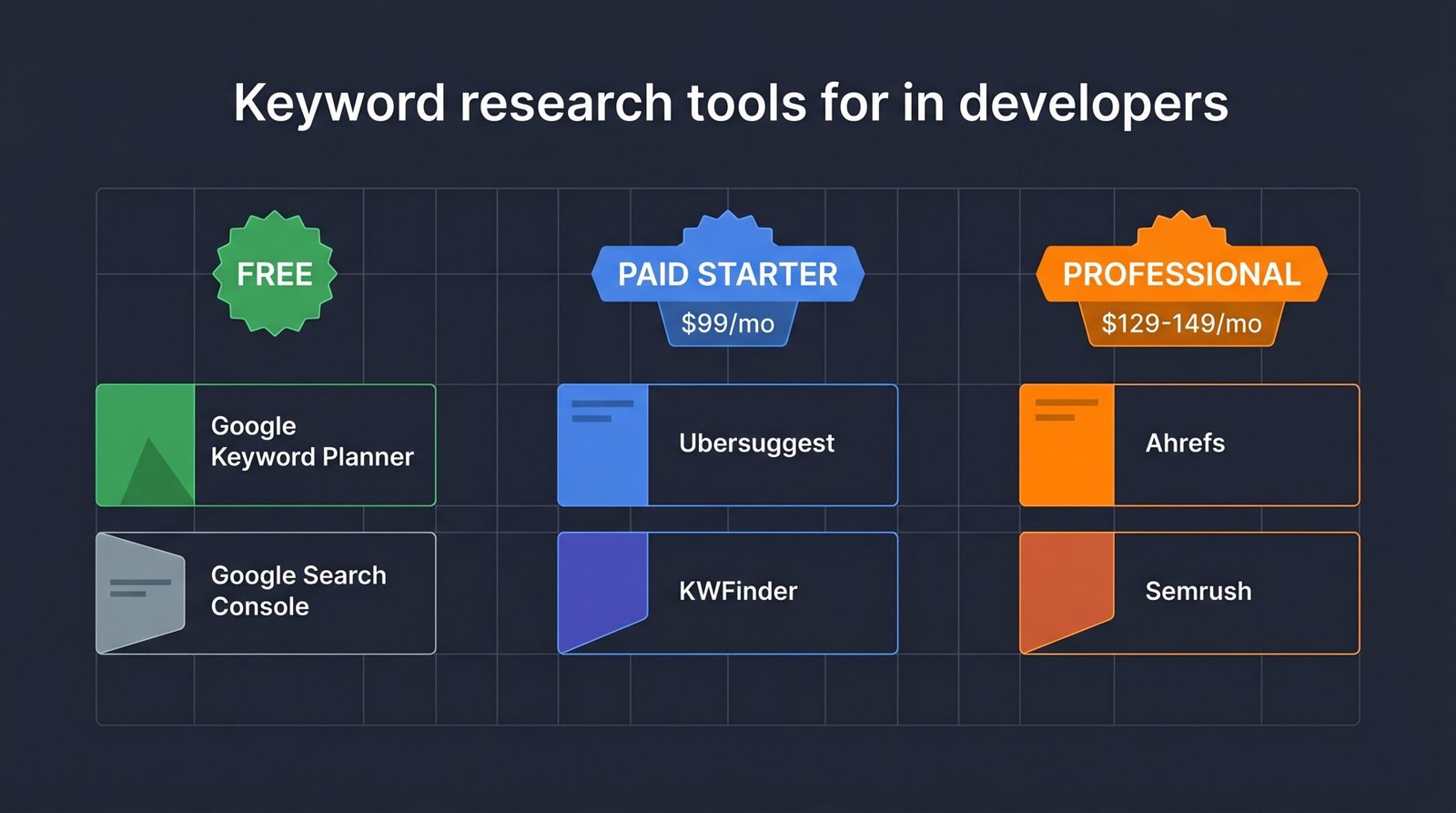
Best Keyword Research Tools for Developers and Founders
Most reviews of keyword tools are written for agencies serving clients. You are not an agency. You are a founder or developer doing your own SEO, with finite budget and even more finite time. Here is the decision matrix we suggest based on where you actually are.
If you are pre-revenue or bootstrapped: Stick with Google Keyword Planner plus Google Search Console. Both are free, both pull from Google’s own data, and together they will get you 80% of the way for the first six months. Add AnswerThePublic’s free tier when you need question ideas. Do not pay for a tool until you have a content publishing rhythm and the data to act on.
If you have $30 to $50 a month: Buy Ubersuggest or Mangools. Both unlock real keyword expansion, competitor analysis, and difficulty scoring at a price that does not require board approval. KWFinder edges Ubersuggest if you are in a niche where long-tail discovery matters more than aggregate data.
If you have $99 or more a month: Go straight to Ahrefs. The data quality, breadth, and SERP intelligence justify the price, and the tool will reveal opportunities cheaper alternatives miss. Semrush is a worthwhile alternative if you also run paid campaigns or want intent classification built in.
If you are researching niche SaaS or app keywords: Ahrefs Keywords Explorer is the strongest pick. The Parent Topic feature and Traffic Potential metric are particularly valuable in narrow technical verticals where search volume per keyword is low but cumulative intent across a topic cluster is high. Combine with a technical SEO audit early on so your indexing and crawl health do not undermine the keywords you target.
If you want trend signals: Run Exploding Topics alongside your main tool. The combination of growth-rate signal plus mature search volume data is how you find keywords that are big enough to matter but small enough to win.
If you want to understand user questions: Use AnswerThePublic for question discovery, then validate volumes in your main tool. This is the fastest way to build content that ranks in PAA boxes and earns featured snippets. Pair it with a deliberate on-page SEO workflow so your structured answers and headings actually capture the snippet.
For a broader view of how keyword research fits into the rest of the stack (analytics, rank tracking, backlink monitoring, content optimization), our complete SEO tools guide covers the full toolkit. And if you are building a SaaS specifically, the SaaS SEO strategy guide adds context on bottom-of-funnel keyword targeting.
How to Use Keyword Research Tools (Without Wasting Hours)
The tools matter less than the workflow. Founders who waste time in keyword research usually do so because they have no process. Here is the six-step workflow we use, which keeps research under two hours for a typical content batch.
1. Start with seed keywords. Open ChatGPT and prompt it with something like: “I run a [product type] for [audience]. Give me 30 seed keywords my target customers might search for, organized by funnel stage.” This generates a working list in seconds, with better coverage than most founders produce on their own. Treat it as raw input, not gospel.
2. Expand with your tool of choice. Drop each seed into Ahrefs, Semrush, or whichever tool you use. Pull the Matching Terms and Questions reports. Within an hour, you should have 500 to 2,000 candidate keywords.
3. Filter by intent. Tag each keyword as informational, commercial, navigational, or transactional. Semrush does this automatically. In other tools, look at the current top 10 results: if they are listicles and how-to guides, intent is informational. If they are landing pages and pricing comparisons, intent is commercial. Drop keywords whose intent does not match what you can offer.
4. Check SERP competition manually. For your top 20 candidates, actually look at the search results. If the top 10 are dominated by enterprise sites with 100,000+ referring domains, that keyword is locked up no matter what the difficulty score says. Look for SERPs with at least one or two pages where you could realistically replace them.
5. Cluster related keywords into topic groups. Multiple keywords often deserve one article, not many. Group semantically related terms and pick one canonical primary keyword per cluster. This is the single biggest difference between content that ranks and content that thrashes.
6. Prioritize by a simple formula. Score each cluster as (volume x intent match) divided by difficulty. Sort high to low. Publish in that order. Skip anything where the math does not justify the work.
That is the workflow. The tools change every couple of years, but this process has held up across five years of SEO work for both small SaaS launches and larger content programs.
Frequently Asked Questions
What is the best free keyword research tool?
Google Search Console is the best free tool if you already have a live site with traffic, because it shows real query data rather than estimates. For brand-new sites or pre-launch research, Google Keyword Planner is the strongest free option since it pulls volume data directly from Google. AnswerThePublic’s free tier (three daily searches) is a useful supplement for generating question-based keyword ideas. Combined, these three cover most early-stage needs without spending a cent.
How accurate is Google Keyword Planner?
Google Keyword Planner is the most accurate source of search volume because the data comes from Google itself, but it has two notable quirks. First, volumes are shown as ranges (1K to 10K, for example) unless you run an active ad campaign. Second, Keyword Planner aggressively groups similar keywords together, which can mask long-tail variations. For absolute search volume on broad keywords, trust it. For granular long-tail research, supplement with a dedicated SEO tool like Ahrefs.
Is Ahrefs or Semrush better for keyword research?
Both are excellent and the choice comes down to use case. Ahrefs has a slight edge for pure organic SEO research, with cleaner SERP overviews, the Parent Topic feature, and more reliable difficulty scores. Semrush wins if you also run paid campaigns or want built-in intent classification on every keyword. For founders doing only SEO, Ahrefs is the better pick. For founders combining SEO and PPC, Semrush often saves time. Pricing is comparable, around $129 to $140 per month at entry tier.
How do keyword research tools calculate search volume?
Most third-party tools (Ahrefs, Semrush, Moz, Ubersuggest) blend clickstream data from browser extensions, anonymized panel data, and machine learning models calibrated against Google Keyword Planner ranges. This is why volumes differ between tools, sometimes by 30 to 50 percent. Google Search Console reports actual click and impression data for your site, while Keyword Planner reports Google’s own range data. Treat any single number as directional, and use trends and relative comparisons rather than chasing exact figures.
Do I need a paid keyword research tool for a new site?
No. For the first three to six months of a new site, Google Keyword Planner plus Google Search Console will give you enough data to start ranking content. The bottleneck early on is not data quality, it is execution: publishing consistent, useful content. Once you have 20 to 30 articles published and real Search Console data flowing in, a paid tool starts paying for itself by revealing keyword gaps and competitor opportunities. We suggest delaying paid tools until you have something to optimize.
What is keyword difficulty and how should I use it?
Keyword difficulty is an estimate (usually 0 to 100) of how hard it will be to rank in the top 10 for a given keyword. Each tool calculates it differently, mostly based on the backlink profiles of currently ranking pages. Use difficulty as a rough filter, not gospel. A keyword with a difficulty score of 30 can still be unreachable if the top 10 results are all from dominant brands. Always supplement the score with a manual SERP review before committing to a target.
Can I use multiple keyword research tools together?
Yes, and most experienced SEOs do. A common stack is Google Search Console (real performance data), Ahrefs or Semrush (discovery and competitor analysis), AnswerThePublic (question ideas), and Exploding Topics (trend signals). Each tool answers a different question, and using them together gives you a fuller picture than any single source. The trick is having a workflow that uses each tool for its strength rather than running the same query in five places.